


Unused Variable Analysis
The Unused Variable Analysis feature in Total Visual CodeTools helps you detect and eliminate unnecessary code from your VB6 and VBA projects including Microsoft Access, Excel, Word, etc. Quickly find code that's defined but never referenced or used. This includes:
- Unused variables defined at the procedure, module, and project/global levels through Dim, Public, and Private statements
- Unused procedure parameters
- Unused constants
- Unused classes
- Unused user defined types and their elements
Unused code commonly occurs when changing existing code or eliminating previous code without noticing the variable definition remained. You fix this by simply deleting the variable definition.
However, this can also occur when you define a variable -- especially a procedure parameter -- then forget to use it. Maybe you wanted to track something or do something special based on a value but failed to do so. Rather than simply deleting the variable, you need to determine its purpose and make sure it's no longer necessary or implement it correctly.
The Unused Variable Analysis is simple to use. Invoke it from the Total Visual CodeTools menu or toolbar, then select the objects to examine. It can be the entire project, one module, or one procedure.
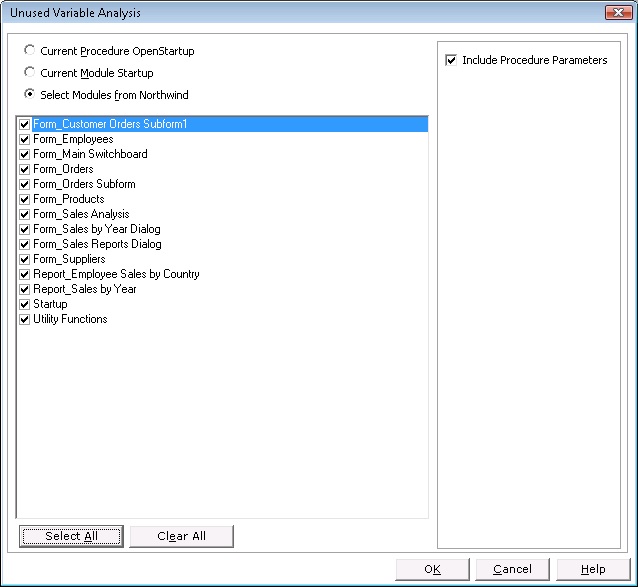
Example of selecting all modules from Northwind
The powerful VB6/VBA code parser in Total Visual CodeTools examines all the selected modules to determine what variables, constants, etc. are defined. It also determines where they are used to see which items are never used. The list is provided in the results.
Run the process and the results are provided in an HTML report:
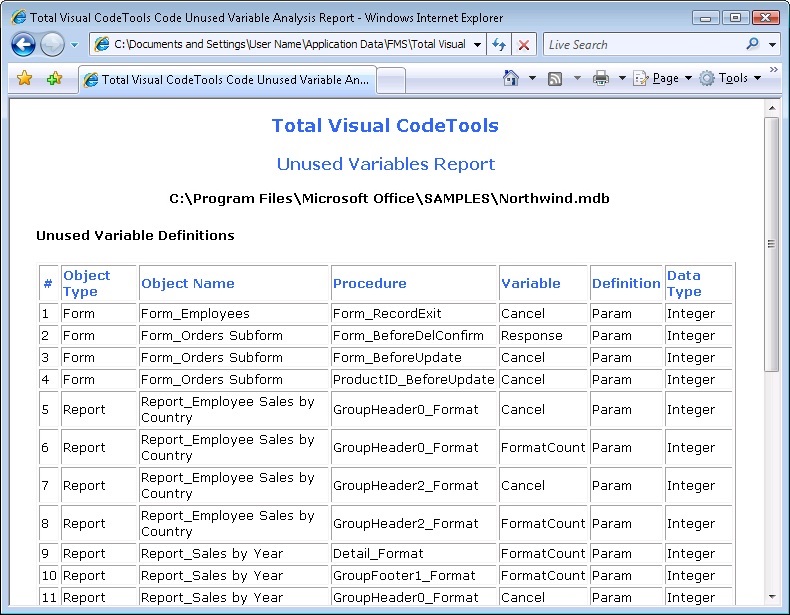
Review the results and fix accordingly.
Microsoft Office Access 2016, 2013, 2010 Version
is Shipping

Supports Office/Access 2016, 2013, 2010, 2007, 2003, 2002, 2000, and Visual Basic 6.0!
Also available for
Access 97

Rave Reviews
"Total Visual CodeTools is by far my favorite third-party product."
Alison Balter, Author, Conference Speaker, Instructor

Best Visual Basic Add-In
Rave Reviews
CodeTools Info

Why CodeTools?
Additional Info




