|


Close Tour
|
Using the Tool Window
|
|
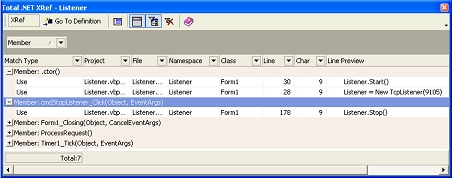
The Total .NET XRef toolwindow has
several controls that make it easier to work with lists of
references:
-
Main
Toolbar-
The main toolbar contains launch points for the program’s
top-level functionality.
-
The Items List-
When you tell Total .NET XRef to find a list
of references, it places the list in a grid view along with
several columns of information.
-
Navigating Through References-
You can click on any reference in the list and
Total .NET XRef takes you to the code window that contains the
reference. This is useful if you need to see all of the places
in code that are referred to in the list.
-
The Totals
Field-
The Totals field in the toolwindow’s title bar shows you
the total number of references found. This value can be very
useful in determining the estimated cost of making a change in
code. For more information. Note that the Totals field
respects the current filter. For example, if your current
filter is only showing 12 of 100 items, the Totals field will
show the filtered count, which is 12.
The titlebar
of the toolwindow shows the name of the code item you are
currently working with.
|
|
