


Never Wonder What Changed in Your Access Database Again
Quickly identify every difference between Microsoft Access databases, objects, VBA code, forms, reports, queries, macros, and data.
Know exactly what changed and quickly pinpoint the source of the problem.
Total Access Detective reveals exact changes between Microsoft Access databases, objects, code, and data!
Why Access Developers Need Total Access Detective
Every Access developer has faced one of these situations:
- You worked on the database at home, came back to the office and forgot to update the office version before making new modifications. Missing one item could cause a bug that haunts you later!
- A client says they didn't change anything, but the database behaves differently.
- A team member updated a database and didn't document their modifications.
- A new bug appears and nobody knows when it was introduced.
- A customer's database doesn't match your master version.
- Hours are wasted manually comparing forms, queries, tables, VBA code and data.
Total Access Detective understands Microsoft Access objects including forms, reports, tables, queries, macros, VBA modules, and data to identify meaningful differences.
The World's Best Microsoft Access Database Comparison Tool
In its tenth major release since its debut in 1995, Total Access Detective is trusted by the Microsoft Access community around the world. With each version, we've added more functionality to maximize your control of your Microsoft Access databases, and improve your productivity.
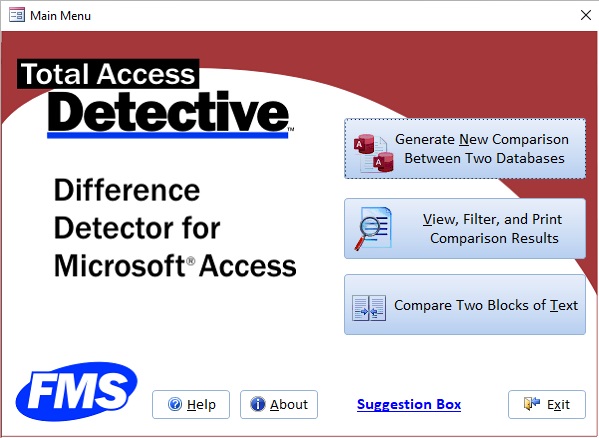
 Shipping for Microsoft Access 365/2024
New Features:
- Supports Access 365/2024's 32 and 64 bit versions
- Supports all Access database formats used by your Access version
- Supports new controls introduced in Access 2019 and later
- Supports ACCDB Databases with BigInt and DateTime2 columns
- Improved Two Database Comparison Results Form
- New Object tab in Two Database Comparison Overview
- Improved filtering of results by Object Type and Name
- Improved text comparison user interface
- Updated user interface
- New manual and help file
- all the new features...
Discover why so many Microsoft Access users and developers rely on Total Access Detective to pinpoint exactly what changed in their Access databases.
Eliminate the guesswork and get on with your real work!
Quickly Discover Exactly What Changed
Instead of manually inspecting databases, Total Access Detective automatically identifies:
- New, deleted and modified objects
- VBA code differences by procedure or blocks of code
- Form and report design changes
- Query modifications
- Table structure changes
- Record-level data differences, plus combining data differences into a new table
- Property changes
- Macro updates
Know exactly what changed and where, enabling faster debugging, upgrades, deployment verification, and client support.
Use Total Access Detective To:
Compare Database Versions
Find every difference between development, testing, production, and customer databases. Great for listing all the work you did for your client or boss!
Find VBA Code Changes
Locate exactly which procedures, functions, classes, and modules were modified.
Compare Forms and Reports
Identify design differences, property changes, control modifications, and embedded macro updates.
Analyze Data Differences
Discover added, removed, and modified records between tables or queries. Great for detecting new or modified data, changes to lookup tables, etc.
Merge Data Changes
Combine data from multiple sources while preserving the records you choose.
Automate Comparisons
Execute comparisons from the command line and integrate into deployment processes.
How You Run it
Total Access Detective is available depending on whether you want to find differences between objects in one database or between databases.
Comparing Objects in Your Currently Opened Database
Total Access Detective lets you compare any two objects in your currently opened database right from the Microsoft Access Add-ins menu:
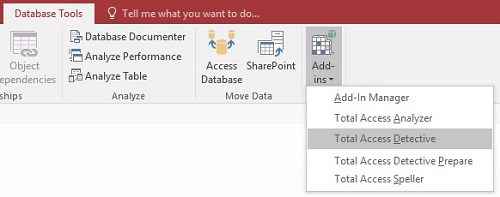
Run Total Access Detective from the Microsoft Access Add-ins Menu
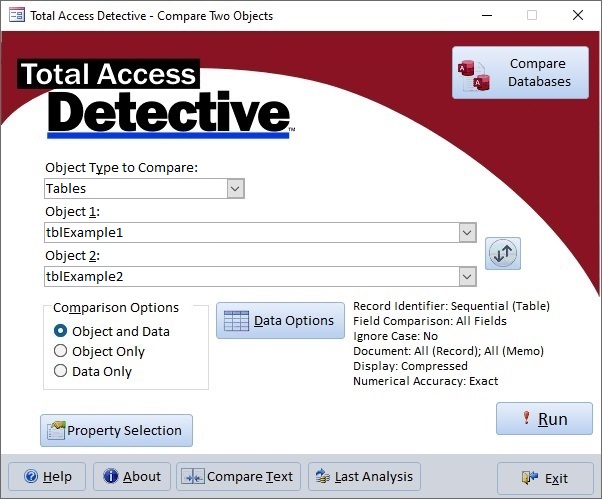
Specify the pair of objects in your Microsoft Access database to compare
Comparing Two Databases
When you want to compare two databases, open our database comparison program and point to your two databases.
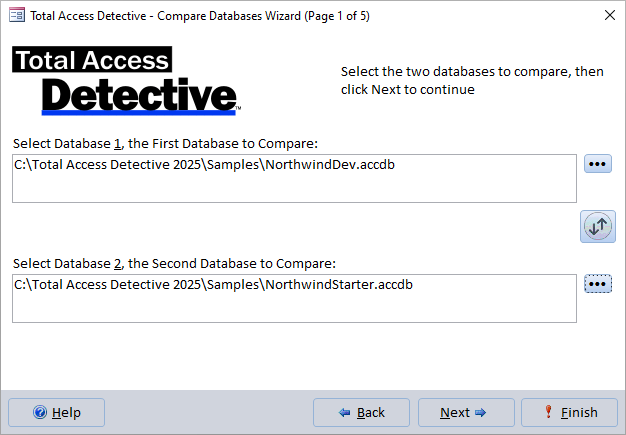
A wizard takes you through the process of:
- Selecting the identically named objects for detailed analysis
- Setting comparison options including how data and modules are compared
- Specifying where to save the results
Total Access Detective then examines all the objects you selected and presents the results.
Microsoft Access Database and Object Comparison Results
Results are displayed on screens that you can view, sort, filter and search. Reports are available and you can even export the results to a table in your database.
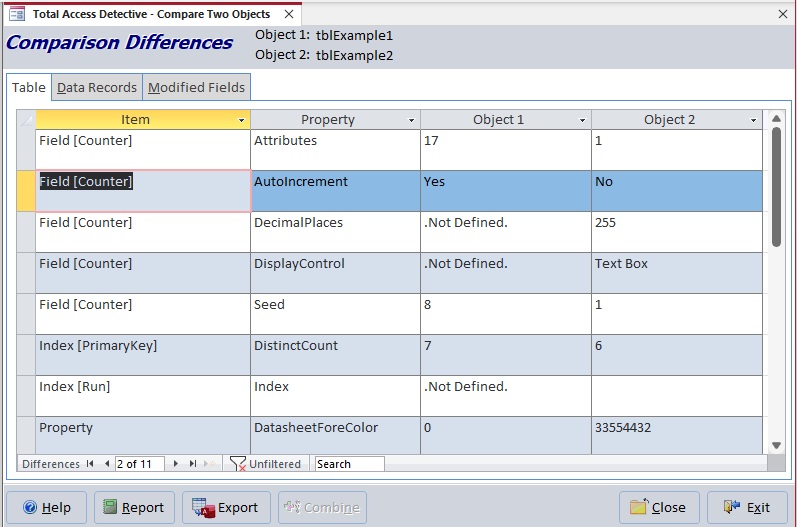
Example of Table Comparison Showing Field, Property and Data Differences
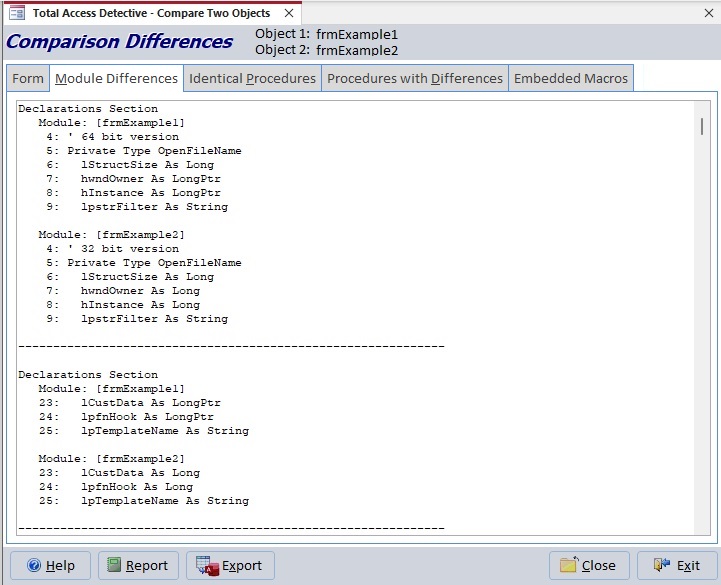
Example of Module Comparison Showing Differing Lines of Code for a Form
For more details on what Total Access Detective offers, visit these topics:
- Module and Procedure Differences (VBA)
- Form Differences including their Modules and Embedded Macros
- Report Differences including their Modules and Embedded Macros
- Macro Differences
- Table Differences
- Query Differences
Stop Guessing! Know Exactly What Changed
When two Access databases don't match, every minute spent investigating is time lost. Total Access Detective reveals exactly where the differences are so you can:
- Fix problems faster
- Support customers more effectively
- Validate deployments
- Merge versions with confidence
- Eliminate costly mistakes
Whether you're an independent consultant, corporate developer, IT department, or Access power user, Total Access Detective gives you complete visibility into your databases. Discover why Access professionals have relied on it since 1995.
Microsoft Access Versions and Updates
Total Access Detective is available from Microsoft Access 365/2024 to Access 2003.
Due to the differences between Access versions, there is a separate version of Total Access Detective for each version of Microsoft Access. It can compare all the database formats that its Access version supports.
- If you are using Microsoft Access 365/2024, 2021 and 2019, choose Total Access Detective 2025 to compare Access ACCDB (2007-2024/365) and MDB database formats.
- Microsoft Access 2013 discontinued support for Access Data Projects (ADPs). If you need to compare ADPs, use the Access 2010 or earlier version.
- The Access 2003 version supports MDBs and ADPs, but doesn't support the Access ACCDB format because it was introduced with Access 2007 and Access 2003 cannot open it.
If you're an existing customer with Access 2016 or earlier, here are the enhancements in our prior releases:
- For Microsoft Access 2016, 2013 and 2010: Version X.6
- For Microsoft Access 2007: Version 12.9
- For Microsoft Access 2003: Version 11.8
See the product guide for a complete list of features.
|
Total Access Detective Pricing by Microsoft Access Version |
|||||||
| Microsoft Access Version | |||||||
Licenses |
Price |
365*/2024 2021, 2019 |
2016 |
2013 |
2010 |
2007 |
2003 |
|
Version |
26.0 |
16.6 |
15.6 |
14.6 |
12.9 |
11.8 |
|
| Single | $399 | Buy Now | Buy Now | Buy Now | Buy Now | Buy Now | Buy Now |
| 5-Seat | $1199 | Buy Now | Buy Now | Buy Now | Buy Now | Buy Now | Buy Now |
|
Upgrade from Another Version |
|||||||
| Single | $299 | Buy Now | Buy Now | Buy Now | Buy Now | Buy Now | Buy Now |
| 5-Seat | $899 | Buy Now | Buy Now | Buy Now | Buy Now | Buy Now | Buy Now |
|
Upgrade to Latest within the Same Version |
|||||||
| Update 16.6 | Update 15.6 | Update 14.6 | |||||
| Single | $249 | Buy Now | Buy Now | Buy Now | |||
| 5-Seat | $749 | Buy Now | Buy Now | Buy Now | |||
|
Premium Support Subscription |
|||||||
| Single | $299 | ||||||
| 5 Seat | $999 | ||||||
|
Also available as part of |
|||||||
|
Total Access Ultimate Suite Total Access Developer Suite |
|||||||
|
* Office/Access 365 Support |
|||||||
| Microsoft Office/Access 365 is a subscription that is constantly updated. Total Access Detective 2026, version 26.0, supports the version of Office/Access 365 when it was released. We cannot guarantee automatic support for all future releases with this version. We strive to provide upgrades to support new features as they become available. | |||||||
|
Licensing Information |
|||||||
| Total Access Detective is licensed on a per user basis.
Each user who runs the program must have a license. Read the License Agreement for details. |
|||||||
|
Runtime/Redistributable Version |
|||||||
| Not Applicable. | |||||||
 Money Back Guarantee
We guarantee Total Access Detective will pay for itself and delight you with its flexibility and ease of use. If you are not completely satisfied with Total Access Detective, return it within 30 days for a prompt and courteous refund.
Microsoft Access 365/2024 Version is shipping!

New X.6 Versions for Access 2016, 2013 and 2010
New Version 12.9 for
Access 2007
Version 11.8 for
Access 2003

Reviews
"Total Access Detective is well worth every penny, it will quickly pay for itself through savings in time and effort."
Tom Cryan, Denver Access User Group product review

Best Debugging Tool
Detective Info

Why Detective?
Additional Info