


New Features in Versions X.7 for Microsoft Access 2003, 2002, and 2000
This is no longer the latest version of Total Access Detective 2003.
Existing customers qualify for a discounted upgrade price to Version 11.8.
Visit New Features for more information.
 Total
Access Detective is the most powerful database, object, code, and text comparison product for Microsoft Access. With the release of the Access
2007 version, we've also enhanced it for Microsoft Access 2003, 2002, and 2000. If you need to know exactly what changed between any two
Access objects or databases, Total Access Detective is for you.
Total
Access Detective is the most powerful database, object, code, and text comparison product for Microsoft Access. With the release of the Access
2007 version, we've also enhanced it for Microsoft Access 2003, 2002, and 2000. If you need to know exactly what changed between any two
Access objects or databases, Total Access Detective is for you.
Previous Upgrades
These versions were previously released for Total Access Detective 2000, 2002 and 2003:
- Total Access Detective 2000, Version 9.0 enhancements and features in the original release.
- Total Access Detective 2000, Version 9.5 enhancements and features.
- Total Access Detective 2002, Version 10.0 enhancements and features in the original release.
- Total Access Detective 2002, Version 10.5 enhancements and features.
- Total Access Detective 2003, Version 11.0 enhancements and features in the original release.
Version X.7 Enhancements
We've made many enhancements compared to the original Access 2003 version 11.0, and X.5 versions of Access 2002 and 2000:
- Improved ADP Comparisons
- New Documentation Options
- New Data Comparison Features
- Improved User Experience
- Two Object Comparison Enhancements
- Two Database Comparison Enhancements
- New Reports and Report Enhancements
- Vista and User Security Support
- Additional Enhancements
Many enhancements were made for comparing ADPs objects.
- For two ADP comparisons, a new process compares properties that aren't in MDBs
- In an ADP, two tables can be now be compared
- Includes examination of extended properties
- Supports data comparison
- Supports combining data into a new table
New features let you better control the comparisons you generate.
Case Insensitive Module Comparison
For module comparisons, in addition to ignoring indentations, you can now Ignore Case. This lets you avoid flagging differences due to mismatched capital and lower case letters.

This option is also available for the Text Comparison feature.
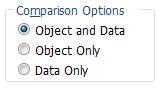 Separate Table Object and Data Comparisons
When comparing two tables, you can compare either the table design or data, or both. Previously, the design was always compared.
Text Comparison Feature for Two Database Comparison
The text comparison feature, which was previously only available under the two object comparison add-in, is now available on the two database comparison side as well.
Compare Tables with Different Fields
Previously, data could only compared if the two tables had identical field definitions. There are now several options to compare tables:
- Compare fields by order regardless of field names
- Compare identical field names regardless of order
- Treat the first field of non-keyed tables as unique
Compare Data Between Queries
Data from two queries can now be compared with an option to specify whether to perform a sequential search or use the first field as a key field.
Ignore Small Differences Between Numbers
Specify whether you want to see all numeric differences, or differences that exceed a certain percentage. This lets you avoid small rounding errors and immaterial differences.
Data Comparison with Field by Field Results
Previously, during data comparison, modified records were only displayed as individual records listing all the modified fields in one record. This is now supplemented with an additional table listing each field difference as a separate record showing the two values.
More information: Comparing Data in Access Tables and Queries.
General Enhancements
Screen flashing is eliminated when comparing forms, reports, and modules. This lets you minimize Total Access Detective while it’s processing.
Last Analysis Results are Preserved
Previously, once you closed the results of your comparison, your analysis was gone. Now, a Last Analysis button retrieves the results. This is preserved even if you close the Total Access Detective add-in and return (provided your database remains the same).
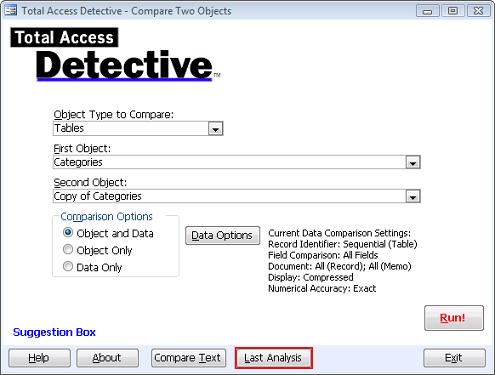
Last Analysis is Available from the Add-in for Comparing Two Objects
Similarly, the last selected object names are preserved when you run Total Access Detective again.
Partial Comparison Results
If you cancel while the objects are being compared, the process stops and the incomplete results displayed rather than discarded.
This can be particularly helpful when comparing data and you decide to stop after it identifies a few differences and don’t need all the differences.
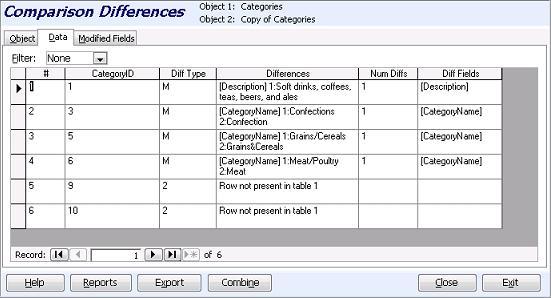
Results Shown in Separate Tabs
Object and other differences (data or modules behind forms/reports) are now shown on separate tabs:
Reduced Need to Prepare Databases
Previously, the Total Access Detective Prepare step was necessary before comparing modules between two databases. This is no longer needed when comparing MDB/ACCDB databases. Prepare is still required for ADPs.
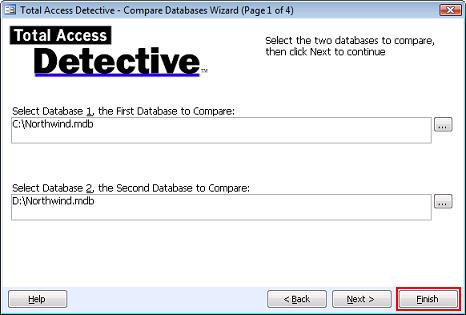
Finish Button Eliminates Manual Selections
The Database Comparison wizard now has a Finish button on all its pages. Simply select the two databases and press Finish to compare all the identically names objects. It skips the subsequent Wizard pages, and uses the previously specified values.
Command Line Support
To eliminate manually selecting the database and options, a Windows shortcut can pass the names of the two databases to compare. It then compares all the common objects in the two databases.
Support for Password Protected Databases
Objects in password protected databases are compared.
Reports for Two Database Comparison
Many new reports were added:
- Data Differences Fields Compared: shows the fields compared when an option other than identical structures is used
- Table Data Comparison Paired Fields: shows paired field values
- Portrait and Landscape reports for object comparison with better support for long object names and property values
- When viewing object differences, reports are available for the entire list or just the currently filtered list
- When viewing macro or module differences, reports are available for the entire list or just the current macro/module.
- List of available reports with their description and default file name when you export it.
Several reports were enhanced including:
- Data Differences Summary now shows total in addition to new, and modified number of records
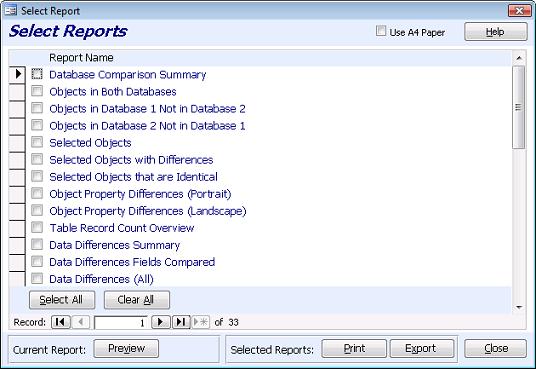
Two Database Comparison: Report Selection Screen
New Reports for Two Object Comparison
- Portrait and Landscape reports are available to show object property differences. The reports are improved to better show long object names and property values
- Fields Compared for Data Differences: shows the fields compared when an option other than identical structures is used
- Field Differences of Modified Records: shows paired field values
Report Enhancements
A single report selection screen is used to select the reports, and print, preview, or export them.
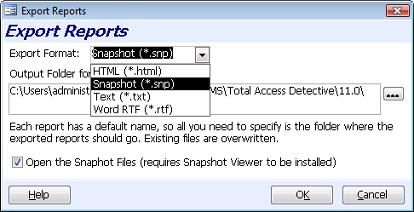
Export Reports
Individual or multiple reports can be exported to a folder you specify in formats such as HTML, Snapshot, Text, or Word RTF.
- Total Access Detective is compatible with Vista and the new User Access Control features.
- Temporary files are placed in your user folder rather than the Total Access Detective folder.
- Help file is in the new web CHM format rather than old HLP format.
Many other improvements and performance enhancements were implemented to make Total Access Detective better than ever! There's also a new 87 page, professionally printed user manual.
For a quick overview of Total Access Detective 2007, Take the Tour.
Pricing and Access Versions
Due to differences with each version of Microsoft Access, Total Access Detective is specific to each version of Access.
|
Total Access Detective Pricing by Microsoft Access Version |
|||||||
| Microsoft Access Version | |||||||
Licenses |
Price |
365*/2024 2021, 2019 |
2016 |
2013 |
2010 |
2007 |
2003 |
|
Version |
26.0 |
16.6 |
15.6 |
14.6 |
12.9 |
11.8 |
|
| Single | $399 | Buy Now | Buy Now | Buy Now | Buy Now | Buy Now | Buy Now |
| 5-Seat | $1199 | Buy Now | Buy Now | Buy Now | Buy Now | Buy Now | Buy Now |
|
Upgrade from Another Version |
|||||||
| Single | $299 | Buy Now | Buy Now | Buy Now | Buy Now | Buy Now | Buy Now |
| 5-Seat | $899 | Buy Now | Buy Now | Buy Now | Buy Now | Buy Now | Buy Now |
|
Upgrade to Latest within the Same Version |
|||||||
| Update 16.6 | Update 15.6 | Update 14.6 | |||||
| Single | $249 | Buy Now | Buy Now | Buy Now | |||
| 5-Seat | $749 | Buy Now | Buy Now | Buy Now | |||
|
Premium Support Subscription |
|||||||
| Single | $299 | ||||||
| 5 Seat | $999 | ||||||
|
Also available as part of |
|||||||
|
Total Access Ultimate Suite Total Access Developer Suite |
|||||||
|
* Office/Access 365 Support |
|||||||
| Microsoft Office/Access 365 is a subscription that is constantly updated. Total Access Detective 2026, version 26.0, supports the version of Office/Access 365 when it was released. We cannot guarantee automatic support for all future releases with this version. We strive to provide upgrades to support new features as they become available. | |||||||
|
Licensing Information |
|||||||
| Total Access Detective is licensed on a per user basis.
Each user who runs the program must have a license. Read the License Agreement for details. |
|||||||
|
Runtime/Redistributable Version |
|||||||
| Not Applicable. | |||||||
Additional Resources
Microsoft Access 365/2024 Version is shipping!

New X.6 Versions for Access 2016, 2013 and 2010
New Version 12.9 for
Access 2007
Version 11.8 for
Access 2003

Reviews
"Total Access Detective is well worth every penny, it will quickly pay for itself through savings in time and effort."
Tom Cryan, Denver Access User Group product review

Best Debugging Tool
Detective Info

Why Detective?
Additional Info




