Use the AppendOnly Property and the ColumnHistory Method to Keep Historical Data for Memo Fields in Microsoft Access
Provided by Molly Pell, Senior Systems Analyst
In Access 2007-Format databases (ACCDBs), the AppendOnly property for Memo fields allows you to store a history of the changes made to the field. The history of the Memo field can later be retrieved using the ColumnHistory method, as follows:
Sub GetColumnHistory()
Dim strHistory As String
strHistory = Application.ColumnHistory("Contacts", "Notes", "ID=1")
Debug.Print strHistory
End Sub
Using the Microsoft Contacts template for Access 2007, we’ll demonstrate how to enable and use this feature. Start off by creating a new Contacts.accdb file, using the template available from Microsoft Access.
First, close all open forms, and then open the Contacts table in Design view. Locate the Notes field, and change the AppendOnly property to Yes:
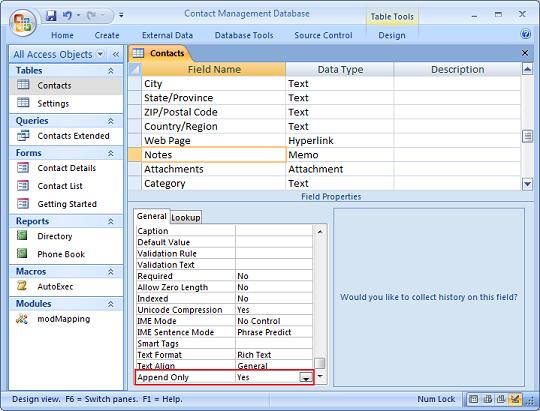
This enables collecting history on the field.
Now open the Contacts table in Datasheet view, and add a new record. Be sure to enter a value in the Notes field. Save the record by clicking on another row in the datasheet.
Now return to the record you just added, and change the value in the Notes field. You can’t see it now, but behind the scenes, Access is still storing the original value, along with the date and time of each data change.
Note the ID value for the record that you added (we’ll assume that ID=1), as we’ll use that in the last step.
Press [Ctrl+G] to open the Immediate window, and type or paste the following:
?Application.ColumnHistory("Contacts", "Notes", "ID=1")
Click Enter to see the entire column history for the Notes field, where ID = 1:
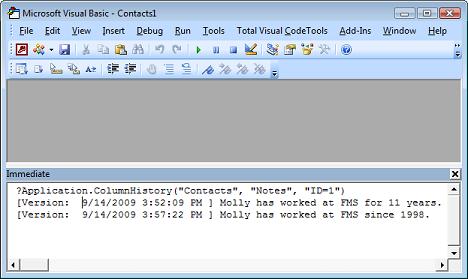
You may wish to display the column history on a form or report. For example, you can add a text box to the Contact Details form, and set the following properties:
| Property | Value |
| ControlSource | =ColumnHistory([RecordSource],"Notes","[ID]=" & Nz([ID],0)) |
| Enabled | False |
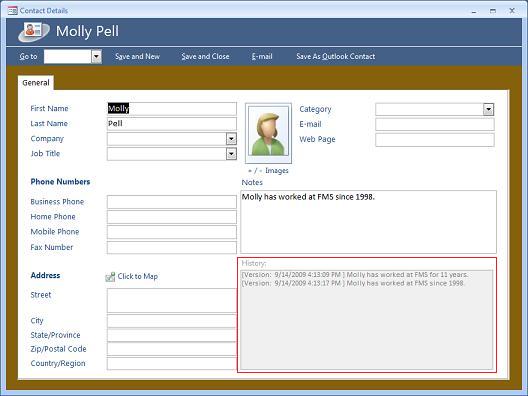
See also
From Microsoft: AppendOnly Property
From Microsoft: ColumnHistory Method
 Latest Newsletter
 Demos
Demos
 Microsoft Access Developer Help Center
 Microsoft Access Query Help Center
 MS Access to SQL Server Upsizing
 Microsoft Outlook Tips
 Technical Papers
 Tips and Techniques
 Videos
Connect with Us
 Email Newsletter
 Developer Team Blog
 Facebook
 X/Twitter
 Support Forum & Tickets
Additional Resources
 Book
Book Links to Related Sites
 My FMS
Thank you! Thank you! I just finished reading this document, which was part of a link in the recent Buzz newsletter. I have printed it for others to read, especially those skeptical on the powers of Access and its capabilities.
Darren D.
 All Our Microsoft Access Products



