



All Reports in Total Access Analyzer for Microsoft Access
Total Access Analyzer includes 400+ reports, making it the most powerful documentation and analysis program for Microsoft Access professionals.
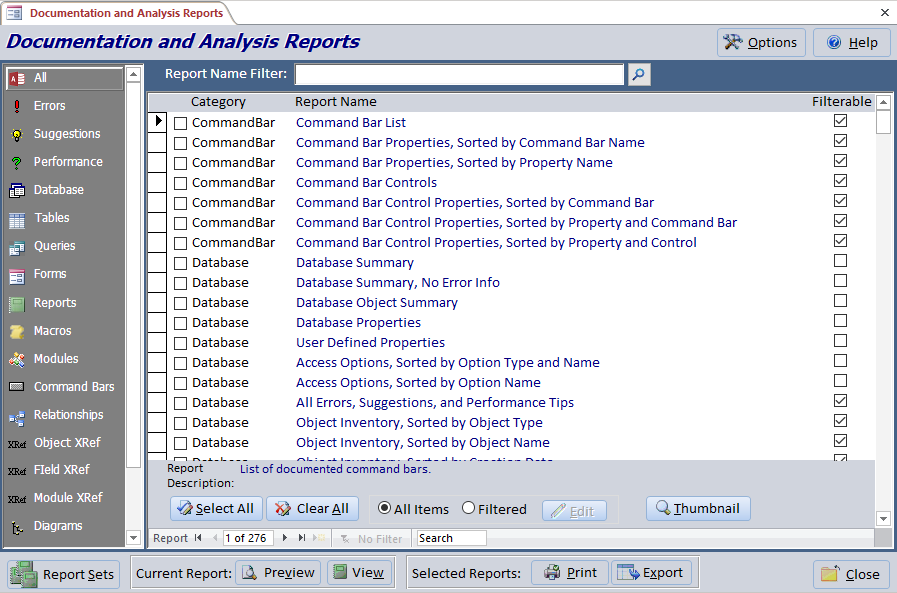
You can customize the header and footer of the reports from the [Options] button. Many of the reports allow you to filter the objects or issues.
Each database's documentation is stored separately, so you can always go back to your previously documented data.
The reports are organized into these major categories:
- Database Summary
- Object Cross Reference Analysis
- Database Flow Diagrams
- Module Analysis
- Errors, Suggestions and Performance Tips
- Basic Documentation
Featured reports are highlighted below with linked images and details.
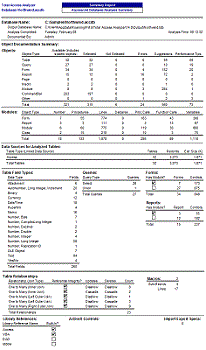 Database Summary
An overview of what's in your database.
Object Cross Reference Analysis
Cross-Reference reports show where and how objects are used. Knowing this information is critical before making modifications to individual objects
Field Cross-Reference
- Sorted by Field Name
- Sorted by Object Name
- by All Objects
- by Queries
- by Forms
- by Reports
- by Data Access Page
Object Cross-Reference
- Table References
- Sorted by Table Name
- Sorted by Calling Object
- Query References
- Sorted by Query Name
- Sorted by Calling Object
- Form References
- Sorted by Form Name
- Sorted by Calling Object
- Report References
- Sorted by Report Name
- Sorted by Calling Object
- Control References in Code
- Sorted by Calling Object
- Sorted by Referenced Control
- Macro References
- Sorted by Macro Name
- Sorted by Calling Object
- Object References by Variable NEW!
- Control References from Forms and Reports NEW!
- Sorted by Calling Object
- Sorted by Referenced Control
- CommandBar References
- Sorted by CommandBar Name
- Sorted by Calling Object
- Hyperlinks
- Data Access Page References
- Sorted by Page Name
- Sorted by Calling Object
- Database Diagram References
- Sorted by Diagram Name
- Sorted by Calling Object
- Stored Procedure References
- Sorted by Procedure Name
- Sorted by Calling Object
- View References
- Sorted by View Name
- Sorted by Calling Object
Hierarchical diagrams visually reveal how objects reference each other through multiple levels.
Application Flow Diagram
Procedure and event flow for the entire database
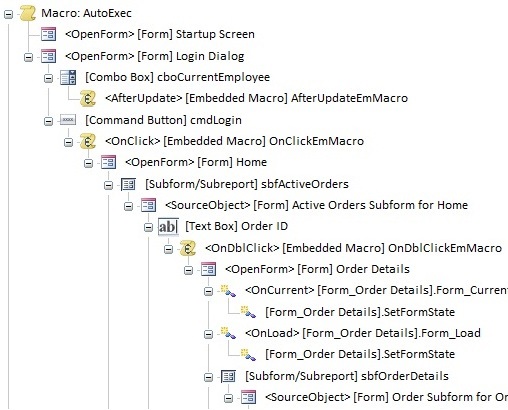
Data Diagram
How data flows from tables into queries, forms, reports, etc.
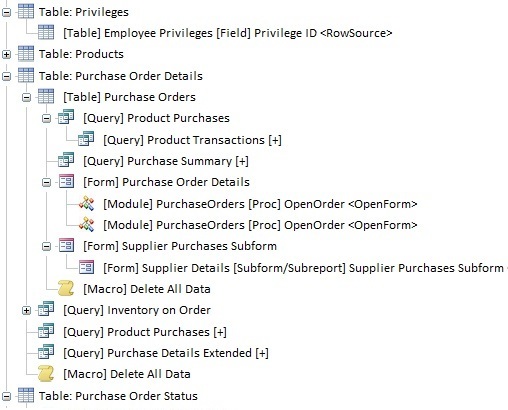
Object Diagram
What objects are referenced by a form, report, or query
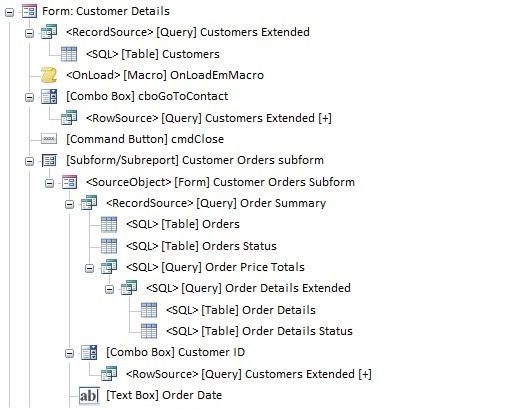
For detailed analysis and comprehension, select an item and redraw the hierarchy of a single object. The redrawn diagram can be printed from the Documentation Explorer, allowing you to create a report of a single object's diagram.
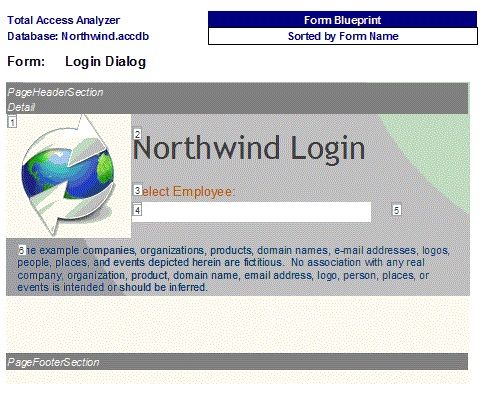
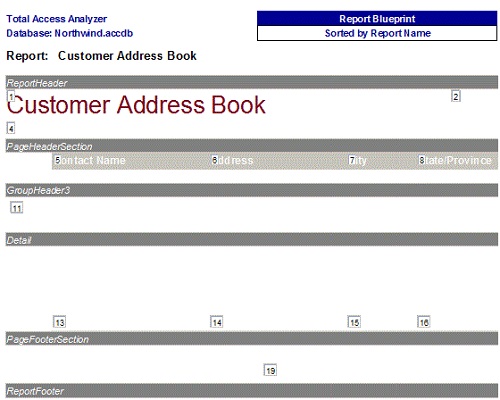
Form and Report Blueprints
Quickly see what each form and report looks like with each control annotated:
Module Analysis
Module List
- Sorted by Module Name
- Sorted by Module Type
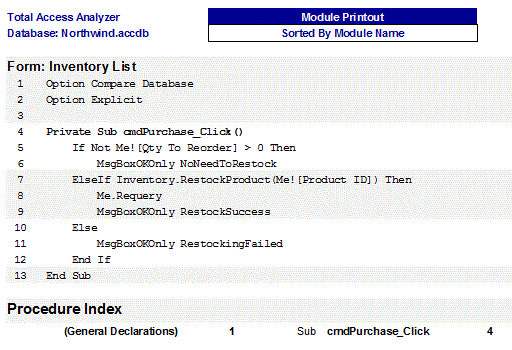
Module Printouts
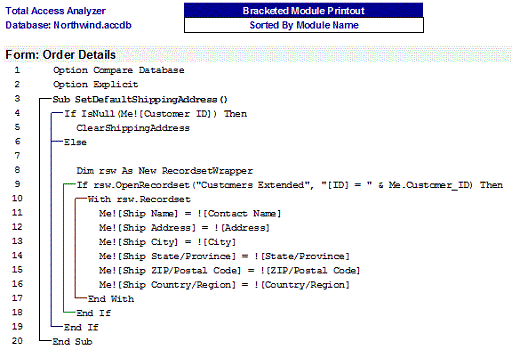
Total Access Analyzer offers two reports to print your modules. The first is the standard display of your code as is, the second formats your code to indent the logic loops and show brackets around loops and exit arrows from them:
- Module Analysis Summary (across all form, report and standard modules)
- Sorted by Module Type
- Sorted by Module Name
- Single Module Overview
- Procedure Lists
- Procedure List with Comments
- Sorted by Mod. and Proc.
- Sorted by Procedure Name
- Procedure Usage
- Library Declarations
- Sorted by Module Name
- Library Declarations, Sorted by Procedure Name
- VBA Functions
- Sorted by Calling Object
- Sorted by Function
- DoCmd
- Sorted by Module and Procedure
- Sorted by Action
- Action Summary
- Action and Argument Summary
- Enum Declarations
- Sorted by Module
- Sorted by ENUM Name
- Events Defined by Module
- Events Raised
- Sorted by Module and Procedure
- Sorted by Module and Event
- Labels
- Sorted by Module and Procedure
- Sorted by Label Name
- User Defined Type Declarations
- Sorted by Module
- Sorted by Type Name
- Variable List
- Sorted by Module and Procedure
- Sorted by Variable Name
- Condition, Sorted by Module and Procedure
- Variable References
- Sorted by Module and Procedure
- Sorted by Variable Name
- Variable Constants
- Sorted by Module and Procedure
- Sorted by Constant
- Condition, Sorted by Module and Procedure
- Variables Defined WithEvents
- Variables of Class Module
- Sorted by Module
- Sorted by Class Module
- Variables of Enum
- Sorted by Module
- Variables of Enum, Sorted by Enum Name
- Variables of User Defined Type
- Sorted by Module
- Sorted by Type Name
- Temporary Variables (TempVars)
- Sorted by Calling Object
- Sorted by TempVar Name
- Classes Implemented
- Sorted by Calling Module
- Sorted by Implemented Class
- DefType Statements
- Compiler Conditions
- Summary
- Sorted by Condition
- Sorted by Module and Line
- Sorted by Module and Procedure
Errors, Suggestions, and Performance Tips
Total Access Analyzer detects a wide range of issues to help you create better Access applications by flagging items that will cause it to crash, and offering suggestions to improve your application and performance. A list of issues detected is available here.
These are problems that will most likely cause your Access application to crash. For instance, references to objects that were deleted or renamed will crash when the user encounters them. When Total Access Analyzer detects these errors, you should examine them carefully and fix them before deploying your database. A variety of reports with different sorting and filters are available:
- Summary of Errors
- by Type
- by Type with Descriptions
- By Error Type
- All
- Table
- Query
- Form
- Report
- Macro
- Module
- Command Bars
- Security
- Data Access Pages
- Database Diagram
- Stored Procedures
- View
- By Object Name
- All Errors
- Table Errors
- Query Errors
- View Errors
- Form Errors
- Report Errors
- Macro Errors
- Module Errors
- Security Errors
- Command Bars Errors
- Data Access Page Errors
- Database Diagram Errors
- Stored Procedure Errors
- Object Reference Errors
Suggestions incorporate our knowledge of Best Development Practices for creating professional Access applications. Suggestions cover items that are not necessarily going to cause your application to crash or perform poorly, but may make it easier to maintain, support, and appear more polished. For instance, we may note that certain objects or code are unused, but that doesn't mean you have to delete them. A variety of reports with different sorting and filters are available:
- Summary of Suggestions
- by Type
- by Type with Descriptions
- Table Fields with Different Types
- Identical SQL and RecordSources
- By Suggestions Type
- All
- Table
- Query
- Form
- Report
- Macro
- Module
- By Object Name
- All Suggestions
- Table Suggestions
- Query Suggestions
- Form Suggestions
- Report Suggestions
- Macro Suggestions
- Module Suggestions
- Unused Objects
- Tables and Queries
- Tables
- Queries
- Forms and Reports
- Forms
- Reports
- Macros
- Unused Module Code
- Procedures
- Properties
- Constants
- Variables
- Module Procedures that Should be Private
- Module Procedures without Error Handling
- Module Functions without Return Type
- Module Variable Conflicts with Reserved Words
- Module Variables that Should be Type Cast
- Module Constants without Explicit Type
- Module Unused User Defined Types
- Module Debug & Stop Statements
Performance tips are ideas where you may be able to enhance the speed of your application. Certainly, many tips are not relevant because you've already implemented the most efficient solution. Nonetheless it's helpful to consider these ideas or objects that may be made more efficient. A variety of reports with different sorting and filters are available:
- Summary of Performance Tips
- by Type
- by Type with Descriptions
- By Performance Type
- All Items
- Table Items
- Query Items
- Form Items
- Report Items
- Module Items
- By Object Name
- All Items
- Table Items
- Query Items
- Form Items
- Report Items
- Module Items
Basic Documentation
Database Documentation
- Database Properties
- User Defined Properties
- Access Options, Sorted by Option Name
- Access Options, Sorted by Option Type and Name
- All Errors, Suggestions, and Performance Tips
- Database VBA Library References
- Ribbons
ActiveX Controls
- ActiveX Controls Summary
- ActiveX Control References
- Sorted by ActiveX Type
- Sorted by Object Name
Object Inventory
- Sorted by Object Name
- Sorted by Object Type
- Sorted by Creation Date
- Sorted by Last Updated Date
- Database Containers, Documents, and Properties
Import Export Specifications
- Summary
- Sorted by Name
- Sorted by Type
- Detail
- Sorted by Name
- Sorted by Type
Relationships
- Individual Relationships
- Relationships Filtered on Primary Table
- Relationships Filtered on Foreign Table
- Relationships Window
Ribbons
- Ribbons List NEW!
- Ribbons XML (landscape or portrait) NEW!
Table Documentation
Note: Table Fields with Different Types is part of Suggestions
- Table List
- Table Properties
- Sorted by Table Name
- Sorted by Property Name
- Table Indexes
- Sorted by Table Name
- Sorted by Fields
- Table Keys
- Sorted by Table Name
- Sorted by Fields
- Table Index Properties
- Sorted by Table Name
- Sorted by Property and Table
- Sorted by Property and Index
- Table Fields
- Sorted by Table Name (Portrait)
- Sorted by Table Name (Landscape)
- Sorted by Field Name (Portrait)
- Sorted by Field Name (Landscape)
- Sorted by Data Type and Size Summary
- Sorted by Data Type and Size Detail
- Table Field Properties
- Sorted by Table Name
- Sorted by Field Name
- Sorted by Property and Table
- Sorted by Property and Field Name
- Table Field General Properties (as seen on the Table Designer's General tab)
- Table Field Lookup Properties (as seen on the Table Designer's Lookup tab)
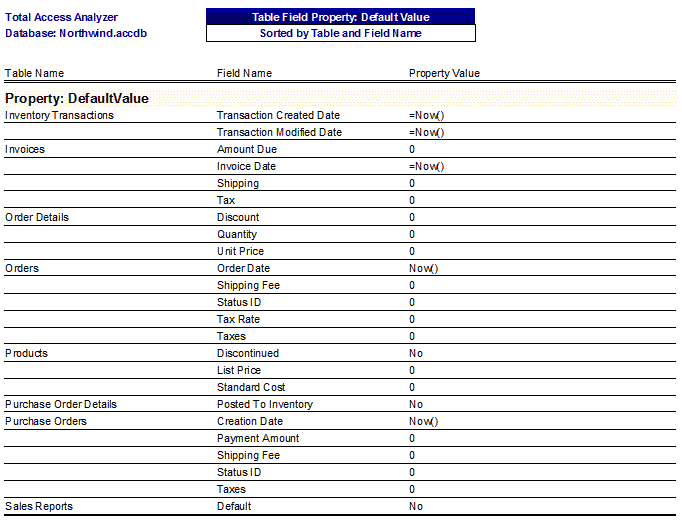
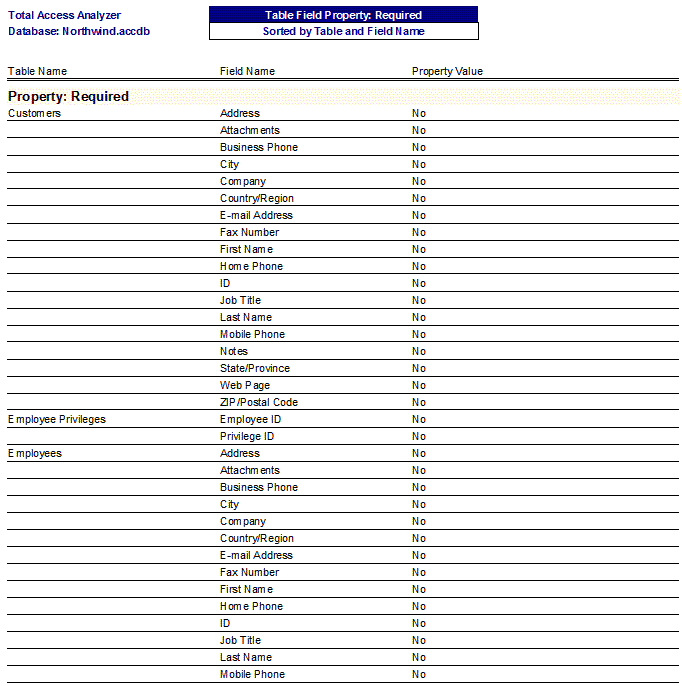
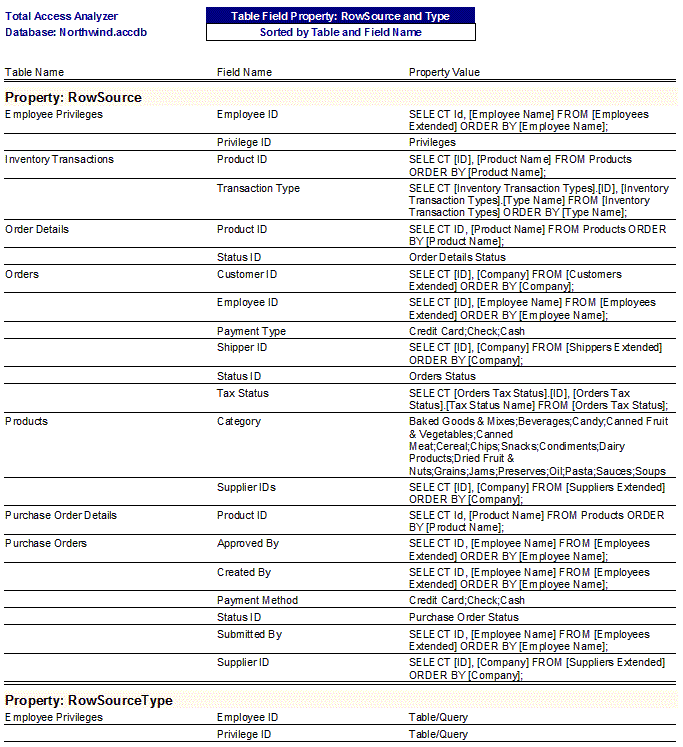
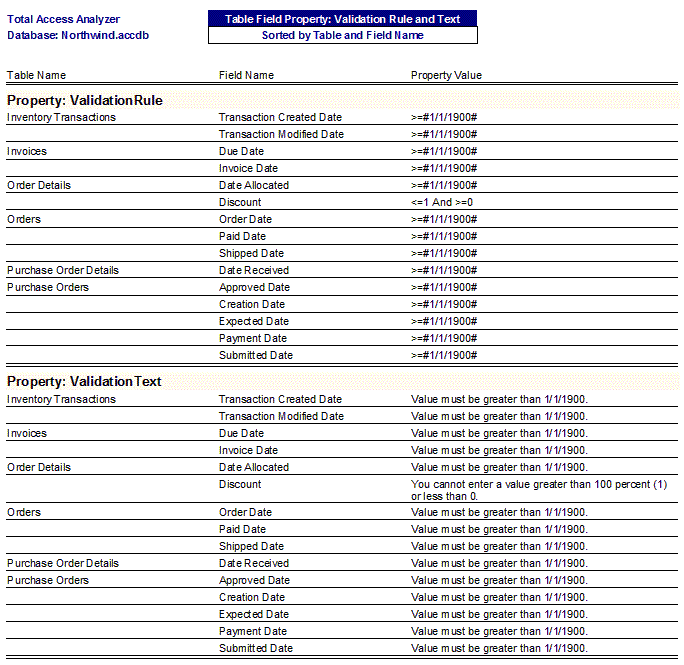
- Table Field Property Slice Reports to see all the assignments of that property across all the tables and fields. Great for quickly reviewing for consistency and problems:
- Table Dictionary
- Table Dictionary with Field Properties
Query Documentation
- Query List
- Sorted by Query Name
- Sorted by Query Type
- with SQL, Sorted by Query Name
- with SQL, Sorted by Query Type
- Query List Action Queries
- Sorted by Query Name
- Sorted by Query Type
- Query Properties
- Sorted by Query Name
- Sorted by Property Name
- Query Tables
- Sorted by Query Name
- Sorted by Table Name
- Query Columns
- Sorted by Query and Column Order
- Sorted by Query and Column Name
- Query Column Properties
- Sorted by Query Name
- Sorted by Property and Query
- Sorted by Property and Column
- Query Joins
- Query Fields Referenced
- Queries with References NEW!
- To Forms
- To Form Controls
- To Procedures
- To VBA Functions, Count
- To VBA Functions, Sorted by Query
- To VBA Functions, Sorted by Function
- Query Parameters
- Sorted by Query Name
- Sorted by Parameter Name
- Query Dictionary
Macro Documentation
- Macro List
- Sorted by Macro Name
- Sorted by Number of Lines
- Macro Dictionary (with or without page breaks between macros)
- Embedded Macro Dictionary (with or without page breaks between macros)
- for Forms
- for Reports
- Embedded Macro Properties
Data Macro Documentation NEW!
- Table Data Macro Events
- Table Data Macro Events and Lines
- Table Data Macro References
Form Documentation
- Form List
- Sorted by Form Name
- Sorted by Number of Controls
- with Record Source, Sorted by Name
- with Record Source, Sorted by Record Source
- Form Properties
- Sorted by Form Name
- Sorted by Property Name
- Form Embedded Macro Properties
- Form Embedded Macro Dictionary (with and without page breaks between macros)
- Form Subforms
- Sorted by Form Name
- Sorted by Subform Name
- Form Section Properties
- Sorted by Form Name
- Sorted by Property and Form
- Sorted by Property and Section
- Form Controls
- Sorted by Form Name and Control Name
- Sorted by Form Name and Control Type
- with Associated Labels
- Conditional Formatting
- Form Control Type
- Form Control Type Summary
- Form Controls, Sorted by Control Type
- Form Control Types 2010 and Later, Sorted by Control Type
- Form Control Type Combo Box and List Box Properties NEW!
- Form Control Validation Properties NEW!
- Form ControlSource NEW!
- Expressions
- Values
- Form Control Properties
- Sorted by Form and Control Name
- Sorted by Form and Control Type
- Sorted by Property and Form
- Sorted by Property and Control
- Form Shortcut Keys
- Form ActiveX Controls
- Sorted by Form Name
- Sorted by OLE Class
- Form Dictionary
- Form Dictionary with Properties
Report Documentation
- Report List
- Sorted by Report Name
- Sorted by Number of Controls
- with Record Source, Sorted by Name
- with Record Source, Sorted by Record Source
- Report Page Setup
- Sorted by Report Name
- Sorted by Orientation
- Report Embedded Macro Properties
- Report Embedded Macro Dictionary (with and without page breaks between macros)
- Report Properties
- Sorted by Report Name
- Sorted by Property Name
- Report Subreports
- Sorted by Report Name
- Sorted by Subreport Name
- Report Section Properties
- Sorted by Report Name
- Sorted by Property and Section
- Sorted by Property and Report
- Report Controls
- Sorted by Report Name and Control
- Sorted by Report and Control Type
- with Associated Labels
- Conditional Formatting
- Report Control Type
- Report Control Type Summary
- Report Controls, Sorted by Control Type
- Report Control Types 2010 and Later, Sorted by Control Type
- Report Control Type Combo Box and List Box Properties NEW!
- Report ControlSource NEW!
- Expressions
- Values
- Report Control Properties
- Sorted by Report and Control
- Sorted by Report and Control Type
- Sorted by Property and Report
- Sorted by Property and Control
- Report ActiveX Controls
- Sorted by Report Name
- Sorted by OLE Class
- Report Group Levels, Sorted by Level Number
- Report Dictionary
- Basic Report Dictionary
- with Report Properties
- with All Properties
Workgroup and Security Permission Documentation
Command Bar Documentation
- Command Bar List
- Command Bar Properties
- Sorted by Command Bar Name
- Sorted by Property Name
- Command Bar Controls
- Command Bar Control Properties
- Sorted by Command Bar
- Sort by Property and Command Bar
- Sort by Property and Control
ADP Database Diagram Documentation
- Database Diagram List
ADP Stored Procedure Documentation
- Stored Procedure List
- Stored Procedure List with TSQL
ADP View Documentation
- View List
- View List with TSQL
- View Properties
- View Columns
System Reports
- Total Access Analyzer Output Databases
- Sorted by Name
- Sorted by Analysis Time
- Sorted by Start Date
- Total Access Analyzer Report List
- Report List with Export File Names
- Sorted by Category
- Sorted by File Name
- List of All Errors, Suggestions, and Performance Tips Detected
- New Errors, Suggestions, and Performance Tips
- Total Access Analyzer List
- Errors Detected
- Suggestions Detected
- Performance Tips Detected
Microsoft Access 2019 / 365 Version is shipping!

Version 16.7 for
Microsoft Access 2016
Version 15.7 for
Microsoft Access 2013
Version 14.7 for
Microsoft Access 2010
Version 12.97 for
Microsoft Access 2007
Version 11.95 for
Microsoft Access 2003
Version 10.8 and 9.8 for
Access 2002 and 2000

Awards and Reviews



"Total Access Analyzer is an amazing product that I've relied on and recommended for years. It's a huge time saver."
Sal Ricciardi, Programming Writer, Microsoft Corporation
Analyzer Info


Why Analyzer?
Additional Info




