



 New Features of Total Access
Analyzer for Microsoft Access 2010
New Features of Total Access
Analyzer for Microsoft Access 2010
This is no longer the latest version of Total Access Analyzer 2010.
Existing 14.X customers can upgrade to Total Access Analyzer 2010, Version 14.7 for a nominal fee.
For more information on the new features, visit Total Access Analyzer 2010, Version 14.7.
The most powerful Microsoft Access database documentation and analysis program is now available for Microsoft Access 2010. Total Access Analyzer helps you know exactly what's in your database, how the objects are related to each, how the code calls each other, and a variety of other tips and suggestions to improve and fix your databases.
Microsoft enhanced Microsoft Access 2010 with many new features, a modified ACCDB file format, new properties and macro commands, VBA support for 64 bit code, and much more.
Total Access Analyzer supports these new features with additional enhancements to extend its functionality and improve its use based on our experiences and customer feedback.
Enhancements
We've made many enhancements since the previous version for Microsoft Access 2007:
- Microsoft Access 2010 and Windows 7 Support
- New Module VBA Documentation and Options
- Advanced Macro Documentation and Analysis
- Temporary Variable Documentation and Analysis (TempVars)
- Additional Errors Detected and Suggestions Offered
- Displaying Results Enhancements
- Report Enhancements
- Improved User Experience
- Pricing and Microsoft Access Versions
- Additional Resources
Supports Microsoft Access 2010, 32-bit and 64-bit versions
Total Access Analyzer 2010 includes a 32 bit and a 64-bit version of its add-in to support both versions of Microsoft Access 2010. The setup program automatically detects the Access 2010 version you've installed and installs the appropriate one.
It supports any operating system (32 and 64 bit) that Access 2010 supports including Windows 7, Vista, and XP.
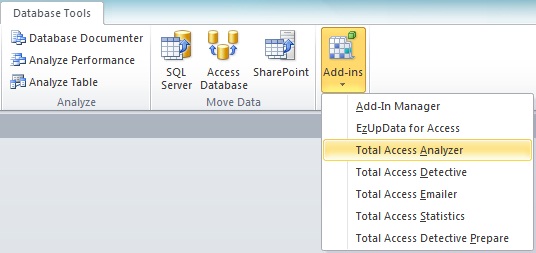
After launching the add-in, the main form appears:
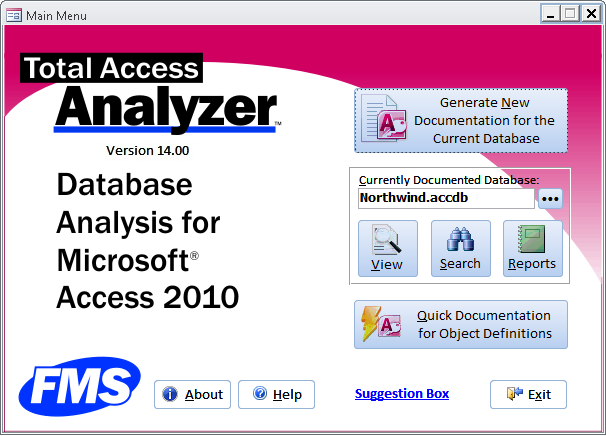
Document All Database Types Supported by Microsoft Access 2010
Total Access Analyzer supports all the database types Microsoft Access 2010 uses including:
- ACCDB database format (from Access 2007 and 2010)
- Jet Engine/MDB formats (from Access 2000, 2002, 2003, 2007, and 2010)
- Access Data Projects (ADP) linked to SQL Server
This means you can use Total Access Analyzer 2010 with Microsoft Access 2010 to document and analyze databases created by older versions of MS Access.
Partial Module Cross-Referencing
Previously, all modules needed to be selected for Module XREF to be performed. The new version lets you choose a subset of modules for faster processing. The code analysis may be incomplete if important modules are not included. If some modules are not selected, a warning message appears, but you can now proceed at your own risk.
VBA Module Parser Supports Compiler Conditionals
The VBA module parser now supports compiler conditionals as defined in #IF...#ELSE…#END IF statements. This is particularly common when using the VBA7 constant to manage 32 versus 64 bit code:
#If VBA7 Then
  < 64 bit specific code >
#Else
  < 32 bit specific code >
#End If
Duplicate definitions of constants, variables, declare statements, user defined types, enum, procedures, and other constructs are properly documented and handled for the code analysis.
Conditionals are displayed in many of the module XREF documentation views and reports. A new Compiler Conditions item is added.
 IF..ELSE..END IF
Documentation and Indentations
IF..ELSE..END IF
Documentation and Indentations
Macro lines are documented including IF..ELSE..END IF structures. The Macro Dictionary Report now shows your macro lines with syntax indentation.
"Macro Compiler" to Validate Macro Commands
Macro actions with missing arguments are errors that will crash when the macro line is executed. Total Access Analyzer flags these errors so you can catch them before deployment. Missing arguments for RunMenuCommand items are also identified.
Enhanced Embedded Macro Documentation
All your Embedded Macros can now be seen in one place. Scattered across form and report properties and control events, it is difficult to see all the automation code in a database. The Embedded Macros folder consolidates this under Macros:
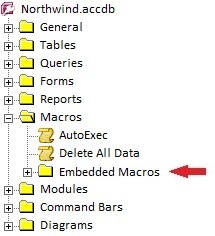
Expanding the folder displays all the forms and reports and their controls with embedded macro events:
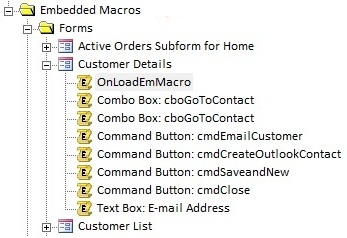
By selecting an item, the corresponding macro code is displayed.
Temporary variables were introduced in Access 2007. They let you create variables in macros and modules that can be referenced by other objects such as queries using the TempVars![VariableName] syntax. This is easy to do but challenging to manage. New features help you know where they are defined, where they are used, and problems that exist.
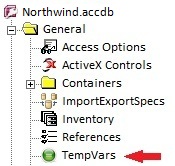
TempVars Folder added to the General Folder
A new TempVars item provides the list of temporary variables and where there are used across your entire database:
Temporary Variable Reports
Four new temporary variable reports are available under Database and Module XREF to see the list of temporary variables that are defined and where they are referenced.
Detect Undefined and Unused Temporary Variables
- Temporary variable cross-referencing is performed to detect errors where TempVars are referenced but never created.
- A new suggestion flags unused TempVars. Temporary variables that are created but never referenced.
More information on Microsoft Access Temporary Variable (TempVars) Cross Reference
Over the years, as we encounter mistakes in our own work, when possible, we add their detection to Total Access Analyzer. The new version includes several new Best Practices:
 Timer
Interval and Timer Event Mismatch
Timer
Interval and Timer Event Mismatch
Total Access Analyzer identifies timer event and timer interval inconsistencies as errors:
- Forms with a timer interval (not 0) but no Form_Timer event
- Forms with a Form_Timer event but timer interval property set to zero
 Queries Using Other Queries
with Both having GroupBy Clauses
Queries Using Other Queries
with Both having GroupBy Clauses
A new performance tip identifies queries that may benefit from fewer Group By levels. Queries with GROUP BY clauses take longer to process. Queries with Group By clauses based on other queries with Group By clauses may perform better if the grouping were only done at the final level. This depends on the question being asked and may not work if there's a need for the unique group as part of an earlier query. However, if that's not needed, performance differences may be considerable.
Action Queries Opened by OpenQuery Command
We suggest using the Execute command to run action queries.
 SQL Server list of reserved
words updated for SQL Server 2012
SQL Server list of reserved
words updated for SQL Server 2012
The list of SQL Server reserved words is updated for SQL Server 2012 along with the new list of anticipated future reserved words.
Check for Truncated Number Fields
We suggest setting this option so users are not confused by truncated numbers.
Many enhancements were made to show more data and make it easier to use:
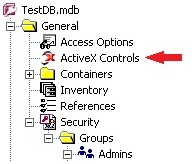
ActiveX controls appear as a New Category under General
This makes it easy to see the types of ActiveX controls used in the database and where they are used. This does not appear if there are no ActiveX controls in your database.
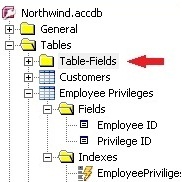
New Table-Fields folder under Tables
The new Table-Fields folder lists the fields across all the tables. This makes it easy to filter and sort field names and types across all your tables.
Explorer Tab Captions are Context Sensitive
The Explorer has many tabs which vary based on the selected folder or object in the treeview. To make it easier to know what’s available, the captions change to better describe what's available. For tabs that never have data to display, the captions are blank.
 Enhanced Opening of
Referenced Object in Design Mode
Enhanced Opening of
Referenced Object in Design Mode
For modules, when viewing the Module XREF tab, pressing the Design button now opens the referencing (parent) object. Previously, it was opening the called object which can still be opened from the other tabs, but the XREF opens the calling side which makes it more convenient to see where your code is used.
 Preview Multiple Reports
Previously, only one report could be previewed or opened in report view. Now, multiple reports can be opened simultaneously so you can see more reports at once. The only exception is when the same report is used with different filters where only one instance of that report can be opened at a time.
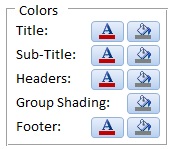 Color Customization for Reports
Colors can be applied to sections of the report under Report Options. Text and background colors can be selected for the title, sub-title, headers, footer, and group shading.
New Reports
Many new reports were added for a total of 380+ reports. They include database level documentation:
- ActiveX Controls: Summary and Cross-References
- Import Export Specifications details
- Temporary Variables
- Workgroup Security Summary of Groups and Users
New Module Cross-Reference reports were added, especially with the documentation of compiler conditions:
- Compiler Conditions, Summary
- Compiler Conditions, Sorted by Condition
- Compiler Conditions, Sorted by Module and Procedure
- Compiler Conditions, Sorted by Module and Line
- Variable List Condition, Sorted by Module and Procedure
- Variable Constants Condition, Sorted by Module and Procedure
- Debug and Stop Statements
Reports were also added for where DoCmd is used:
- DoCmd, Action Summary
- DoCmd, Action and Argument Summary
Many of the existing reports were modified to show where conditionals are used.
Macro Dictionary Report
For regular and embedded macros, the macro action is moved to the top of the line and bolded, followed by each of its argument labels and values, similar to the way it appears in the macro editor. IF..ELSE..END IF blocks are indented.
There are two macro dictionary reports now. One has a page break between every macro, and the other doesn’t.
General Enhancements
The look and feel of the add-in supports Office 2010 themes and other appearances expected in a modern Access application. Maximized forms and tabbed document support are used where appropriate to display as much data as possible.
Microsoft Access can be Minimized During Documentation
While Total Access Analyzer is performing database documentation, it can now be minimized.
Manages User Access Control Rights
Total Access Analyzer respects your Windows login rights. By default, it is installed in your user folder, it updates registry settings in your user section and anticipates the issues around user access control and trusted folders.
New Manual and Context Sensitive Help
Updated manual and help file with detailed documentation of how the program works and how to best use it.
Pricing and Microsoft Access Versions
Due to the differences within each version of Microsoft Access, there is a separate version of Total Access Analyzer for each version of Access.
|
Total Access Analyzer Pricing by Microsoft Access Version |
|||||||
| Microsoft Access Version | |||||||
| Licenses | Price | 365*/2019 | 2016 | 2013 | 2010 | 2007 | 2003 |
| Version | 17.1 | 16.7 | 15.7 | 14.7 | 12.97 | 11.95 | |
| Single | $299 | Buy Now | Buy Now | Buy Now | Buy Now | Buy Now | Buy Now |
| 5-Seat | $899 | Buy Now | Buy Now | Buy Now | Buy Now | Buy Now | Buy Now |
|
Upgrade Between Access Versions |
|||||||
| Single | $199 | Buy Now | Buy Now | Buy Now | Buy Now | Buy Now | Buy Now |
| 5-Seat | $599 | Buy Now | Buy Now | Buy Now | Buy Now | Buy Now | Buy Now |
|
Update to the Latest Release within the Same Version |
|||||||
| Update 17.1 | Update 16.7 | Update 15.7 | Update 14.7 | ||||
| Single | $149 | Buy Now | Buy Now | Buy Now | Buy Now | ||
| 5-Seat | $449 | Buy Now | Buy Now | Buy Now | Buy Now | ||
|
Premium Support Subscription |
|||||||
| Single | $299 | ||||||
| 5 Seat | $999 | ||||||
|
Also available as part of |
|||||||
|
Total Access Ultimate Suite Total Access Developer Suite |
|||||||
|
* Office/Access 365 Support |
|||||||
| Microsoft Office/Access 365 is a subscription that is constantly updated. Total Access Analyzer 2019, version 17.1, supports the version of Office/Access 365 when it was released. We cannot guarantee automatic support for all future releases with this version. We strive to provide upgrades to support new features as they become available. | |||||||
|
Licensing Information |
|||||||
| Total Access Analyzer is licensed on a per user basis.
Each user who runs the program must have a license. Read the License Agreement for details. |
|||||||
|
Runtime/Redistributable Version |
|||||||
| Not Applicable | |||||||
Additional Resources
- For a quick overview of Total Access Analyzer, Take the Product Tour
- Previous Version: Features Introduced for the Microsoft Access 2007 Version
- Total Access Analyzer Home
Microsoft Access 2019 / 365 Version is shipping!

Version 16.7 for
Microsoft Access 2016
Version 15.7 for
Microsoft Access 2013
Version 14.7 for
Microsoft Access 2010
Version 12.97 for
Microsoft Access 2007
Version 11.95 for
Microsoft Access 2003
Version 10.8 and 9.8 for
Access 2002 and 2000

Awards and Reviews



"Total Access Analyzer is an amazing product that I've relied on and recommended for years. It's a huge time saver."
Sal Ricciardi, Programming Writer, Microsoft Corporation
Analyzer Info


Why Analyzer?
Additional Info




