



Total Access Analyzer Product Review
Geoff Hollander
Northwest Database Services,
Portland Access User Group
One Microsoft Access utilities web site describes Total Access Analyzer this way, "Total Access Analyzer performs detailed analysis of your Access database to generate complete documentation of all objects and code. It examines your entire database to reveal complex relationships among objects, hidden problems, and even unused objects."
Total Access Analyzer has a huge number of documentation and diagnostic reports
I like how the basic reports are represented in several ways, showing their information with different sorts and layouts. By the time you have looked them all over, you've examined the database every which way; from general overview reports, to those that drill right down to the minute details about every part of your database.
The Documentation Explorer is great tool for surveying what Total Access Analyzer has found
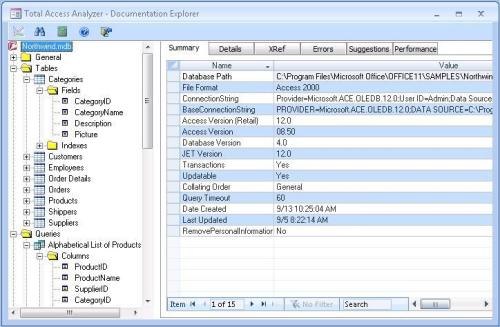
An object tree on the left provides an efficient and fast way to navigate throughout all the objects in your database and drill down to any object's particulars in a few seconds. What I especially like is that you can directly open an object in design mode - forms, reports, etc. - or jump to the IDE window to display your code in a selected sub or function. I found a good example of how useful this is when Total Access Analyzer determined that I could reduce the scope of the function I was reviewing. I was able to jump to the code, edit it, and save it in an instant. (I was also surprised - and humbled - at how many of these little things needing correction there actually were in my code.)
If you aren't sure where something is located - e.g. code in a function or property - there is a Search button on the main menu that will find all or any occurrences of what you are trying to find.
Total Access Analyzer found several potential errors in my test database
Things like:
- Module procedures without scope
- Form tabs that were out of order
- 6 modules with un-referenced variables
- 17 reports where the NoData Event wasn't set up to fire
- and more...
I always thought that I was thorough about going through an application and cleaning up loose ends, but Total Access Analyzer proved:
- I was wrong and
- I probably won't call another application complete until Total Access Analyzer gives it the OK.
That being said, one thing I encountered which I did not expect was that Total Access Analyzer is not able to cross-reference procedures defined in another database. For example, I found that Total Access Analyzer reported a procedure called “PutPar” as undefined. However, in this case, PutPar existed and was defined within an MDE library file which I had referenced.
Total Access Analyzer is very fast when processing a database and generating documentation, so it's easy to re-run it after making any corrections or tweaks it indicates, and then re-run it again until you are satisfied that all of them are straightened out. Any documentation that you run can be saved and recalled; allowing you to keep a history of your database's assessments.
The heart and soul of Total Access Analyzer are the documentation and analysis reports that it creates
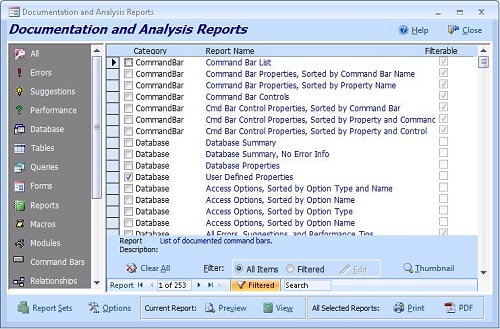
There are so many, as a matter of fact, that they have to be managed in a special Reports form with an Outlook-style button bar interface. Reports are subdivided into and selected by categories, such as Errors, Suggestions, Performance, Database, Tables, Queries, etc., displayed on the left side of the form. Some categories, such as Errors, Suggestions and Performance contain reports that help you fine tune your application before it's delivered, while others will document your application for your client, their IT staff or anyone else who might have to jump in and pick up where you left off.
Note: Selling a documentation package generated by Total Access Analyzer for your application is a great way to add a training-free, trouble-free and reasonably priced profit center to the work you are already performing!
Most reports can be filtered if you wish to drill down to, say, a specific group of modules to report on rather than having to include all of them.
All that being said, I found some things in Total Access Analyzer to be extraneous and a few others to be lacking. For example, in the Reports form, you can choose to display a report by clicking on the View, Thumbnail or Preview buttons. All reports can be viewed in Preview and Thumbnail modes, while the View option cannot show some of the reports offered. I haven't figured out exactly why the redundancy here, as neither View or Thumbnail modes appear to do or display anything significantly different from Preview, nor do they provide any additional capabilities. It sure seems that the Preview mode would be enough.
[FMS Comment: the thumbnails are used to display samples of reports that the current documentation doesn't have]
Report Sets
Reports to be displayed/printed are selected by a clicking a check box preceding each. There is also the Report Sets button that will take you to a Report Sets form, where you can create sets of reports to run together. For example, you might select a group of error and diagnostic reports to run just before application deployment to see if everything is as it should be. You could set up a group of reports to furnish some basic DB documentation for your client, etc.
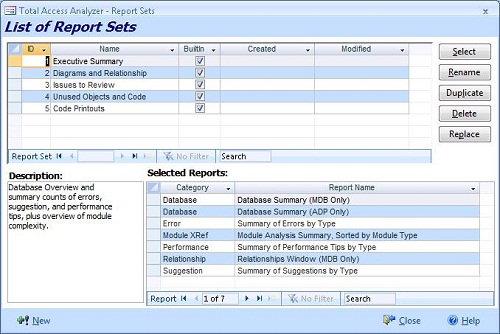
There are some preselected report sets already provided by Total Access Analyzer. Once you select a group of reports to group together, simply click on the Select button and go back to the main Reports form window. You will find all the reports in that group have been selected and are ready for you to determine what type of output you prefer.
This is a great utility, enabling you to custom configure the documentation scope for your needs
That being said, however, I don't think that Total Access Analyzer takes this nearly as far as it should. Bundling reports up together to create a larger document is very smart - especially as Total Access Analyzer has already done the heavy lifting, but when output, what you have is several individual reports; no different that if printed out individually - it's just more convenient.
I think that when reports are selected to be combined into a "document" the page numbering should be contiguous throughout the entire group. So, instead of each report displaying "Page 1 of 4" or "2 of 7", it would display. "Page 1 of [the total number of pages combined into the document]". Also, there should be some kind of optional divider page between reports rather than just a new report header title on the first page of each.
At the least, there should be a divider page between report categories (as defined in the Reports form button bar). A user configurable document cover sheet should be part of this all as well, so that a custom cover page (e.g. displaying your client's and your company's names along with a custom title).
Finally, rather than to simply select a bunch of reports so they can be run together from the Reports form, Total Access Analyzer should enable a user to be able to run the document right from the Report Sets form. This way a developer might create several custom evaluation and documentation packages that could be reused on different databases while still retaining a highly client-personalized appearance.
Total Access Analyzer is a solid product that any Access developer should have in their toolbox; and one that will pay for itself in short order.
Microsoft Access 2019 / 365 Version is shipping!

Version 16.7 for
Microsoft Access 2016
Version 15.7 for
Microsoft Access 2013
Version 14.7 for
Microsoft Access 2010
Version 12.97 for
Microsoft Access 2007
Version 11.95 for
Microsoft Access 2003
Version 10.8 and 9.8 for
Access 2002 and 2000

Awards and Reviews



"Total Access Analyzer is an amazing product that I've relied on and recommended for years. It's a huge time saver."
Sal Ricciardi, Programming Writer, Microsoft Corporation
Analyzer Info


Why Analyzer?
Additional Info




