



 New Features in Total Access Startup 2016
Total Access Startup 2016 (Version 16.0) lets you centrally manage and guarantee that all your users always launch the right version of Microsoft Access with the right version of your Access database (ACCDB, MDB, or ADP).
Total Access Startup 2016 is its fourth major release:
- Originally shipped in 2003 for Microsoft Access 2003
- Total Access Startup 2007 for Microsoft Access 2007
- Total Access Startup 2010 for Microsoft Access 2010
Total Access Startup 2016 Features and Enhancements
- Supports Microsoft Access 2016 and 2013 (32 and 64-bit Versions)
- Supports All Multiple Access Database Formats
- New Tabbed Interface for the Administrator Wizard
- Set a Specific Range of Access Versions
- Add a Splash Screen when your Program Loads
- Create the Shortcut with Icons from the Icon Library
- Customize and Localize Error Messages
- Support New Operating Systems
- Additional Documentation
Total Access Startup 2016 supports launching your MS Access databases using Microsoft Access 2016 or 2013 while controlling for the bitness version of Access. You can specify whether users run the Access 32-bit version, 64-bit version, or either. Because of the significant differences between the 32 and 64 bit versions, your application may only run one or the other. With Total Access Startup you can prevent your users from launching it with the wrong version.
Support remains for all Access database formats including:
- Microsoft Access 2007-2016 ACCDB formats
- Microsoft Access MDB formats
- Access Data Projects (ADPs)
The Administrator program is redesigned with a tabbed interface rather than a series of separate Wizard pages. The options are reorganized from the previous Wizard pages into more logically organized tabs. Easily move between tabs to see all your settings.
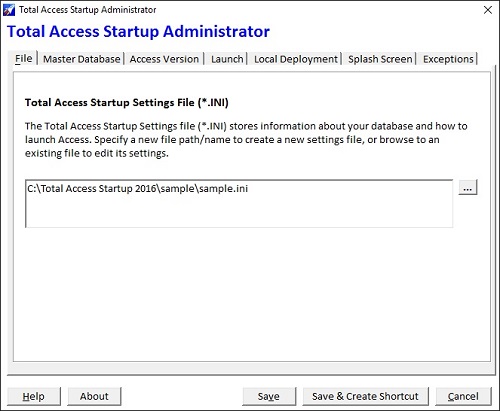
File Tab: Specify the name of the INI file to store your selections
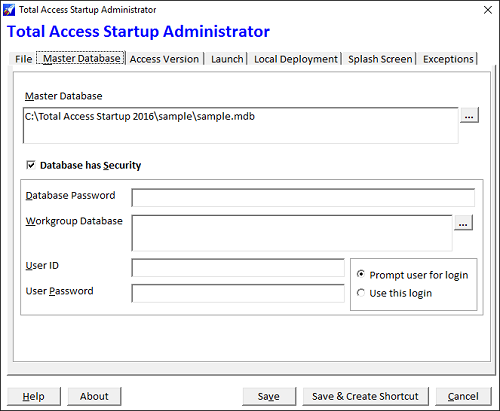
Master Database Tab: Set the master database name and its security settings
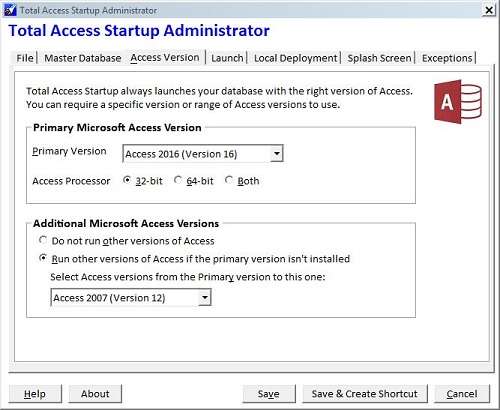
Access Version Tab: Specify the primary Access version and bitness, plus optional range of additional versions
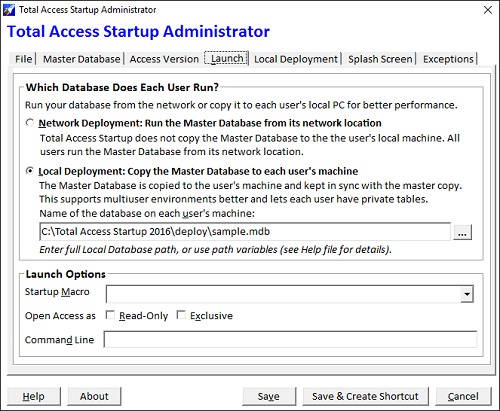
Launch Tab: Specify whether to deploy the database to each PC and how to start Access
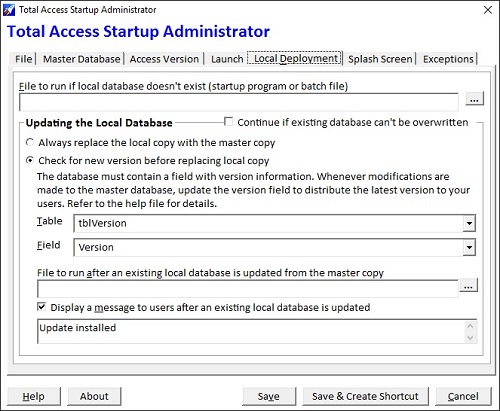
Local Deployment: Specify optional setup programs for initial deployment and updates, and how to determine updated versions
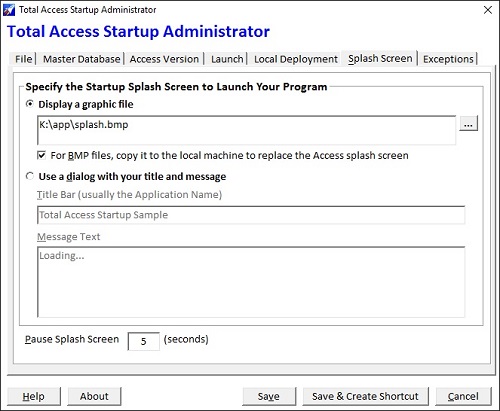
Splash Screen Tab: While loading, specify the graphic file to display or text in a dialog box
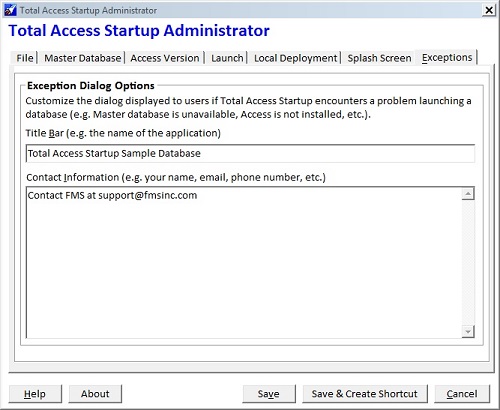
Exception Tab: Customize the title bar and contact information/message for your users if they can't launch your database
Total Access Startup 2016 lets you specify a primary Access version and the range of additional versions. For instance, you can specify Microsoft Access 2016 down to Access 2007. If the user has Access 2016 installed, it is launched. If not, it tries to find Access 2013, then Access 2010, and finally Access 2007. If the last Access version isn't installed, a message for a missing Access version is displayed and the database is not launched.
Specify the Primary Microsoft Access Version and Optional Range of Additional Versions
This lets you support users with the latest version of Access immediately and those who haven't migrated. Of course, your database must support all the versions you specify.
Conversely, you can specify an older Access version and any later versions and it will work in reverse.
You can now specify a graphic file that appears while your program and Access loads to give it a very professional look:
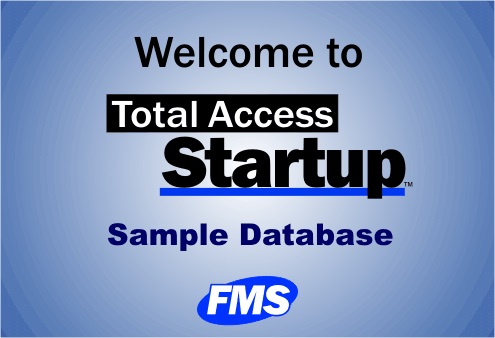
Create and display your own graphic file in BMP, GIF, JPG, and PNG formats. It can replace the Microsoft Access splash screen from appearing to your users.
Enhanced Splash Screen Dialog
If you opt not to display your own splash screen graphic file, the legacy startup dialog is enhanced to be larger and easier to read.
When creating the shortcut, you can now add a custom icon. An Icon Library with over 1,150 icons are included to customize your shortcut.
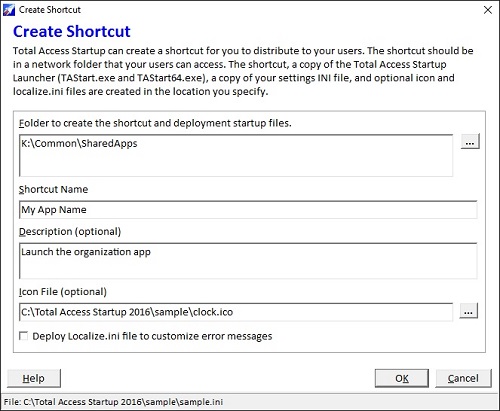
Create Shortcut Form
The Total Access Startup Launcher traps errors that prevent users from starting your database. All the error messages can be customized. Modify our text if you don’t like our wording or translate them from English to your users' language. A Localize.ini file is in the installation folder. Modify it and include it in the deployment folder with your shortcut.
Total Access Startup 2016 supports Windows 10, 8, and 7, Windows Server 2012 R2 and 2016, along with older Windows versions including XP, Vista, 2000, 98, 95, Server 2008, etc. Total Access Startup 2016 supports all operating systems that work with Microsoft Access.
Includes a new help file and manual.
Pricing and Microsoft Access Versions
|
Total Access Startup Pricing for Microsoft Access |
||
| Licenses | Price | All Access Versions |
| Single | $499 | Buy Now |
| 5-Seat | $1,499 | Buy Now |
|
Upgrades |
||
| Single | $299 | Buy Now |
| 5-Seat | $899 | Buy Now |
|
Premium Support Subscription |
||
| Single | $299 | |
| 5 Seat | $999 | |
|
Also Available as part of: |
||
|
Total Access Ultimate Suite |
||
|
Runtime/Redistributable Version |
||
| A royalty-free, distributable file is included to launch your database with the right version of Microsoft Access for people disconnected from your network. | ||
|
Licensing Information |
||
|
Licensing is based on the number of copies of Total Access Startup installed. Each copy requires
a separate license. One installation can manage an unlimited number of databases called by an unlimited number of users on that network. |
||
Total Access Startup is Shipping!

Supports Microsoft Office 365/2016, 2013, 2010, 2007, 2003, 2002, 97, and 95

Reviews
"Total Access Startup is an amazing product and an incredible value. It's not only made my job as a developer easier but it provides a great service to our users"
M. Killough, a happy customer
Startup Info


Additional Info




