Difference Between "Unique Values" (SELECT DISTINCT) and "Unique Records" (SELECT DISTINCTROW) in Microsoft Access Queries
Provided by Molly Pell, Senior Systems Analyst
In Microsoft Access, the SQL syntax of your query may say "Select Distinct" or "Select DistinctRow". Are you familiar with the difference? Learn how this impacts which records and number of records you see, and whether they can be edited.
When creating a query in Microsoft Access, you might want to return only distinct or unique values. There are two options in the query's property sheet, "Unique Values" and "Unique Records":
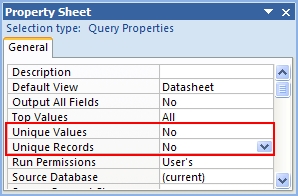
These properties correspond with the DISTINCT and DISTINCTROW statements (respectively) in SQL.
DISTINCT and DISTINCTROW sometimes provide the same results, but there are significant differences:
DISTINCT
DISTINCT checks only the fields listed in the SQL string and then eliminates the duplicate rows. Results of DISTINCT queries are not updateable. They are a snapshot of the data.
DISTINCT queries are similar to Summary or Totals queries (queries using a GROUP BY clause).
DISTINCTROW
DISTINCTROW, on the other hand, checks all fields in the table that is being queried, and eliminates duplicates based on the entire record (not just the selected fields). Results of DISTINCTROW queries are updateable.
Assume you have a simple orders database with the following data:
Table Customers
| CustID | Company | City |
|---|---|---|
| 1 | ABC, Inc. | London |
| 2 | ABC, Inc. | Paris |
| 2 | Acme, Ltd. | New York |
Table Orders
| Order | CustID | Date | Product |
|---|---|---|---|
| 1 | 1 | 6/1 | Total Access Analyzer |
| 2 | 1 | 6/2 | Total Access Statistics |
| 3 | 2 | 6/3 | Total Access Detective |
| 4 | 3 | 6/3 | Total Access Emailer |
You can see that ABC in London has 2 orders (CustID = 1), ABC in Paris has 1 order, and Acme has 1 order.
A simple SELECT query like this:
SELECT Company
FROM Customers
INNER JOIN Orders ON Customers.CustID = Orders.CustID;
returns one row for each Customer Order:
| Company |
|---|
| ABC, Inc. |
| ABC, Inc. |
| ABC, Inc. |
| Acme, Ltd. |
A SELECT DISTINCT query like this:
SELECT DISTINCT Company
FROM Customers
INNER JOIN Orders ON Customers.CustID = Orders.CustID;
limits the results to unique values in the output field. The query results are not updateable.
| Company |
|---|
| ABC, Inc. |
| Acme, Ltd. |
A SELECT DISTINCTROW query like this:
SELECT DISTINCTROW Company
FROM Customers
INNER JOIN Orders ON Customers.CustID = Orders.CustID;
looks at the entire underlying tables, not just the output fields, to find unique rows.
Here, you see both ABC, Inc. companies (the one in London and the one in Paris), even though the output fields match. The query results are updateable because they correspond to the individual records in the Customers table.
| Company |
|---|
| ABC, Inc. |
| ABC, Inc. |
| Acme, Ltd. |
So to summarize, use DISTINCT if you need a snapshot of certain data, without seeing duplicates in the results. Use DISTINCTROW if you want to return entirely distinct records, regardless of what’s shown by the output.
Note that Microsoft SQL Server supports DISTINCT, but not DISTINCTROW.
If you plan to migrate to SQL Server, do not rely on DISTINCTROW queries.
 To discuss this further, visit our blog post
Microsoft Access Queries: “Unique Values” (DISTINCT) vs. “Unique Records” (DISTINCTROW).
To discuss this further, visit our blog post
Microsoft Access Queries: “Unique Values” (DISTINCT) vs. “Unique Records” (DISTINCTROW).
Total Access Detective 2026
Find Differences between Access databases and objects!
Total Access Memo 2025
Add Rich Text Memos to Forms and Reports!


Updated Microsoft Access to SQL Server Upsizing Center with whitepapers, resources, and SQL Server Express Downloads
 Latest Newsletter
 Blog with us
 Follow us on Twitter
Additional Resources
- Microsoft Access Query Tips and Techniques
- This Recordset is not updateable: Dealing with non-updateable queries in Microsoft Access
- Find, hide, or eliminate duplicate data

Retrieving Data
Action Queries
Statistical Analysis

The most popular Microsoft Access Number Cruncher
Source Code Library

SQL Server Upsizing

Microsoft Access to SQL Server Upsizing Center
Additional Resources
Connect with Us
 Email Newsletter
 Developer Team Blog
 Facebook
 X/Twitter
 Support Forum & Tickets


