 
Total .NET Analyzer Product Guide
Thank you for your interest in Total .NET Analyzer! Total .NET
Analyzer provides comprehensive analysis of your C# and Visual Basic
.NET projects. It examines your applications and identifies errors,
performance problems, and standards issues.
FMS is pleased to provide you with this Product Guide to assist in
your evaluation of this exciting new member of the FMS family of
development products.
Contents
Introducing Total .NET Analyzer
Total .NET Analyzer is an add-in to Visual Studio .NET that
provides on demand analysis of Visual Basic .NET and C# code. Use
Total .NET Analyzer to find bugs, performance problems, and standards
before you deploy your application.
Overview
With the advent of .NET, developers have a powerful new set of
tools for building complex and demanding applications. .NET introduces
new programming practices, coding standards, and optimization
techniques. Getting up to speed with the new tools and framework can
be a difficult process.
Total .NET Analyzer helps you in this process by identifying issues
as you develop your code. Total .NET Analyzer covers a full spectrum
of issues, from naming guidelines to optimizations that only a
seasoned developer, given enough time, may be able to detect. Total
.NET Analyzer will help you:
- Find bugs before you deploy your application
- Detect performance bottlenecks
- Implement standards and best practices
- Identify non-optimal usage of the .NET framework
Even if you are a .NET professional, analysis is an essential part
of application development and maintenance. As your applications grow,
the volume and complexity of code often prevents a detailed audit of
your code. Without a consistent, automated analysis tool, developing
and maintaining programs becomes a time consuming chore. Total .NET
Analyzer is designed to reduce and eliminate many of the tedious and
difficult parts of development. Use Total .NET Analyzer every step of
the way:
Developing New Applications
Total .NET Analyzer can improve the development process from the
start! The sooner you start analyzing your applications, the sooner
you can start correcting issues and implementing "best practices."
It’s much easier to do it right the first time around than it is to
change applications that have already been deployed. Plus, Total .NET
Analyzer helps you learn along the way by offering detailed
suggestions for improvements.
Maintaining Existing Applications
Total .NET Analyzer can help you refine and improve existing
applications. Total .NET Analyzer is quick, and its results can be
viewed directly in your .NET solution. Simply click, and you’re taken
to the exact location in code where the issue exists.
Key Features and Benefits
|
Feature |
Benefit |
|
Parser works in real time |
Built on our integrated .NET parser, Total .NET Analyzer parses
your entire project in the background, and quickly pinpoints where
issues occur. |
|
Full integration with Visual Studio .NET |
You don’t have to leave Visual Studio to perform your Analysis.
Total .NET Analyzer appears as a toolwindow right in the IDE. |
|
100% .NET |
Total .NET Analyzer is written in 100% managed C#, and was
designed from the ground up to be completely integrated with
Visual Studio .NET and SourceSafe. With lightning-fast project
parsing, a powerful listview and issue report, code analysis is
now easy and accurate. |
|
Analysis on demand |
Click on Analyze and Total .NET Analyzer quickly builds a list of
every issue found in your solution. |
|
Over 150 rules detected |
Total .NET Analyzer detects over 150 issues ranging from standards
and best practices to serious performance problems. Visit the
Rules page for a complete list. |
|
Customize the analysis to suit your needs |
The Rule Editor allows you to customize the analysis that is
performed to suit your own needs. Turn rules on/off, modify rule
severity and category, and add notes to individual rules. |
|
Easily navigate to issues in your code |
The Analyzer list shows the type of issue, class name, member
name, line and column, and a preview of the line of code
containing the issue. Just click on the result item, and you’re
taken directly to the location of the issue! |
|
Learn and improve coding techniques |
Clicking the "Information" button shows a detailed description of
the issue with possible solutions. As you improve your code, you
will learn how to improve your own development skills! |
|
Create a report of analysis issues |
You can send the entire contents of the Total .NET Analyzer list
to a report at the click of a button. |
Using Total .NET Analyzer
Below is a quick introduction to Total .NET Analyzer. Please see
the help file or manual for a more detailed description.
Launching the Program
When you install Total .NET Analyzer and run Visual Studio .NET,
the add-in is automatically loaded into the IDE and the Total .NET
Analyzer toolwindow appears. With this default behavior, you do not
need to open or start the product—it is automatically loaded whenever
you start Visual Studio .NET.
Start Total .NET Analyzer by selecting clicking [Analyze] in the
Total .NET Analyzer tool window, or Tools, FMS .NET Suite, Total .NET
Analyzer, Analyze from the Visual Studio .NET menu.
The Toolwindow
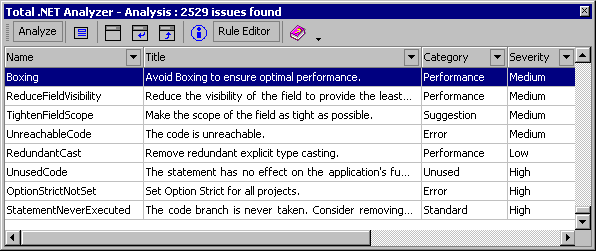
The Total .NET Analyzer toolwindow contains most of the program’s
functionality. The toolwindow shows you a list of errors, suggestions,
performance tips, and standards.
Using the Rule Editor
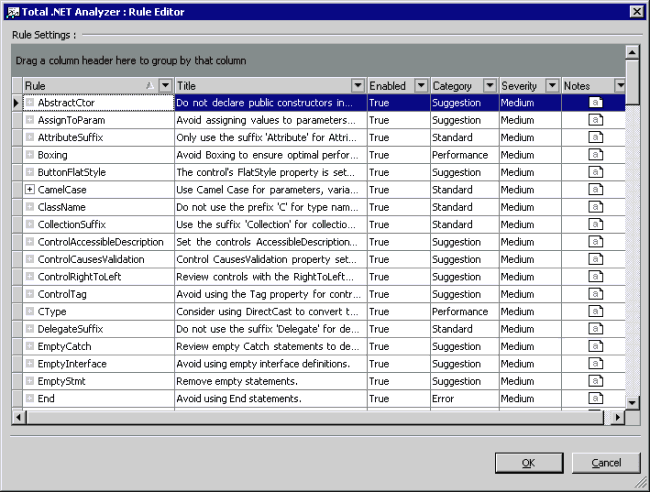
Total .NET Analyzer includes a Rule Editor, which allows you to
control the analysis results that you see. The Rule Editor also allows
you to set the category, severity, and add notes to individual
analysis issues. Click the button on the toolbar: and the Rule Editor
appears:
More Information Report
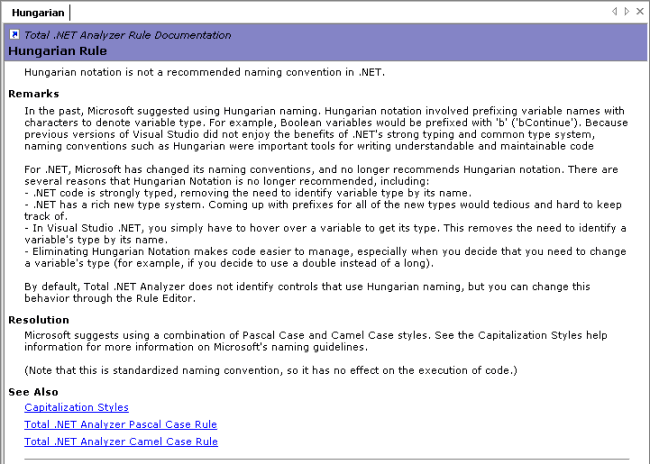
Basic information about each result issue shows in the Name and the
Title columns of the Issues List. To learn more about an issue, click
the “More Information” button on the toolbar, and an HTML page opens
with additional information:
Using the Results Report
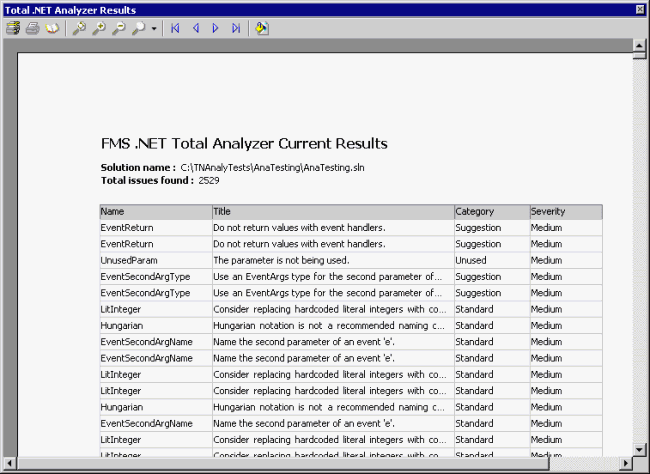
Total .NET Analyzer allows you to generate a Results Report for
viewing and printing. To generate a report for the list currently
showing in the Issues List (including any sorting, grouping, and
filtering that you have applied), press the Results Report icon on the
toolbar, and an HTML window appears showing the current list:
To print the report, press the Print button on the toolbar.
General Information
System Requirements
Total .NET Analyzer has the following minimum system requirements:
- Microsoft Visual Studio .NET
- 3 MB Free Disk Space
- Microsoft Windows 2000 Professional, Windows 2000 Server,
Windows 2000 Advanced Server, Windows XP Professional, or Windows NT
4. Total .NET Analyzer is not supported under Windows 95, 98, or ME.
- PC with a Pentium III-class processor
- At least 256 MB RAM
Product Packaging
Total .NET Analyzer is available for download upon purchase. A
product CD and manual are available upon request
Technical Support
Free technical support is available by phone, fax, email, and on
our web site.
Licensing, Pricing, and Availability
Total .NET Analyzer is licensed on a per-user basis. Each user who
runs the program must own a license. Pricing is $499 per license,
$1,499 for a 5-Pack. Additional discounts available for quantities of
25 or more.
Total .NET Analyzer can be purchased directly from FMS, corporate
resellers, and international distributors. All FMS products offer a
30-day money back guarantee.
Conclusion
Thank you for taking the time to review Total .NET Analyzer. We
invite you to put the product through its paces, and contact us if we
can provide any additional assistance in evaluating the product. If
you're serious about developing in Visual Studio .NET, you'll find
Total .NET Analyzer to be an invaluable tool to help you deliver
higher quality solutions in less time.
About FMS
Founded in 1986, FMS is a privately held software firm located in
Tysons Corner, Virginia. FMS has created a wide range of commercial
products for the Microsoft Access, SQL Server, Visual Studio and
Visual Basic communities. With tens of thousands of customers in over
100 countries, FMS customers are comprised from a variety of public
and private organizations including 90 of the Fortune 100. Committed
to innovation and quality, all FMS products are developed by an
in-house team of experts including several Microsoft MVPs, published
authors, and conference speakers. FMS is a Microsoft Gold
Certified Partner, a Microsoft Independent Software Vender (MSDN ISV),
and member of the Visual Studio .NET Integration Program (VSIP).
Microsoft Visual Studio .NET, Visual Basic, C#, and
Microsoft Windows are registered trademarks or trademarks of Microsoft
Corporation. Total .NET Analyzer is a trademark of FMS Inc. All other
trademarks are trademarks of their respective owners. Reprints and use
of extracts from this document are permitted.
|









 Newsletters
