



Finally! A Spell-Checker for Microsoft Access Developers!
How many times has this happened to you? You spend days, even weeks, working on Microsoft Access forms and reports. You check and re-check and make sure every button works, and every report is complete and understandable. The big day comes. You demo your application to users, or send reports out to your organization. Unfortunately, everyone points out and remembers your spelling errors. Ugh!
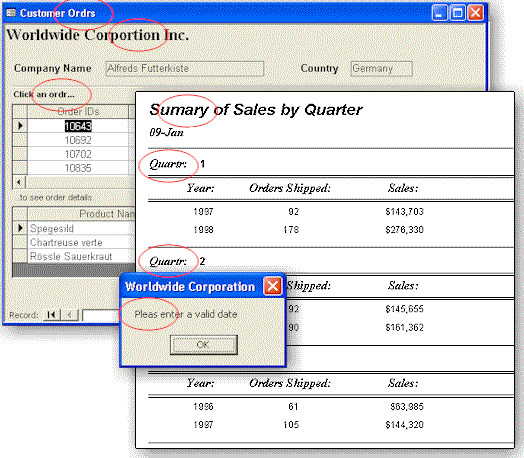
Total Access Speller to the Rescue!
Total Access Speller is an add-in for Microsoft Access that makes it easy to spell check your object properties and designs. Access includes a spell checker, but it only handles data in tables. What about typos in your forms, reports, labels, captions and validation text? No matter how much work you do to make your Access applications fast and reliable, your users (and your boss) see and remember the typos in your user interface and reports.
Total Access Speller provides an easy-to-use wizard that spell checks all properties that can contain text. Total Access Speller uses the Microsoft Office spell checker with your language and custom dictionaries. There is simply no better way to ensure the professional quality of your Access applications.
Ensure Professional Applications
Creating Access applications takes time and effort. To create professional reliable applications, you spend time creating a data design, implementing tables and queries to drive data, and forms and reports to present that data to users. But no matter how much time you spend on design, performance optimization, coding and testing, all it takes is a few typos in critical areas and your application looks less than professional. Why let people question your attention to detail and accuracy?
Without Total Access Speller, you are on your own in performing this critical quality check on your applications. Manually performing spell checking takes forever and is error prone. Total Access Speller solves this problem by providing an automated spell checking solution for your Access objects.
Easy to Use
Total Access Speller is designed exclusively for Microsoft Access. Simply open your database and select Total Access Speller from the Add-ins menu.
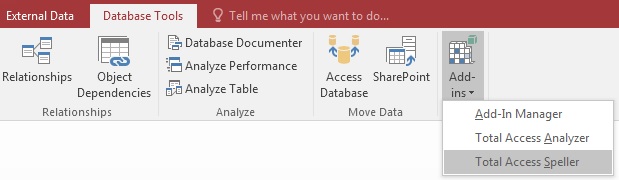
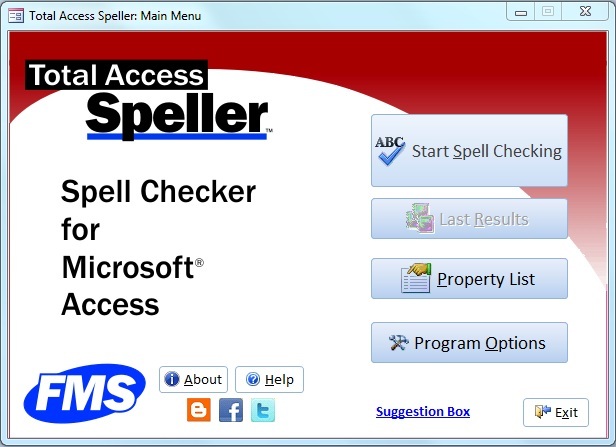
The main menu appears:
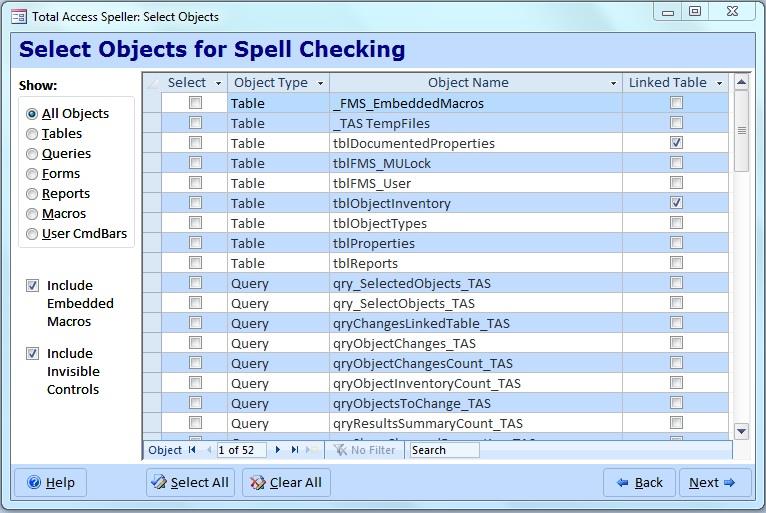
A spell check wizard guides you through the process of selecting the objects you want to examine:
The properties of your selected objects are presented for you to spell check:
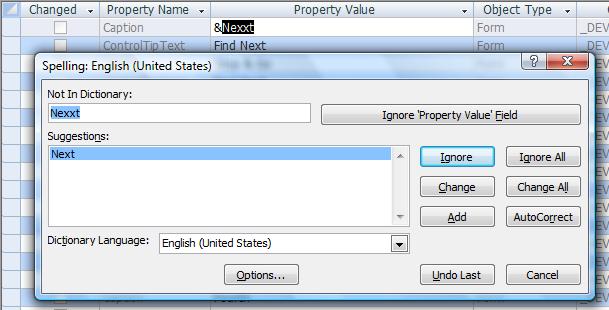
Once you're done changing your text, apply your changes and a summary of the results are presented.
What's Spell Checked?
Object Types
Total Access Speller performs spell checking on properties for the following object types:
- Tables and Table Fields
- Queries and Query Columns
- Forms, Controls, and Embedded Macros
- Reports, Controls, and Embedded Macros
- Macros
- User Defined Command Bars
Property List
A property list covers all properties that contain text for your application's user interface. You can enable or disable properties or add your own. With Total Access Speller, you are in complete control of the spell checking.
Special Handling for HotKeys in Captions
Labels associated with form controls often have "&" to designate shortcut hotkeys. That can be in the middle of a word which would normally confuse a spell checker. Total Access Speller takes this into account to let you spell check the "true" word, then preserves your hotkey letter.
Automatically Updates Your Changes
For all the object properties, your requested changes are applied. The only exception is macros which due to MS Access security limitations, do not allow automatic updates. A report listing these changes is generated so you can make the changes manually.
 100% Guaranteed
Total Access Speller is 100% guaranteed to pay for itself the first time you use it. Quickly find spelling errors in your applications and fix them. Think of the embarrassment, loss of trust, and hassles you'll avoid.
Permanently eliminate typos and distribute your applications with confidence! If you are not completely satisfied with Total Access Speller, return it for a complete refund within 30 days.
Part of the Total Solution
Total Access Speller is a member of the award-winning family of Access add-ins that make your life easier. Like our Total Access Analyzer and Total Visual CodeTools products, Total Access Speller helps you deliver better Access applications in less time.
Pricing and Access Versions
Because of the differences in object properties and behaviors between Access versions, Total Access Speller is Access version specific. Total Access Speller works with all Access database formats supported by your Access version.
For instance, for Access 2010, Total Access Speller works as an add-in for database formats in ACCDB (Access 2007-2016), MDB (Access 2000-2016 formats), and Access Data Projects (ADP) provided you can open them in Access 2010.
|
Total Access Speller Pricing by Microsoft Access Version |
||||||
| Microsoft Access Version | ||||||
| Licenses | Price | 2016 | 2013 | 2010 | 2007 | 2003 |
| Single | $199 | Buy Now | Buy Now | Buy Now | Buy Now | Buy Now |
| 5-Seat | $599 | Buy Now | Buy Now | Buy Now | Buy Now | Buy Now |
|
Upgrade Between Access Versions |
||||||
| Single | $149 | Buy Now | Buy Now | Buy Now | Buy Now | Buy Now |
| 5-Seat | $449 | Buy Now | Buy Now | Buy Now | Buy Now | Buy Now |
|
Upgrade to Latest within the Same Version |
||||||
| Update 12.7 | Update 11.5 | |||||
| Single | $99 | Buy Now | Buy Now | |||
| 5-Seat | $299 | Buy Now | Buy Now | |||
|
Premium Support Subscription |
||||||
| Single | $299 | |||||
| 5 Seat | $999 | |||||
|
Also available as part of |
||||||
|
Total Access Ultimate Suite Total Access Developer Suite |
||||||
|
Runtime/Redistributable Version |
||||||
| Not Applicable | ||||||
|
Licensing Information |
||||||
| Total Access Speller is licensed on a per user basis.
Each user who runs the program must have a license. Read the License Agreement for details. |
||||||
Microsoft Access 365/2016 is shipping!

Also Available for
Microsoft Access 2010, 2007, 2003, 2002, 2000, and 97

Reviews
"Total Access Speller is a solid product. If you need spell checking in your applications, you should get Total Access Speller."
Paul Litwin, Editor, Smart Access Product Review
Speller Info


Additional Info




