



The Most Powerful Data Analysis Program for Microsoft Access
Microsoft Access queries offer basic data analysis. For more advanced computations and real number crunching, programming is required, sometimes lots of it, or you need to export your data to another program.
Fortunately, the Microsoft Access community has relied on Total Access Statistics for almost two decades for advanced number crunching within Access. Designed specifically for Microsoft Access, Total Access Statistics runs as an add-in for Access and offers a wide range of statistical functions to analyze your data. Your data can be in Access tables, linked from other sources such as SQL Server, or from a query. Analyze multiple fields and an unlimited number of records at one time. You can even analyze data from multi-table select queries or crosstabs.
Best of all, the results are provided in tables which you can further analyze or add to your queries, forms, and reports. You'll be amazed at the powerful statistical analysis you can generate within Microsoft Access without being a mathematician or statistician!
Designed Exclusively for Microsoft Access
Total Access Statistics is designed specifically for Microsoft Access and behaves the way you expect. Tightly integrated into MS Access, it runs as an add-in directly from your database (ACCDB, MDB, or ADP formats):
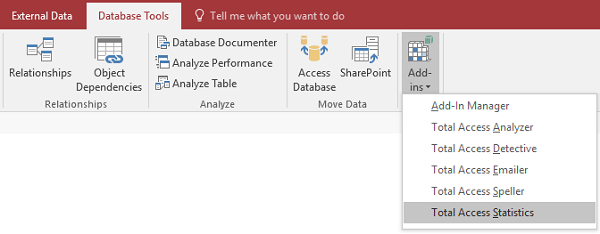
The main Total Access Statistics form appears ready to analyze the data in your database:
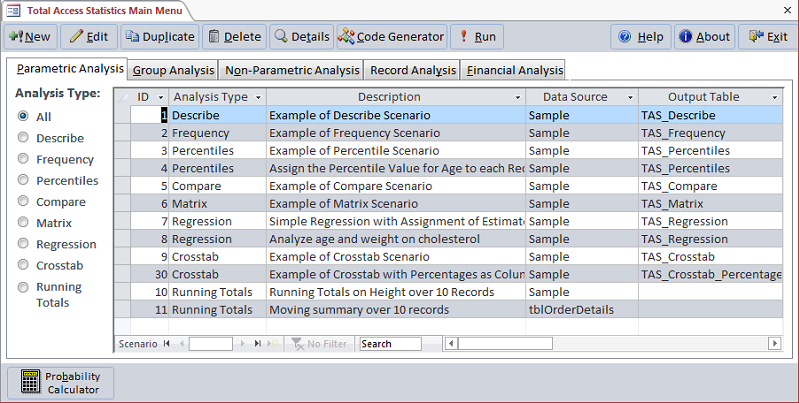
Total Access Statistics Main Screen
 SHIPPING FOR MICROSOFT ACCESS 2016
New Features:
- Supports 32 and 64 bit versions of Access 2016
- Runtime libraries support Access 2016 thru 2003
- Assign percentile values to records
- Column width adjustment for output tables
- Percent format for certain percentage fields
- New financial calculations for cash flow analysis including PV, NPV, FV, IRR, MIRR, XIRR, XMIRR, etc.
- Improved user interface and performance
- Updated help file
- details...
No Programming Required; All Results in Access Tables
The interactive Statistics Wizard guides you through the process with no programming required! All results are generated in the most flexible format: Access tables:

Example of the Output Table for Field Descriptives, Grouped by State and Results for Three Data Fields (Displaying a Subset of Output Fields)
Easily display the results in your forms and reports. Your analysis settings are automatically saved, so you can modify them later or run them again when your data changes.
Wide Range of Statistical Functions
Generate results similar to queries by specifying the fields to analyze and any grouping (GROUP BY) fields. Calculations are created for every combination of unique grouping field values. You can also specify a weighting field, and a value or range of values to ignore. Perform a wide variety of powerful calculations to gain insight from your data:
Field Descriptives
- Count and Missing (null values)
- Minimum, Maximum, Range, Sum, Sum of Squares, Mean
- Variance, Coefficient of Variance, Standard Deviation, Standard Error
- Geometric Mean, Harmonic Mean, Root Mean Square
- Skewness, Kurtosis
- Mode, Mode Count
- t-Test versus Mean (test for null hypothesis)
- Confidence Intervals (t and Normal tests). 95% and user-specified levels
Financial Cash Flow Calculations
 Use discounted cash flows and interest rates to generate for periodic and irregular (date dependent) payments and receipts:
- Net Present Value (NPV)
- Present Value (PV)
- Future Value (FV)
- Internal Rate of Return (IRR)
- Modified Internal Rate of Return (MIRR)
Eliminate the need to use Microsoft Excel for these calculations.
Percentiles
- Median
- Quartiles
- Quintiles
- Octiles
- Deciles
- 5th percentile
- Percentile
- 0.5 Percentile.
Results generated in a separate table or by updating a field in your table
Field Comparison
- Mean difference, Standard Deviation of difference
- Covariance, Correlation, R-Square
- Paired t-Test, Probability (1 or 2 tails)
Frequency Distributions
- Count and/or Percent of Occurrences
- Count or Cumulative
- Number of intervals
- Interval width and Initial Value
Ranking Records
- Calculate Rank Values in a New Table
- Update Rank Values in a Field in the Data Table
- Assign ties to the Average, Consecutive or Cumulative Rank
Record Analysis
- Random Record Selection
- Data Normalization (transposing records)
Regressions
Calculate fitness to a line or curve. Generate the equation coefficients and residual for each data point.
- Simple, Multiple, and Polynomial Regressions
- With or without Y-Intercept
- Calculation of coefficients, R-Square, Standard Error, and ANOVA
- Residual table
Running Totals and Moving Averages
Calculated cumulative or moving totals for:
- Average
- Sum
- Count
- Median
- Minimum
- Maximum
- Range, etc.
Advanced Cross-Tabulations
- Crosstabs with more value calculation options
- Chi-Square with Expected Values
- Percent of row, column, and total displayed as records or columns
- Analyzes multiple value fields in one pass
Probability Calculator
Generate probability of test values:
- Z-value
- t-Value based on degrees of freedom
- Chi-Square
- F-Value with two degrees of freedom
Calculate inverse probability
Group Analysis
- Two Sample t-Test
- One Way Analysis of Variance (ANOVA)
- Two Way ANOVA
Non-Parametric Analysis
- One Sample Chi-Square
- One Sample Sign Test for Median, Mean, and Custom Value
- Kolmogorov-Smirnov Goodness of Fit Test (Uniform, Normal, Poisson)
- Paired Sign Test, Spearman's Rank Correlation
- Wilcoxon Signed Rank Test for Matched Pairs
- Wald-Wolfowitz Runs Test
- Mann-Whitney U Two Sample (non-matched) Test
- Kruskal-Wallis One Way Analysis of Variance
- Friedman's Two Way Analysis of Variance
Additional Details of Statistical Analysis Calculations
Total Access Statistics is simply the best data analysis program for Microsoft Access.
VBA Programmers will appreciate the ability to by-pass the interactive interface to generate the results within an Access application.
Amaze your users by performing advanced statistical analysis with a simple procedure call. Your users won't even know Total Access Statistics is running in the background.
A royalty-free runtime license is included to let you include Total Access Statistics calculations within your applications for distribution to non-Total Access Statistics owners.
Simply distribute our small library (under 2.5 MB) with your database and you'll be generating advanced statistical analysis.
Free Trial Version Available
Download the free trial version to run Total Access Statistics against your own data to see how easy it is to generate complex calculations in Access.
Pricing and Versions
Total Access Statistics runs as an Access add-in which is dependent on your version of Access. Each version can support all the database types supported by that Access version. For instance, Total Access Statistics 2010 can run on all ACCDB and ADP databases, and MDB database formats since Access 2000. Total Access Statistics 2016 is similar, except it doesn't support ADPs which are not supported since Access 2013.
Upgrade Versions
For existing customers, new versions of Total Access Statistics are now available. Click below for a list of enhancements:
- Enhancements for Microsoft Access 2016 and 2013
- Enhancements for Microsoft Access 2010
- Enhancements for Microsoft Access 2007 and 2003
|
Total Access Statistics Pricing by Microsoft Access Version |
||||||
| Microsoft Access Version | ||||||
| Licenses | Price | 365/2016 | 2013 | 2010 | 2007 | 2003 |
| Single | $599 | Buy Now | Buy Now | Buy Now | Buy Now | Buy Now |
| 5-Seat | $1799 | Buy Now | Buy Now | Buy Now | Buy Now | Buy Now |
|
Upgrade Between Access Versions |
||||||
| Single | $399 | Buy Now | Buy Now | Buy Now | Buy Now | Buy Now |
| 5-Seat | $1199 | Buy Now | Buy Now | Buy Now | Buy Now | Buy Now |
|
Update to the Latest Version within the Same Version |
||||||
| Update 14.1 | 12.9 | 11.9 | ||||
| Single | $249 | Buy Now | Buy Now | Buy Now | ||
| 5-Seat | $749 | Buy Now | Buy Now | Buy Now | ||
|
Premium Support Subscription |
||||||
| Single | $299 | |||||
| 5 Seat | $999 | |||||
|
Also available as part of |
||||||
|
Total Access Ultimate Suite |
||||||
|
Runtime/Redistributable Version |
||||||
| Total Access Statistics includes a runtime library with royalty-free redistribution rights. Use is subject to the terms of the License Agreement. |
||||||
|
Licensing Information |
||||||
| Total Access Statistics is licensed on a per user basis.
Each user who runs the program must have a license. Read the License Agreement for details. |
||||||
Microsoft Access 365/2016 shipping!

Version 14.1 for
Microsoft Access 2010
Version X.9 for
Microsoft Access 2007 and 2003
Version X.8 for
Microsoft Access 2002, 2000, and 97

Reviews
"Total Access Statistics performs a wide range of data analysis right inside Access. The product includes a Statistics Wizard to perform parametric, group, non-parametric, record analysis and more. The results are placed in Access tables that you can integrate into your forms and reports."
Alison Balter, Author

Statistics Info
 FAQs
FAQs
Additional Info




