Often times, I'm asked by clients to document their entire server.
This usually includes jobs, database objects and DTS packages. This
used to take a huge amount of time, even with a few make-shift
scripts I had created to perform this action. Not to mention what an
utterly boring task it is for a DBA to document the properties of
each column, table, and database. FMS's new Total SQL Analyzer to
the rescue, freeing up time for people who are tired of creating
mountains of documentation. FMS's Total SQL Analyzer allows you, as
a DBA or analyst, to get back to what you really love to do.
In this review, I took a look at Total SQL Analyzer 1.00.0116. The
installation was quick, easy, and behaved flawlessly while I tried to
"break it". One item I was impressed about is that the product had a
Product Update option, which will detect if there's a later release of
the product. This feature was not completely seamless however. After
detecting there was a newer version of the product, it did not download
it automatically. Instead, it opened a browser and the download page of
FMS.
The purpose of FMS Total SQL Analyzer (TSA) is to provide you with
detailed documentation about every detail on your system. From a product
that specializes in documentation, you would expect to see good online
help included. I found that not only was the online help strong, but
also a hardcopy manual was included. This is an extreme rarity for
technical products.
The documentation is done completely through a wizard. Actually, if
you didn't know any better, you would think you were still in Enterprise
Manager. Within a few screens, the documentation engine cranks up,
documenting every facet of your SQL Server. This takes a substantial
amount of time. As a matter of fact, I have a Pentium III 800 and was
able to go away to lunch and come back before my databases (3 not
including the system databases) on my server were documented. The speed
of TSA is my main complaint. Even when I scaled back the depth of my
documentation, it still took 30-45 minutes to run. This can be quite
intense on your database server as well as it's probed. TSA has an
option to reduce the impact on your servers though. By selecting the
Minimize Server Load option in the documentation wizard, the
documentation engine will pause occasionally so your database server is
not overwhelmed. By checking this option, your overall scan will take
longer, but it's recommended against production servers.
Once the documentation process is complete, you're ready to begin
exploring your server's properties. You can do this in the GUI by
drilling down to the specific object in question or by generating a
report. One nice item about this product is it does keep in-depth
historical documentation, so if an object changes, you can track down
when it occurred and by who. The GUI also gives you performance tips and
issues it has stored in its system about your database. A typical
recommendation would be to not use NULLABLE fields or to use a
non-variable character field. The GUI was very easy to learn because it
looked like the familiar Enterprise Manager for SQL Server 2000. I
liked that as you drilled into each object, it showed you the DDL
statement to create the object, but a negative is that you can't export
this into notepad or similar tool.
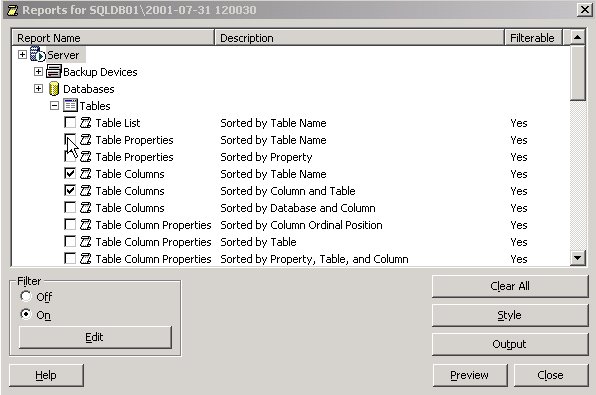
As one would expect, the reports are the best feature of the
application. They're a very flexible way of exporting the results of the
documentation into a highly-presentable format that I can easily hand to
a client and make my own. You can edit the style of the report to strip
out any FMS information. You can export it into HTML style format or
Word. Keep in mind that as you would hope, these reports can be quite
large. Just exporting a small database ran over a 100 pages in
documentation. This is the beauty of the product. Imagine how boring
this task would be if I were to manually do this. TSA gives you tons of
types of reports and you can generate a report for any type of SQL
Server object.
Total SQL Server Analyzer is an invaluable tool that can save you
time in preparing documentation, whether for Business Analyst,
customers, or for disaster recovery preparedness. The documenting engine
outputs data that is gold to me because I don't have to spend the days
it would take to generate it. It lets me spend those days performing
better uses for my time.
Summary of Pros and Cons
|
Pros |
Cons |
-
Ease of use
-
Saves tons of time in
documenting your SQL Server
-
Historical view of your data change. Let's
you see when your objects have changed
-
Documenting engine can be scheduled to run
during slow times
|
-
Slow documenting engine
-
Can be intense on a production
server while documenting is occurring
-
Can't automatically compare
two reports to look for differences
|
Back to Main Reviews Page









 Newsletters
