


|

|
Total Access Memo Quick Tour

|
Page 2 of 5 |

|
Easily Add Total Access Memo to your Forms and Reports
Putting Total Access Memo to work in your Access database couldn't be easier.
Step 1: Open your form in design view and select the Insert, ActiveX Control icon from the Design,
Controls menu: 
Step 2: Select the FMS Total Access Memo control from this list and press OK:
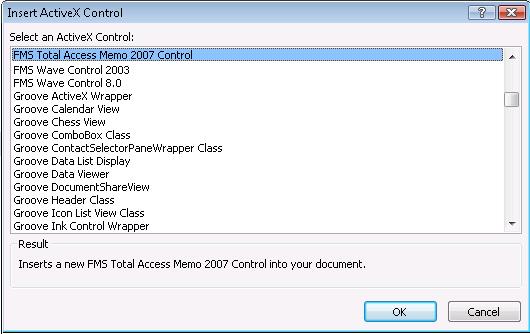
Step 3: Specify the memo field in your table to store your rich text.
That's it: you're done!
2025 Version is Shipping!

Supports 64 and 32-bit versions of Microsoft Access 2010, 2013, 2016, 2019, 2021, 2024/365,
and 32-bit versions of Access 2007, 2003, 2002, and 2000!

Reviews

Best ActiveX Control
"Total Access Memo makes all the difference in my Access apps! Only Memo gives me fonts, colors, images and all the formatting tools I need. It's great!"
B. Simmons, Ciena, Linthicum, MD
Memo Info


Additional Info