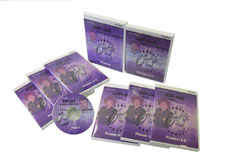
 Microsoft ASP.NET Training Microsoft ASP.NET Training
This ASP.NET tutorial is designed
for .NET developers of all experience levels, and provides
extensive hands-on ASP programming lessons, tips, and techniques
by .NET experts Alison Balter and Paul Sheriff. Alison and Paul
provide the very best in ASP training courseware, and you'll
come up to speed on active server pages scripting quickly with
their expert guidance. With over 30 hours of
content-rich instruction, you'll learn everything
from basics through advanced topics, as well as
architecting and deploying.Over 30 hours of
running time, covering 230 topics including...
- NET framework
- Crystal Reports
- XML
- Deploying
This course is a
complete set of all the ASP.NET courses: ASP.NET
Basics, ASP.NET Advanced, and
Architecting & Deploying ASP.NET
- 6 CDs-Basics
- 6
CDs-Advanced
- 3
CDs-Architecting & Deploying
- Exclusive
Printed Courseware
- Reference Text
- 5-user License
Video Advantage
Compared with conferences or training seminars, videos let you control
the time, place, and pace of your training. No need to dedicate days away from the office to get the training you need.
You set your own pace
of learning, and if you don't get it the first time, simply rewind and play it again!
With additional courseware available separately, you can easily re-use
the videos to train your entire development team or every new hire!
- Instructor: Alison Balter & Paul Sheriff
- Courseware: Paul Sheriff
- Running Time: Approximately 30 hours
- Includes: 15 CDs and 2 printed courseware manuals.
ASP.NET Basics Phase I
Getting Started with the Sample Application
- Introducing the Sample Application
- The Sample Application
Introduction to Visual Studio .NET
- Using Visual Studio .NET
- Configuring Visual Studio .NET
- Project Template
- Visual Studio Integrated Development Environment (IDE)
- Using Help
- Types of Windows
- Using the Editor
|
Introduction to Microsoft .NET
- What is Microsoft .NET
- .NET and XML
- Overview of .NET Framework
- The Common Language Runtime
- The .NET Classes
- Common Language Specification
- Intermediate Language
- Services in .NET
- Common Type System
- Types of Application You Can Build
- Data Services
- Security Services
- Migrating to .NET
- Benefits of Using the .NET Framework
|
ASP.NET Basics Phase II
Overview of .NET Framework Classes
- The .NET Framework
- Namespaces
- The System Namespace
- Namespaces Dealing with Data
- The System.IO Namespace
- The System.TEXT Namespace
- The System.Collections Namespace
- The System.Web.Services Namespace
- The System.XML Namespace
Intro to ASP.NET
- Overview of ASP.NET
- HTML Controls
- Web From Server Controls
- How Web Forms Work
- IIS Objects
- Creating User Controls
|
Intro to Internet Programming
- What is the Internet
- HTML Basics
- Websites Created Using HTML
- Websites Created Using ASP
- Before You Begin Coding
- Websites Created Using ASP.NET\
|
ASP.NET Basics Phase III
Working with VB.NET
- Learning the Basics
- Event Handling Basics
- Visual Basic .NET Data Types
- Option Strict
- Conversion Functions
- Constructing Text Using String.Format
- Creating Your Own Procedures
- Creating Classes
|
Validation Controls
- Introducing Validation Controls
- Using the RequuredFieldValidator Control
- Using the RangeValidator Control
- Using the RegularExpressionValidator Control
- Using the CustomValidator Control
- Using the ValidationSummary Control
- Using the CompareValidatorControl
|
ASP.NET Basics Phase IV
Debugging in Visual Studio .NET
- Using the Debugger
- Invoking the Debugger
- Tools for Debugging
- Using Breakpoints
- Useful Debugging Tools
- Other Useful Debugging Windows
- Using the Debug Class
- Conditional Compilation
- The Stop Statement
Data Binding on Web Forms
- Overview of Binding on Web Forms
- Displaying Data in a DataGrid Control
- Creating and Configuring a Dataset
- Filling a DropDownList Control with Data
|
Introduction to ADO.NET
- Getting Started with ADO.NET
- Benefits of ADO.NET
|
ASP.NET Basics Phase V
Error Handling
- Getting Started with Structured Exception Handling
- Using Error Handling
- Working with Specific Exceptions
- Throwing Exceptions
- Passing Error Information
- Creating and Error Page
Working with Data
- Introducing the DataReader
- Using a Data Reader to Fill a DropDownList Control
- Retrieving DataSets Generically
- Working with Relations in a Database
|
ADO.NET Connection and Command Objects
- Introducing ADO.NET Connections
- Providing ADO.NET Connection Information
- Using ADO.NET Connection Objects
- Updating Data Using a Command Object
|
ASP.NET Basics Phase VI
Using Stored Procedures with ADO.NET
- Executing Stored Procedures
- Investigating the Stored Procedures
- OleDb and Stored Procedures
- SqlClient and Stored Procedures
Editing Data Using the DataGrid Control
- Editing Data
- Adding a Hyperlink Column
- Editing Data on the Detail Page
- Adding Editing Support
- Adding a Template Column
- Adding a New Row
- Deleting Rows
|
Using the DataGrid Control
- Using the DataGrid
- Loading the Data Grid with Data
- Formatting Numeric Columns
- Enabling Paging
- Selecting a Row
- Sorting Columns
|
ASP.NET Advanced Phase I
Using the Repeater Control
- Introduction to List-Bound Controls
- How Does the Repeater Control Work?
- Creating the Repeater Example
- More Advanced Repeater Features
|
Using the DataList Control
- Introducing the DataList Control
- Add the Control's Data Source
- Adding the Full Item Template
- Using the DataList Control's Properties
- Adding the EditItem Template Section
- Add Event-Handling Code
|
ASP.NET Advanced Phase II
Using Crystal Reports
- Crystal Reports Overview
- Creating a Report
- Viewing the Report
- Selecting Specific Rows
Other ASP.NET Controls
- More Server Controls
- The CheckBoxList and RadioButtonList Controls
- The Calendar Control
- The AdRotator Control
- The Literal Control
- The Placeholder Control
|
Creating User Controls
- Why Create User-Defined Controls
- Creating a Header Control
- Creating a Navigation Control
- Creating More Complex User Controls
- Defining and Raising Events
|
ASP.NET Advanced Phase III
State Management in ASP.NET
- Investigating State Management
- Using the Session Object
- Using Cookies
- Isomg the VoewState Property
- Cokkieless Sessions
- ASP.NET State Service
- SQL Server State Management
- What's Changed from ASP
|
Introduction to Web Security
- Overview of Web-Based Security
- Forms-Based Authentication
- Supporting Authorization
|
ASP.NET Advanced Phase IV
Creating Mobile Web Applications
- Reviewing the Status Quo
- Introducing the Microsoft Mbile Internet Toolkit (MMIT)
- How Does MMIT Work?
- Creating the Sample Applications
- Working with the ObjectList Control
- Adding Validation Controls
|
Development and Deployment Techniques
- Development Techniques
- Deploying ASP.NET Applications
|
ASP.NET Advanced Phase V
Introduction to XML
- Why XML?
- Getting Started with XML
- XML Document Structure
- XML Schema
Creating and Consuming XML Web Services
- Creating a Simple XML Web Services
- Consuming a Web Service
- Creating a Useful Web Service
|
Introduction to XML Web Services
- Programming Across the Web
- Doing XML Web Services the
Hard Way
- Doing XML Web Services the
Easy Way
- Examples of Web Services
|
ASP.NET Advanced Phase VI
Consuming Web Services Asynchronously
- Reviewing Web Services
- Consuming a Web Service Synchronously
- Consuming a Web Service Asynchronously
|
Securing Web Services
- Securing Web Services
- Windows Integrated Authentication
- Windows Basic Authentication
- Custom SOAP Authentication
- Client Certificates
- IP Address Restriction
|
Architecting & Deploying
Phase I
Overview
- Overview of an ASP.NET Design Pattern
- Goals of a Framework
Application Configuration Class
- Using Web.Config
- Application Object Versus Configuration Class
- Creating a Configuration Class
|
Environment Setup
- Computer Setup
- Developer Standards
- Visual Studio .NET Options
- Project Layout
- The Sample Site
Web Page Layout
- Page Design
- Frameless Web Pages
- Using User Controls
|
Architecting Deploying
Phase II
Creating a Base Page Class
- User Tracking
- Centralized Error Handling
Other Data Grid Settings
- How To Setup Page Caching
- How TO Setup Sorting
|
Data Driven Menu System
|
Architecting & Deploying
Phase III
Deployment Overview
- Overview of .NET Deployment
- Environments to Deploy To
- What Makes Deployment so Hard?
- How to Distribute the Files
- A Deployment Checklist
.NET Framework Installation
- Installing the .NET Framework
- The Redistributable .NET Framework
- Tips & Tricks
Windows Forms Deployment
- Overview of Windows Forms Deployment
|
Windows Installer 2.0
- Overview of the Windows Installer
- VS.NET Setup & Deployment Projects Overview
- Packaging Options
- Merge Modules
Web Deployment
- Overview of Web Deployment
- XCopy Deployment
- Copy Project Menu in VS.NET
- Setup & Deployment Project Example
- Customizing the Setup Project
- Custom Actions in the Setup Project
|
*Identical
Course Outline Used in .NET
PROGRAMMER'S BUNDLE and DELUXE .NET PROGRAMMER'S BUNDLE
|






 Newsletters
