



 Total Access Analyzer 97 - Available Reports
Total Access Analyzer offers a large number of presentation quality reports describing your database. The list below describes the 225+ reports in Total Access Analyzer 8.0 for Microsoft Access 97. Don't worry, the list is not overwhelming. Often, the same data is shown with different sort orders to reveal hidden information (for instance, for field lists you can sort by table name to see the fields in each table, and sort by field name to see which tables each field is in). Total Access Analyzer also has a filter feature that lets you specify which objects you want in your reports.
Every Total Access Analyzer report is customizable. You can specify header information (to include your name, organization name and/or project name) and many formatting settings. Since the data is in Microsoft Access tables, you can also create your own reports from the documentation results.
 Cross-Reference Analysis
- How objects reference each other
Cross-Reference Analysis
- How objects reference each other
Diagrams
- Hierarchical reports showing multi-level relationships
Errors, Suggestions, and Performance Tips
- potential problems in the database
Basic Documentation
- Detailed information on each object
- Database Documentation
- Object Inventory
- Table Documentation
- Query Documentation
- Form Documentation
- Report Documentation
- Macro Documentation
- Module Documentation
- Bracketed and Formatted Module Printout
- Security Documentation
- Command Bar Documentation
Other Reports
Cross-Reference Analysis
Analysis of all the objects in your database and how they reference each other.
Field Cross-Reference
- Field References, Sorted by Table Name
- Field References, Sorted by Field Name
- Field References by All Objects
- *Field References by Queries
- *Field References by Forms
- *Field References by Reports
Object Cross-Reference
- Table References, Sorted by Table Name
- Table References, Sorted by Calling Object
- *Hyperlinks
- Query References, Sorted by Query Name
- Query References, Sorted by Calling Object
- Form References, Sorted by Form Name
- Form References, Sorted by Calling Object
- Report References, Sorted by Report Name
- Report References, Sorted by Calling Object
- Macro References, Sorted by Macro Name
- Macro References, Sorted by Calling Object Name
- *CommandBar References, Sorted by CommandBar Name
- *CommandBar References, Sorted by Calling Object
Module Cross-Reference
- Module Analysis Summary, Sorted by Module Name
- Module Analysis Summary, Sorted by Module Type
- Procedure List, Sorted by Module and Procedure
- Procedure List, Sorted by Procedure Name
- *Procedure List with Comments, Sorted by Module and Procedure
- *Procedure List with Comments, Sorted by Procedure Name
- *Procedures Called - Where Procs are Called From - All Procedures
- Procedures Called - Where Procs are Called From - All Procedures
- *Procedures Called, Non-Event Procedures only
- Procedures Called, Sorted by Child Procedure
- Procedure Calls - What each procedure calls
- Variable List, Sorted by Module and Procedure
- Variable List, Sorted by Variable Name
- Variable References, Sorted by Module and Procedure
- Variable References, Sorted by Variable Name
- *Variable Constants, Sorted by Module and Procedure
- *Variable Constants, Sorted by Constant
- Built-In Function Calls, Sorted by Function
- Built-In Function Calls, Sorted by Parent
- DoCmd Calls, Sorted by Module and Procedure
- DoCmd Calls, Sorted by Action
- Labels, Sorted by Module and Procedure
- Labels, Sorted by Label Name
- Library Declarations, Sorted by Module Name
- Library Declarations, Sorted by Library Procedure Name
- User Defined Type Declarations, Sorted by Module
- User Defined Type Declarations, Sorted by Type Name
- *Variables of User Defined Type, Sorted by Module
- *Variables of User Defined Type, Sorted by Type Name
- *Variables of Class Module, Sorted by Module
- *Variables of Class Module, Sorted by Class Module
- DefType Statements
Diagrams
Hierarchical diagrams visually revealing how objects reference each other through several levels.
- Application Flow Diagram showing procedure and event flow for the entire database
- Data Diagram showing how data flows from tables into queries, forms, reports, etc.
- Object Diagram showing what objects are referenced by a form, report, or query.
Application Diagram
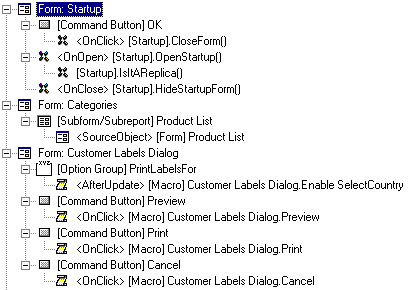 |
The Application Diagram shows the hierarchical flow of your entire application. It starts with the Startup form or Autoexec macro, then shows what procedures and objects it calls, along with the same for the called objects. Every form, report, or procedure that is not called by another object starts its own tree. This provides a visual overview of all your procedure calls, macro calls, and form and report events, and is the most detailed of the three diagrams. |
Data Flow Diagram
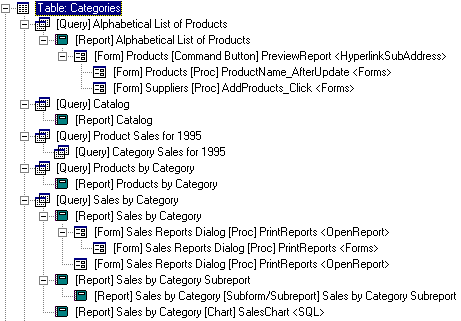 |
The Data Diagram shows how your database's tables are used across your application. rence each table. The Data Diagram shows that plus the objects that use the objects referencing each table. This illustrates the entire family of objects related to each table. |
Object Diagram
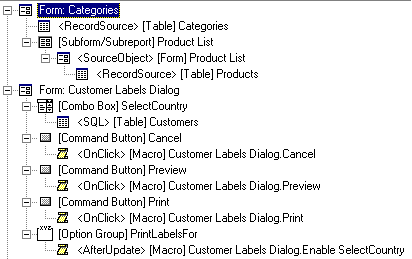 |
The Object Diagram shows all the objects a form, report, or query is dependent on. You can quickly see a form, its subforms, and the queries, tables, and macros they use. The Object Diagram is almost like the Data Diagram in reverse. Rather than seeing how data flows from a table, the Object Diagram reveals what flows into an object. Unlike the Application Diagram, the Object Diagram includes form and report use of tables and queries, and excludes procedure calls. This significantly simplifies the diagram. |
Errors, Suggestions, and Performance Tips
Over 100 types of errors, suggestions, and performance tips are detected in your database.
Errors
Errors are considered items that will cause your application to crash.
- By Error Type, All
- * By Error Type, Table
- * By Error Type, Query
- * By Error Type, Form
- * By Error Type, Report
- * By Error Type, Macro
- * By Error Type, Module
- * By Error Type, Command Bars
- * By Error Type, Security
- * By Object Name, All Errors
- * By Object Name, Table Errors
- * By Object Name, Query Errors
- * By Object Name, Form Errors
- * By Object Name, Report Errors
- * By Object Name, Macro Errors
- * By Object Name, Module Errors
- * By Object Name, Command Bars Errors
- * By Object Name, Security Errors
- *Object Reference Errors
Suggestions
Suggestions are ideas to help you improve your database's stability, robustness, or ease of maintenance. Examples include lists of unused objects or code, procedures without error handling, etc. There are reports for all suggestions, and reports for a few specific suggestions:
- * By Suggestions Type, All
- * By Suggestions Type, Table
- * By Suggestions Type, Query
- * By Suggestions Type, Form
- * By Suggestions Type, Report
- * By Suggestions Type, Macro
- * By Suggestions Type, Module
- * By Object Name, All Suggestions
- * By Object Name, Table Suggestions
- * By Object Name, Query Suggestions
- * By Object Name, Form Suggestions
- * By Object Name, Report Suggestions
- * By Object Name, Macro Suggestions
- * By Object Name, Module Suggestions
- Module Procedures Unused
- Module Procedures that Should be Private
- Module Procedures without Error Handling
- Module Functions without Return Type
- Module Variable Unused
- * Module Variable Conflicts
- Module Variables that Should be Type Cast
- * Module Constants without Explicit Type
- * Module Unused User Defined Types
- Module Debug & Stop References
Performance Tips
Performance Tips are items to help you improve the performance of your database. Examples include complex forms or reports, queries that return a large number of fields, etc.
- * By Performance Type, All Items
- * By Performance Type, Table Items
- * By Performance Type, Query Items
- * By Performance Type, Form Items
- * By Performance Type, Report Items
- * By Performance Type, Macro Items
- * By Performance Type, Module Items
- * By Object Name, All Items
- * By Object Name, Table Items
- * By Object Name, Query Items
- * By Object Name, Form Items
- * By Object Name, Report Items
- * By Object Name, Macro Items
- * By Object Name, Module Items
Basic Documentation
This is the simplest output providing detailed information on each object.
Database Documentation
- Database Properties
- * User Defined Properties
- Access Options
- * All Errors, Suggestions, and Performance Tips
- * Database VBA References
- * Database Containers
- * Database Containers and Documents
- * Database Containers and Document Properties
Object Inventory
- Sorted by Object Name
- Sorted by Object Type
- Sorted by Creation Date
- Sorted by Date Last Updated
Table Documentation
- Table List, Sorted by Table Name
- Table List, Sorted by Table Type
- Table Properties, Sorted by Table Name
- Table Properties, Sorted by Property Name
- * Table Index Properties, Sorted by Table Name
- * Table Index Properties, Sorted by Property and Table Name
- * Table Index Properties, Sorted by Property and Index Name
- Table Fields, Sorted by Table Name
- Table Fields, Sorted by Field Name
- * Table Fields with Different Types
- Table Field Properties, Sorted by Table Name
- Table Field Properties, Sorted by Field Name
- Table Field Properties, Sorted by Property and Table Name
- Table Field Properties, Sorted by Property and Field Name
- Table Dictionary
- Table Dictionary with Field Properties
Table Relationships
- Relationship List
- Relationships Window - Summarized
- * Relationships Window - Summarized (Size to Fit)
- * Relationships Window
- * Relationships Window (Size to Fit)
Query Documentation
- Query List, Sorted by Query Name
- Query List, Sorted by Query Type
- * Query List with SQL, Sorted by Query Name
- * Query List with SQL, Sorted by Query Type
- * Query List Action Queries, Sorted by Query Name
- * Query List Action Queries, Sorted by Query Type
- Query Properties, Sorted by Query Name
- Query Properties, Sorted by Property Name
- * Query Columns, Sorted by Query and Column Order
- * Query Columns, Sorted by Query and Column Name
- Query Tables, Sorted by Query Name
- Query Tables, Sorted by Table Name
- * Query Fields Referenced
- Query Parameters, Sorted by Query Name
- Query Parameters, Sorted by Parameter Name
- Query Joins
- Query Dictionary
Form Documentation
- Form List, Sorted by Form Name
- * Form List, Sorted by Number of Controls
- Form List with Record Source
- Form Properties, Sorted by Form Name
- Form Properties, Sorted by Property Name
- * Form Subforms, Sorted by Form Name
- * Form Subforms, Sorted by Subform Name
- * Form Section Properties, Sorted by Form Name
- * Form Section Properties, Sorted by Property and Form
- * Form Section Properties, Sorted by Property and Section
- Form Controls, Sorted by Form Name and Control Name
- Form Controls, Sorted by Form Name and Control Type
- Form Control Properties, Sorted by Form and Control Name
- Form Control Properties, Sorted by Form Name and Control Type
- * Form Control Properties, Sorted by Property and Form
- * Form Control Properties, Sorted by Property and Control
- * Form Hotkeys
- * Form ActiveX Controls, Sorted by Form Name
- * Form ActiveX Controls, Sorted by OLE Class
- Form Dictionary
- Form Dictionary with Control Properties
- Form Blueprint
Report Documentation
- Report List, Sorted by Report Name
- * Report List, Sorted by Number of Controls
- Report List, Sorted by Record Source
- Report Properties, Sorted by Report Name
- Report Properties, Sorted by Property Name
- * Report Subreports, Sorted by Report Name
- * Report Subreports, Sorted by Subreport Name
- * Report Section Properties, Sorted by Report Name
- * Report Section Properties, Sorted by Property and Report
- * Report Section Properties, Sorted by Property and Section
- Report Controls, Sorted by Report Name and Control Name
- Report Controls, Sorted by Report Name and Control Type
- Report Control Properties, Sorted by Report Name and Control Name
- Report Control Properties, Sorted by Report Name and Control Type
- * Report Control Properties, Sorted by Property and Report
- * Report Control Properties, Sorted by Property and Control
- * Report ActiveX Controls, Sorted by Report Name
- * Report ActiveX Controls, Sorted by OLE Class
- Report Dictionary
- Report Dictionary with Control Properties
- Report Blueprint
Macro Documentation
- Macro List
- * Macro List, Sorted by Number of Lines
- Macro Dictionary
Module Documentation
- Module List, Sorted by Module Type
- * Module List, Sorted by Module Name
- Standard Module Printout with Procedure Index
- Bracketed and formatted Module Printout
Workgroup and Security Documentation
- Users
- Groups
- Container Permissions for Groups
- Container Permissions for Users
- Object Permissions for Groups
- Object Permissions for Users
Command Bar Documentation
- * Command Bar List
- * Command Bar Properties, Sorted by Command Bar Name
- * Command Bar Properties, Sorted by Property Name
- * Command Bar Controls
- * Control Properties, Sorted by Command Bar Name
- * Control Properties, Sort by Property and Command Bar Name
- * Control Properties, Sort by Property and Control
Other Reports
- Total Access Analyzer Output Databases
- Total Access Analyzer Report List
- * List of All Errors, Suggestions, and Performance Tips
- * Total Access Analyzer List of Errors Detected
- * Total Access Analyzer List of Suggestions
- * Total Access Analyzer List of Performance Tips
* These reports are new in version 8.0. The other reports are also available in version 2.5 for Microsoft Access 2.0.
Microsoft Access 2019 / 365 Version is shipping!

Version 16.7 for
Microsoft Access 2016
Version 15.7 for
Microsoft Access 2013
Version 14.7 for
Microsoft Access 2010
Version 12.97 for
Microsoft Access 2007
Version 11.95 for
Microsoft Access 2003
Version 10.8 and 9.8 for
Access 2002 and 2000

Awards and Reviews



"Total Access Analyzer is an amazing product that I've relied on and recommended for years. It's a huge time saver."
Sal Ricciardi, Programming Writer, Microsoft Corporation
Analyzer Info


Why Analyzer?
Additional Info




