



Product Review - Total Access Analyzer
Microsoft Online Certified Professional Magazine, Mike Gunderloy
April 3, 2002
FMS makes quite a few useful utilities now, but this is the one that started them off in the Microsoft Access world a decade back. Total Access Analyzer is, quite simply, the standard for documenting Access databases and projects.
To use Total Access Analyzer, you open it from the Add-Ins menu, select objects (or your entire database) and tell it to get to work. It then goes off and gets as much information as it possibly can from those objects. It combines this with performance and error analysis to make suggestions about improving your database, and builds dependency diagrams to show you which objects are used where.
Particularly notable in this new addition (besides the obvious support for Access 2002 databases) is the extended list of best practices and suggestions. For example, if you've created a listbox control with its LimitToList set to No, but haven't written a NotInList event, Analyzer will flag this as a probable error (you can also decide which things to check for if you don't agree with FMS's best practices).
Property listings, lots of reports, cross-references, field dictionaries, searching in the documentation...I could fill the whole review with a simple feature listing. But suffice it to say that this remains one of the most essential add-ins on the market for the serious Access developer.
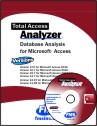
Microsoft Access 2019 / 365 Version is shipping!

Version 16.7 for
Microsoft Access 2016
Version 15.7 for
Microsoft Access 2013
Version 14.7 for
Microsoft Access 2010
Version 12.97 for
Microsoft Access 2007
Version 11.95 for
Microsoft Access 2003
Version 10.8 and 9.8 for
Access 2002 and 2000

Awards and Reviews



"Total Access Analyzer is an amazing product that I've relied on and recommended for years. It's a huge time saver."
Sal Ricciardi, Programming Writer, Microsoft Corporation
Analyzer Info


Why Analyzer?
Additional Info




