


Microsoft Access Query Cross-Reference
This report answers the critical question:
Where are my Microsoft Access queries used and referenced?
This powerful cross-reference report shows where and how each Microsoft Access query is used across your entire database.
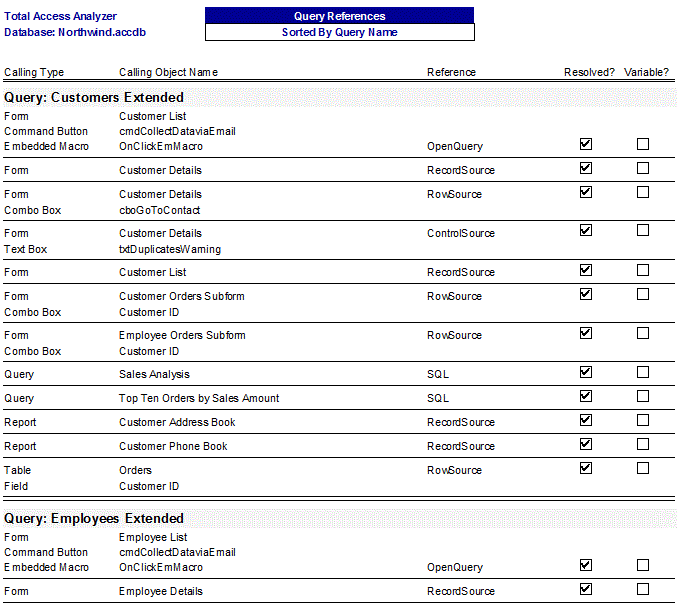
In this example, you can see several queries and where they're used. Some are only used once, while others are used in multiple places. This is critical to know before modifying a query for one reference to it. Without knowing where and how the query is used elsewhere, you can easily fix one bug and create new ones.
Within each grouping, the calling object type and name are listed along with the reference property name. Trying to generate this information manually would be extremely timely and inaccurate. Total Access Analyzer examines your entire database as a whole to generate this extensive cross-reference information.
Part of the Unused Query Analysis
Do you have queries you think aren't used, but are afraid to delete because you're not sure? By performing the extensive cross-reference analysis to determine where queries are used, Total Access Analyzer also determines queries that aren't used. A separate Suggestions report lists queries that aren't referenced which are candidates for deletion. See Finding and Deleting Unused Access Objects and Code for more details.
NOTES
- The Resolved? column is checked if the query exists (if it doesn't, an error appears in the Error reports).
- The Variable? column is checked if a variable containing a query name is referenced in code.
Microsoft Access 2019 / 365 Version is shipping!

Version 16.7 for
Microsoft Access 2016
Version 15.7 for
Microsoft Access 2013
Version 14.7 for
Microsoft Access 2010
Version 12.97 for
Microsoft Access 2007
Version 11.95 for
Microsoft Access 2003
Version 10.8 and 9.8 for
Access 2002 and 2000

Awards and Reviews



"Total Access Analyzer is an amazing product that I've relied on and recommended for years. It's a huge time saver."
Sal Ricciardi, Programming Writer, Microsoft Corporation
Analyzer Info


Why Analyzer?
Additional Info




