


Verifying Consistent Definitions of Identically Named Fields Across Microsoft Access Tables
A fundamental Best Practice of database design is to make sure identically named fields represent the same data and are defined the same way (same data type and data size).
Assuming you want to do this, it's important to verify identically named fields are defined the same way. Failure to do this may cause data loss (truncated data) as information moves from one table to another, or inconsistent search results.
For instance, a FirstName text field should always be the same length anywhere it's defined. Not 30 characters in one table and 50 in another. Similarly, a numeric CustomerID field should not be an Integer in one table, a Long Integer in another, and a Double in another.
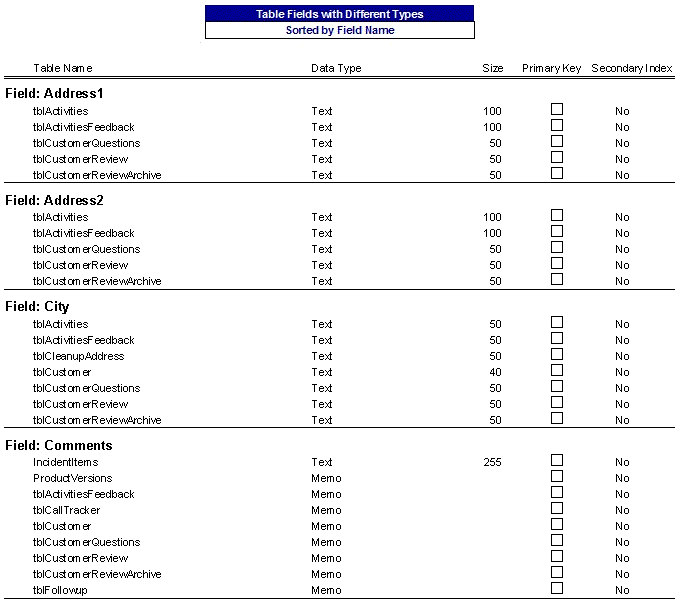
As part of its analysis, Total Access Analyzer examines all the fields in your MS Access database, compares identically named fields in multiple tables, and flags the field names that are not identically defined. If it finds any, the results are presented in the Suggestions report: Table Fields with Different Types.
The report shows for each field with an inconsistency in Data Type and Size, all the places where the field is defined. You can then determine if and where you need to make the changes.
In this example, you may want to change the Quantity field from a size 40 to 50 in the tblCustomer table, and modify the Comments field in the IncidentItems table from a Text to Memo:
Microsoft Access 2019 / 365 Version is shipping!

Version 16.7 for
Microsoft Access 2016
Version 15.7 for
Microsoft Access 2013
Version 14.7 for
Microsoft Access 2010
Version 12.97 for
Microsoft Access 2007
Version 11.95 for
Microsoft Access 2003
Version 10.8 and 9.8 for
Access 2002 and 2000

Awards and Reviews



"Total Access Analyzer is an amazing product that I've relied on and recommended for years. It's a huge time saver."
Sal Ricciardi, Programming Writer, Microsoft Corporation
Analyzer Info


Why Analyzer?
Additional Info




