


 New Features in Total Visual CodeTools 2010
Total Visual CodeTools 2010 is the seventh major version of the product since its debut as Total Access CodeTools in 1996. The latest version introduces the following new features:
- Supports Microsoft Office 2010, 2013 and 2016, 32-bit Version
- VBA Code Parsing Supports Access/Office 2010 and 2013
- Code Cleanup and Code Delivery Faster with Apply Changes Option
- Long Text/SQL Builder Supports Query Retrieval and Converts Tabs and Spaces
- Select Case Builder Supports Text Blocks and Numeric Ranges
- Code Delivery Removes Line Continuation Characters
- Copy Control Builder Supports Multiple Target Controls
- Tools Available During Debugging
- Screens are Resizeable
- Recordset Builder Defaults to Current Database and Simplifies Selections
- Three Locations for Total Visual CodeTools on Your Menus
- Default 'Send To' is Remembered
- Message Box Builder Enhanced
- Code Cleanup Error Enabler and Handler Tags are Customizable
- Redesigned Storage of Standards and Improved International Support
Total Visual CodeTools 2010 supports the 32 bit version of Microsoft Office 2010, 2013 and 2016. It also supports Office 2000 through 2007, Visual Basic 6, and Windows 7 and earlier operating systems.
It does not support the 64 bit version of Office 2010 and later due to the complete change of the VBA IDE add-in integration.
The VBA code parser that underlies the Code Cleanup, Code Delivery, and Unused Variable Analysis supports the new code and syntax in Office 2010/2013/2016 including the use of conditional compilers (e.g. #IF.. #ELSE.. #ENDIF) that is common for developers supporting both 32 and 64 bit environments.
For situations where the same variable is defined more than once based on the conditional compiler directives, the first definition is used (for Code Cleanup and Delivery).
After Total Visual CodeTools performs the analysis to cleanup or deliver your code, it prompts you to review the results before applying the changes. A new feature lets you bypass this step if no serious errors were encountered. This allows the entire process to complete without intervention. It is especially useful if you’ve successfully performed this task on your project before.
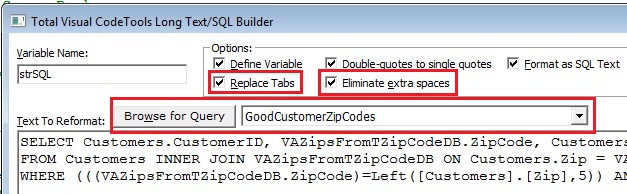
The Long Text/SQL Builder now lets you retrieve the SQL string from the query of a database you specify. No need to open the SQL pane of query to copy and paste the text yourself.
There are also new options to simplify the conversion of SQL queries and text blocks to VB6/VBA code. Tabs can be automatically replaced by spaces, and extra spaces can be eliminated:
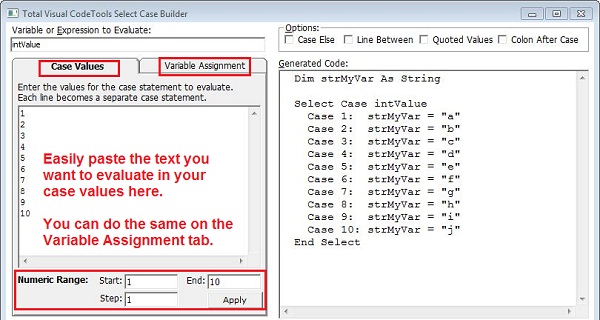
The Select Case Builder now makes it easy to specify multiple case and variable assignment values. Simply paste a block of text with the values you want and the code is generated. You can also generate a numerical range of case values by specifying the start, end, and step values:
A new option for Code Delivery removes line continuation characters from your code so each line in on one line no matter how long it is.
You can now select multiple target controls and automatically generate the code you want to copy to all of them at one time.
Certain tools such as Clear Immediate Window and help are available when you are debugging your code. Previously, all the tools were disabled.
The forms for the builders and standards screen are now resizable to maximize their display on your screens.
The Recordset Builder has several enhancements:
- If opened from Access and referring to itself, when it's opened from another Access database, it’ll default to itself
- New field selection buttons: Select All and Clear All
- Adds brackets around field names with special characters in them
- For Access databases, it understands field data types, and assigns appropriate values for text, numeric and date fields.
By default, the Total Visual CodeTools menu appears on the main menu bar. Under Standards, you can change this so it resides under the Add-Ins or Tools menu instead.
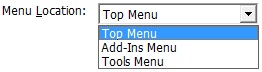
The setting for the default Send To option is no longer under Standards. Total Visual CodeTools automatically uses the last option you chose the next time you open a builder.

The Message Box Builder has a new user interface that supports Windows 7.
The system modal option is removed because a message box is always modal, and options for right justification and right-to-left reading are added.
Total Visual CodeTools offers a feature to let you specify comment tags before and after each procedure’s error enabler and error handler so you can easily replace them if you decide to change your error management code.
Previously, the comment tags for these were hardcoded, for example:
  'TVCodeTools ErrorEnablerStart
  'TVCodeTools ErrorEnablerEnd
Now, you can specify these values under Standards, Error Handling.
Rather than a text file, the standards are now stored in a MS Access database. This eliminates some of the challenges supporting international languages and double byte characters.
If you install Total Visual CodeTools 2010 on a machine which had Total Visual CodeTools 2007, the previous settings are automatically imported. Otherwise, use the [Import Legacy CTS File] button from the Standards options under Manage Settings to retrieve the settings from an earlier version.
Pricing and Access Versions
Total Visual CodeTools 2010 supports all 32-bit VBA hosts from Access/Office 2000 through 2016, plus Visual Basic 6. Total Visual CodeTools is also part of our suites.
|
Total Visual CodeTools Pricing for Visual Basic (VB6) and VBA such as Microsoft Office/Access/Excel/Word |
|||
| Licenses | Price | 2016, 2013, 2010, 2007, 2003, 2002, 2000, VB6 |
97 |
| Single | $299 | Buy Now | Buy Now |
| 5-Pack | $899 | Buy Now | Buy Now |
|
Upgrades |
|||
| Single | $199 | Buy Now | Buy Now |
| 5-Pack | $899 | Buy Now | Buy Now |
|
Premium Support Subscription |
|||
| Single | $299 | More Information | |
| 5-Pack | $999 | ||
|
Also Available as part of: |
|||
|
Runtime/Redistributable Version |
|||
| Not Applicable | |||
|
Licensing Information |
|||
| Total Visual CodeTools is licensed on a per developer basis. Each developer who uses the program must have a license. |
|||
Microsoft Office Access 2016, 2013, 2010 Version
is Shipping

Supports Office/Access 2016, 2013, 2010, 2007, 2003, 2002, 2000, and Visual Basic 6.0!
Also available for
Access 97

Rave Reviews
"Total Visual CodeTools is by far my favorite third-party product."
Alison Balter, Author, Conference Speaker, Instructor

Best Visual Basic Add-In
Rave Reviews
CodeTools Info

Why CodeTools?
Additional Info




