Discover the power of Microsoft Access Template Databases
Provided by: Molly Pell, Senior Systems Analyst
For years I’ve been using the Office templates for Word and Excel to do everything from calculating budget spreadsheets to printing greeting cards, but it wasn’t until I switched over to Office 2007 that I began to understand the power of the Microsoft Access database templates. These are a few of the benefits I’ve gotten from using the templates:
-
Saving efforts on design and development.
When I need a new database for personal or group use, using a template lets me start with a fully tested, consistent, and attractive database. I can easily modify it to suit my personal needs, but more often than not they’ve already anticipated 95% of what I want. For example, the Assets database is a simple yet powerful way to keep track of computer equipment in the office…it has everything I need out of the gate. -
Learning Microsoft recommended best practices.
Until Access 2007, I largely avoided embedded macros, but just exploring the templates got me up to speed on the expanded macro functionality much more quickly than reading about it. -
Having immediate test and example databases.
Without any effort, I have a robust and attractively-designed database to use in an example or tip. As an added benefit, if I need to show a customer something, I can point them to the same template database.
Some of the templates, such as the Contact Management template, even have short “how to” videos showing you how to use and customize the database. The most popular template databases are accessible from the Access 2007 Getting Start page (notice the Template Categories on the Left):
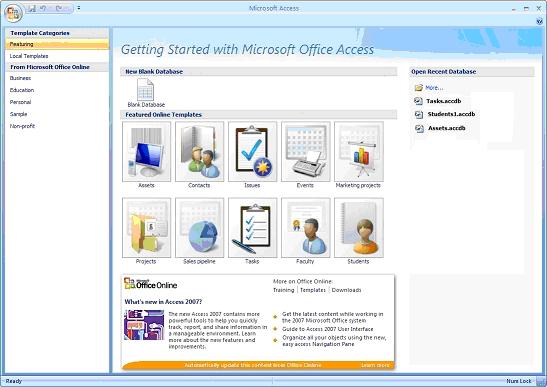
And more are available on Microsoft’s web site. There’s a template for almost everything that you can think of. Don’t find what you need? Make sure to suggest a template to FMS or make your own.
Don’t forget to provide feedback about the templates as you use them. Microsoft reviews this feedback and enhances templates to improve customer satisfaction, so get your requests in and they’ll be heard.
 Latest Newsletter
 Demos
Demos
 Microsoft Access Developer Help Center
 Microsoft Access Query Help Center
 MS Access to SQL Server Upsizing
 Microsoft Outlook Tips
 Technical Papers
 Tips and Techniques
 Videos
Connect with Us
 Email Newsletter
 Developer Team Blog
 Facebook
 X/Twitter
 Support Forum & Tickets
Additional Resources
 Book
Book Links to Related Sites
 My FMS
Thank you! Thank you! I just finished reading this document, which was part of a link in the recent Buzz newsletter. I have printed it for others to read, especially those skeptical on the powers of Access and its capabilities.
Darren D.
 All Our Microsoft Access Products



