Avoiding a Microsoft FrontPage Error Message with Windows SharePoint Services
Provided by the FMS Marketing Team
On occasion, while using Microsoft FrontPage this error message appears:
An error occurred accessing your Windows SharePoint Services files. Authors – if authoring against a Web Server, please contact the Webmaster for the server’s Web site. Webmasters – please see the server’s application event log for more details.
This can be particularly confusing if you're not even using SharePoint. While this message varies in frequency of appearance, it can be very annoying.
It can appear when accessing a folder or file for the first time in a session, and when publishing to a remote server.
The most well known solution, which is a cumbersome and largely ineffective one, is to re-install the server. Don't do that!
Fortunately, there is a far simpler process which nearly always remedies the situation. By following these steps, almost all instances of this error message disappear:
- Open your copy of Internet Explorer.
- In the menu bar, select Tools > Internet Options > Advanced
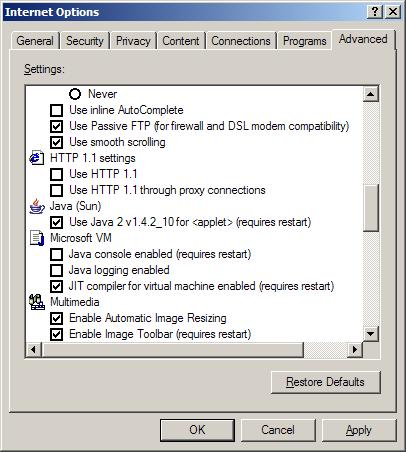
- Scroll approximately half way down to HTTP 1.1 settings.
- Unselect all “HTTP 1.1 settings” .
- Return to the General tab, delete cookies, delete internet files,
both on and off line, and clear the history.
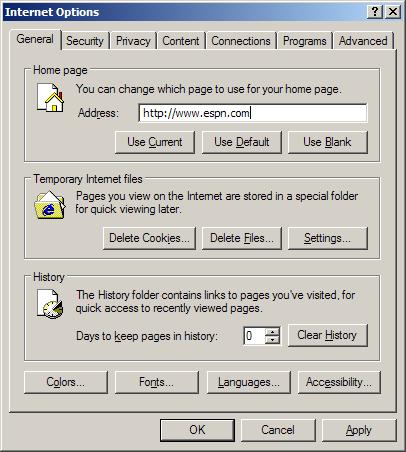
This simple work around resolves and eliminates the error message and allows you to work in FrontPage uninterrupted.
 Latest Newsletter
 Demos
Demos
 Microsoft Access Developer Help Center
 Microsoft Access Query Help Center
 MS Access to SQL Server Upsizing
 Microsoft Outlook Tips
 Technical Papers
 Tips and Techniques
 Videos
Connect with Us
 Email Newsletter
 Developer Team Blog
 Facebook
 X/Twitter
 Support Forum & Tickets
Additional Resources
 Book
Book Links to Related Sites
 My FMS
Thank you! Thank you! I just finished reading this document, which was part of a link in the recent Buzz newsletter. I have printed it for others to read, especially those skeptical on the powers of Access and its capabilities.
Darren D.
 All Our Microsoft Access Products



