Microsoft Office 2007 Add-ins May Become Disabled when Loading Older Microsoft Office Applications
Provided by Molly Pell, Senior Systems Analyst
Microsoft offers several add-ins for Microsoft Office 2007 to offer additional functionality or features. For example, the Microsoft Save as PDF or XPS add-in is a free and popular supplement to Microsoft Office 2007 that allows you to export to PDF and XPS formats.
These add-ins behave perfectly fine if Office 2007 is your only office platform, but they may become disabled if you are using side-by-side installations of Office. For example, an Office 2007 add-in may become disabled when Office 2003 is loaded.
Assume you are happily using the Save as PDF or XPS add-in under Microsoft Office Access 2007, when you decide that you need to open Access 2003. When Access 2003 loads, it attempts to load all of the Office add-ins. Since the Save as PDF or XPS add-in is only supported under Office 2007 programs, it fails to load. Office thinks that the add-in is broken, and marks it as disabled so that Office won’t try to load it anymore.
The next time Access 2007 is loaded, it sees that the add-in is disabled, and does not try to load it.
Don’t fret – you can re-enable the add-in through the options form.
Follow these steps to re-enable add-ins that have become disabled:
- Click the Microsoft Office Button, and then click Access Options, Excel Options, PowerPoint Options, or Word Options.
- On the Tools menu, click Add-ins:
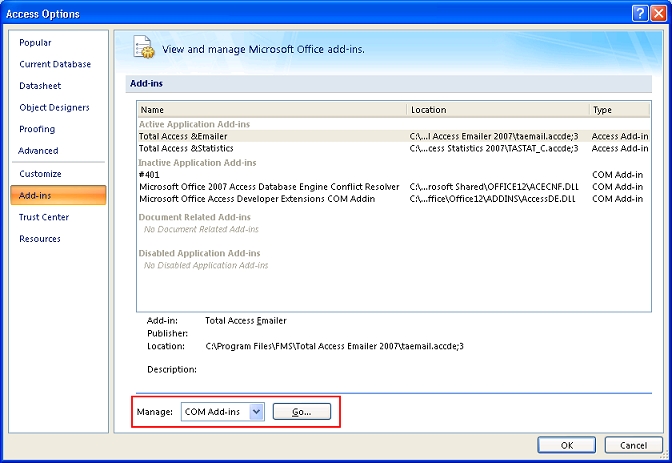
- In the Manage drop down list, select "Com Add-ins", and
click "Go":
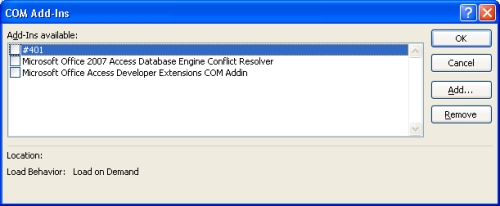
- Check all of the add-ins that you want to re-enable, and click OK.
 Latest Newsletter
 Demos
Demos
 Microsoft Access Developer Help Center
 Microsoft Access Query Help Center
 MS Access to SQL Server Upsizing
 Microsoft Outlook Tips
 Technical Papers
 Tips and Techniques
 Videos
Connect with Us
 Email Newsletter
 Developer Team Blog
 Facebook
 X/Twitter
 Support Forum & Tickets
Additional Resources
 Book
Book Links to Related Sites
 My FMS
Thank you! Thank you! I just finished reading this document, which was part of a link in the recent Buzz newsletter. I have printed it for others to read, especially those skeptical on the powers of Access and its capabilities.
Darren D.
 All Our Microsoft Access Products



