Preventing the Movement of Toolbars In Microsoft Access
Provided by the FMS Development Team
Have you been annoyed when the toolbars normally docked at the top of your Access window get moved? You can prevent this by setting a simple property to prevent a user or yourself from accidentally moving it. Here's how to do it (in Access 2000 or later):
- Place the toolbar in the position you want.
- From the menu bar, go to: Tools -> Customize.
(Note: In Access 97, go to: View -> Toolbars -> Customize) - Select the Toolbars tab.
- Highlight the desired Toolbar (i.e. "Menu Bar")
- Click the "Properties" button.
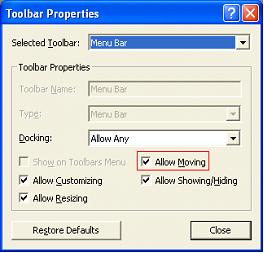
- On the Toolbar Properties window, uncheck the "Allow Moving" option.
 Latest Newsletter
 Demos
Demos
 Microsoft Access Developer Help Center
 Microsoft Access Query Help Center
 MS Access to SQL Server Upsizing
 Microsoft Outlook Tips
 Technical Papers
 Tips and Techniques
 Videos
Connect with Us
 Email Newsletter
 Developer Team Blog
 Facebook
 X/Twitter
 Support Forum & Tickets
Additional Resources
 Book
Book Links to Related Sites
 My FMS
Thank you! Thank you! I just finished reading this document, which was part of a link in the recent Buzz newsletter. I have printed it for others to read, especially those skeptical on the powers of Access and its capabilities.
Darren D.
 All Our Microsoft Access Products



