Make Word your editor by checking writing style (in addition to spelling and grammar) as you type
Provided by Molly Pell, Senior Systems Analyst
By default, Microsoft Office Word checks spelling and grammar as you type, saving you from embarrassing typos and grammatical mistakes. But did you know that you can improve your documents even more by checking style and other preferences? In addition to the default Spelling & Grammar options, you can customize Word to check your documents for the following style preferences:
- Commas before the last item in a list
- Punctuation inside of quotes
- Spacing between sentences
- Clichés, colloquialisms, and jargon
- Gender-specific words
- Misused words
- Passive sentences
- Long sentences
- Wordiness
- Etc.
First, select “Tools, Options” from the Word menu, and go to the Spelling & Grammar tab:
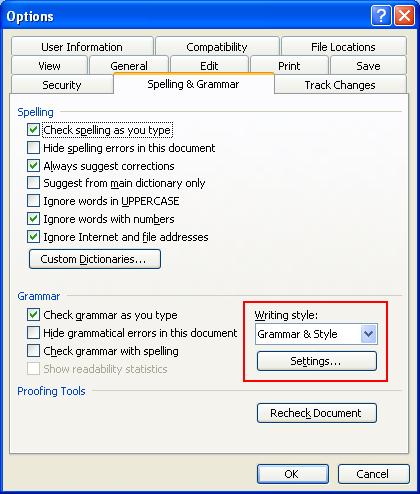
On this tab, change the “Writing style” option to “Grammar & Style,” and select the desired options:
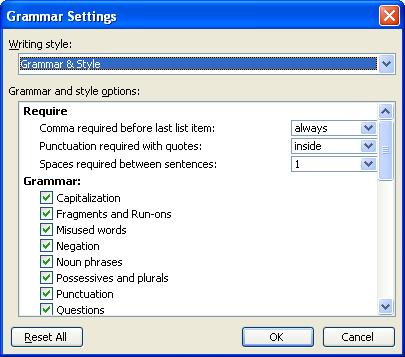
It may take some trial and error to determine exactly which preferences are right for you or your organization, but these style suggestions can dramatically improve your documents almost immediately.
 Latest Newsletter
 Demos
Demos
 Microsoft Access Developer Help Center
 Microsoft Access Query Help Center
 MS Access to SQL Server Upsizing
 Microsoft Outlook Tips
 Technical Papers
 Tips and Techniques
 Videos
Connect with Us
 Email Newsletter
 Developer Team Blog
 Facebook
 X/Twitter
 Support Forum & Tickets
Additional Resources
 Book
Book Links to Related Sites
 My FMS
Thank you! Thank you! I just finished reading this document, which was part of a link in the recent Buzz newsletter. I have printed it for others to read, especially those skeptical on the powers of Access and its capabilities.
Darren D.
 All Our Microsoft Access Products



