Windows Shutdown Event Logger
Provided by the FMS Development Team
Administrators and users of Windows 2003 Server are familiar with a new feature that prompts for entry of a reason when the system is restarted or shutdown. The details collected by this prompt are logged and can be viewed under System Events. This feature can be useful for monitoring or diagnosing unexpected shut down events.
This same tool is available on Windows XP workstations by activating a registry key. To implement this feature:
- Using REGEDIT, locate: HKEY_LOCAL_MACHINE\SOFTWARE\Microsoft\Windows\CurrentVersion\Reliability
- If the registry value ShutDownReasonUI exists, update its value data to 1.
If the registry value ShutDownReasonUI does not exist, create a new DWORD value with that name, and the value data = 1. - Reboot your machine.
During subsequent Shutdowns, Windows will provide the prompt, below:
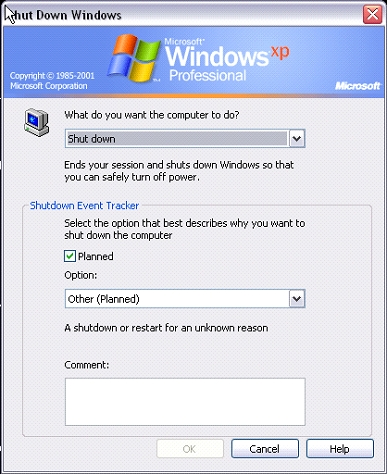
To view these log entries, access the event viewer (Administrative tools | Event Viewer), under the System events category.
 Latest Newsletter
 Demos
Demos
 Microsoft Access Developer Help Center
 Microsoft Access Query Help Center
 MS Access to SQL Server Upsizing
 Microsoft Outlook Tips
 Technical Papers
 Tips and Techniques
 Videos
Connect with Us
 Email Newsletter
 Developer Team Blog
 Facebook
 X/Twitter
 Support Forum & Tickets
Additional Resources
 Book
Book Links to Related Sites
 My FMS
Thank you! Thank you! I just finished reading this document, which was part of a link in the recent Buzz newsletter. I have printed it for others to read, especially those skeptical on the powers of Access and its capabilities.
Darren D.
 All Our Microsoft Access Products



