Reviewer's Guide
Thank you for your interest in Total VB Statistics. FMS is pleased to
provide you with this Reviewer's Guide to assist in your evaluation of
Total VB Statistics. The contents of this document are organized as
follows:
Additional documentation is included with the Total VB Statistics
product, including a printed User's Guide and online help system.
Background
Total VB Statistics addresses the problem many Visual Basic developers
face when they need to perform data analysis. Although one can use Visual
Basic and the SQL query language to perform basic data analysis, it is
insufficient for more advanced functions such as percentiles, regressions,
correlations, t-tests, confidence intervals, group analysis, non-parametrics,
probability, etc.
Until now, Visual Basic developers who needed these features either
didn't include them or resorted to exporting their data into separate
statistical analysis programs and importing the results back (if they
could).
Designed Specifically for Visual Basic
Total VB Statistics is designed specifically for Visual Basic developers
and addresses their needs for integrating powerful data into their
applications.
With a wide range of statistical calculations, Total VB Statistics
eliminates the complexity of using and controlling a separate statistics
program. Total VB Statistics integrates statistical analysis directly into
any Visual Basic project (version 5 or 6). Any Microsoft Jet/Access table,
linked table (such as SQL Server or Oracle table), or query can be analyzed.
Multiple numeric fields and an unlimited number of records may be handled at
one time, with many options to group and ignore data. Best of all, the
results are placed in Access tables that the developer can fully control,
manipulate, and add to their forms and reports.
With a simple procedure call, the power of Total VB Statistics is added
directly into a Visual Basic project. The end-user won't even know that
Total VB Statistics is running in the background. Events are raised so the
developer can create their own custom messages.
Total VB Statistics includes a small (under 1 MB in size) statistics
ActiveX DLL that is distributed with the project. A royalty-free
distribution license allows developers to economically add statistical
analysis to their projects.
Easy to Use
Total VB Statistics is designed to make it very easy for Visual Basic
developers to add advanced statistical analysis to their Visual Basic
projects. Many developers don't understand or are intimidated by statistical
analysis, so ease of use is very important.
The Scenario Designer, with its Wizard-like interface, simplifies the
process of setting up a scenario (analysis). The analysis settings (not the
data or results) are stored for easy re-use or modification. Scenarios can
be run and the results examined to verify or refine the analysis. This can
all be done without programming.
Once the scenario is finalized, the Scenario Designer automatically
generates the Visual Basic code to be pasted into a project. Adding
statistical analysis to a Visual Basic project couldn't be easier!
FMS Experience with Statistics
FMS is very experienced in the creation of statistics products for
database analysis. In 1990, we launched our first statistics program,
ParaStat, for Borland's Paradox DOS. In 1994, we released our first
statistics programs for Windows: Total Access Statistics for Microsoft
Access 2.0, and ParaStat for Windows for Paradox for Windows. Over the
years, the products were upgraded many times to add new features and keep up
with new database versions.
The statistical functions included in our products are based on years of
customer feedback and selected for their popularity and usefulness for
database analysis. They significantly exceed the needs of most developers.
Our products do not have as many statistical functions as programs such
as SPSS or SAS, and are intended to fill the gap between the rudimentary
tools in Access/Visual Basic and the high-end, very advanced statistical
programs. The advantage of our products is their tight integration with
their database platform, programmatic control, and output in a format
(tables) that can be used by developers in their application. Additionally,
our product, including runtime license, is priced below the single user
copies of most high-end statistics programs.
Compatibility with Total Access Statistics
Total VB Statistics is designed specifically for Visual Basic developers
and is compatible with our existing Total
Access Statistics
product for Access. Both Access and Visual Basic developers share the same
Jet Engine/Access database format. Scenarios created by either program can
be used by the other. For existing customers of Total Access Statistics,
this means they can run the scenarios they created in Access directly in
their Visual Basic programs with no modifications!
However, they are not the same program. Total Access Statistics is an
Access add-in tightly integrated with Access, while Total VB Statistics is a
Visual Basic ActiveX DLL optimized for Visual Basic and behaves the way
Visual Basic developers expect.
Product Packaging and Technical Support
Total VB Statistics includes a CD with the Scenario Designer, Statistics
ActiveX DLL, and on-line help. A 134 page printed user manual is also
included describing the program and the definition of each calculation.
Technical support is provided for free and is available by phone, fax,
e-mail, and through our support site.
Pricing and Availability
Total VB Statistics supports Visual Basic versions 5 and 6. Licensing is
on a per developer basis. A single developer license is $599, and a five
developer license is $1799. Each license includes royalty-free distribution
rights for one developer to include Total VB Statistics within his/her
Visual Basic applications.
Total VB Statistics is available directly from FMS and most corporate
resellers. FMS also has international distributors in many countries. Visit
www.fmsinc.com for more details.
About the Authors
Total VB Statistics is written by Luke Chung, president and founder of
FMS, and Jim Ferguson, a Microsoft Visual Basic MVP and co-author of the
Microsoft Jet Engine Programmer's Guide (Microsoft Press).
System Requirements
Total VB Statistics has the following system requirements:
- Visual Basic 5.0 or 6.0, and the Jet Engine
- Pentium processor or better
- 12 MB RAM or more
- 5 MB free disk space
Installation Instructions
A standard setup program is included. Just follow the steps and point to
the directory where you want to install the program. You must have Visual
Basic 5.0 or 6.0 installed in order to use the program.
Running Total VB Statistics
Total VB Statistics is launched from the Programs menu under Total VB
Tools, Statistics. The Scenario Designer starts and asks for a database to
analyze.
The program includes a sample database in the directory you installed the
program. The database, SAMPLE.MDB, includes data and scenarios you can use
to test the program. Select the database and the Scenario Designer appears:
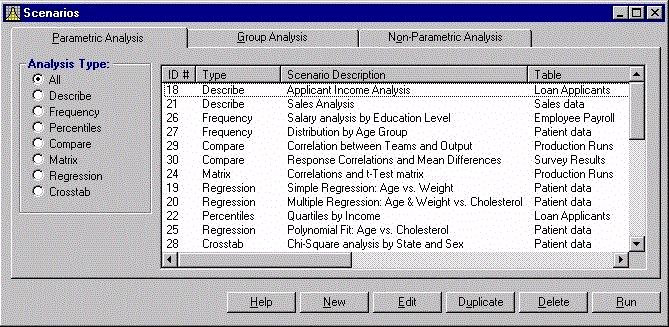
Scenario Designer
Scenarios are organized into three major groups by the tabs across the
top: Parametric Analysis, Group Analysis, and Non-Parametric Analysis.
Within each tab, a variety of Analysis Types is available. Saved scenarios
appear in the list.
You can create, edit, duplicate, delete, or run a scenario from this
screen. Pick a scenario and press the Run button. The results (one or two
tables depending on the scenario) appear on the screen. The table is
actually created and stored in the sample database.
For more information on creating scenarios or specific calculations,
please refer to the online help or user manual.
Generating Code
You'll notice that each scenario has a unique ID number. Adding
statistical analysis to a Visual Basic project is simply identifying which
scenario to run. Just right-click on any scenario and from the menu select
Generate VB Code. This screen appears showing the code to add to your
project:
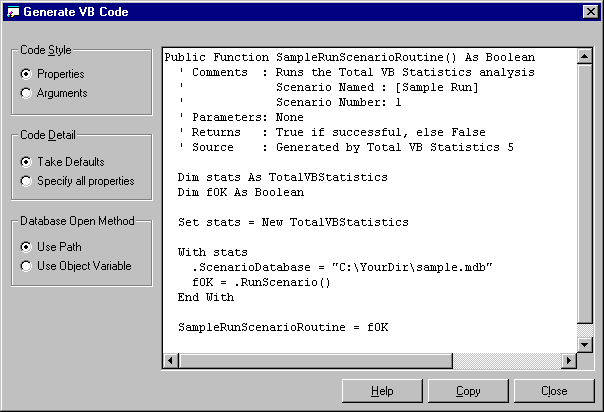
Generate VB Code
Several options are available to customize the code, then simply copy and
paste!
Total VB Statistics includes a complete set of features to make it easy
to add powerful data analysis to Visual Basic projects.
General Features
Feature |
Benefit |
| Interactive Scenario Designer |
Create, test, and fine-tune statistical
analysis interactively using a Wizard-like application. All scenarios
are automatically saved for re-use or modification. |
| Programmatic interface |
Easily add statistical analysis inside
Visual Basic projects. A hidden interface lets you run Total VB
Statistics while controlling what the user sees. |
| Accuracy |
All calculations are in double precision
(15 digits accuracy) |
| Platform Support |
Runs on any network or operating system
that supports Visual Basic and the Jet Engine |
| Multi-user ready |
Multiple users can run an application that
uses Total VB Statistics at the same time. |
| Compatible with Total Access Statistics |
Scenarios created in Total Access
Statistics can also be run within Visual Basic applications, and vice
versa. |
| Royalty-Free License |
Each license allows a developer to include
Total VB Statistics in applications distributed to an unlimited number
of customers. |
| Small DLL |
Only one small file, a statistics ActiveX
DLL under 1 MB in size, is added to your applications. |
Data Analysis Features
Feature |
Benefit |
| Analyze Jet Tables |
Analyze any table in a Microsoft Jet
Engine/Access database (MDB file) |
| Analyze Queries |
Analyze data from any Jet Engine/Access
query including multi-table queries |
| Analyze Linked Tables |
Analyze any linked table supported by the
Jet Engine including local tables such as dBase, Paradox, and FoxPro,
any ODBC database, and databases such as SQL Server and Oracle. |
| Results in Access tables |
Rather than a large number of statistical
functions, each returning one value, Total VB Statistics generates many
values at once. Each value is stored in a separate record and field in a
table making it easy for the developer to link to other tables for
additional analysis, display, or reports. |
| Analyze Large Data Sets |
Multiple fields and an unlimited number of
records can be analyzed at one time. |
Group Data
(optional) |
For every unique combination of values in
the specified group fields, a separate calculation is generated. For
instance, grouping on a State field generates separate results for each
state (stored as individual records in the output table). |
Ignore Values
(optional) |
Specific values or ranges of values to
omit. For instance, 999 is sometimes entered as an "unknown" value and
must be ignored. |
Weighting Field
(optional) |
Specify a weighting field to perform
calculations such as weighted averages, weighted standard deviations,
weighted regressions, etc. |
Statistical Functions
The statistical functions are grouped into these categories:
Parametric Analysis
Parametric analysis is performed on numeric fields that are assumed to be
continuous and normally distributed. Fields are analyzed individually or
compared with each other.
Type |
Description |
| Describe |
Analysis of a numeric field: std.
deviation, std. error, variance, coefficient of variance, skewness,
kurtosis, geometric mean, harmonic mean, RMS, mode, confidence
intervals, t-Test vs. mean, percentiles, etc. |
| Frequency |
For each field, frequency distribution
analysis for each interval (range of values): count, sum, percent of
total, cumulative count, percent, and sum. |
| Percentiles |
Median, quartiles, quintiles, deciles, and
percentiles. Similar to Describe, but results placed in records rather
than fields (each percentile is a record). |
| Compare |
Compare two fields: mean and standard
deviation of difference, correlation, covariance, R-square, paired
t-Test. |
| Matrix |
Similar to Compare, but rather than several
fields compared to one, all fields are compared to each other creating a
matrix. |
| Regression |
Simple, multiple, and polynomial
regressions with coefficient analysis, ANOVA, and residual table. |
| Crosstab |
Cross-tabulation with row and column
summaries, and % of row, column, and total for each cell. Chi-Square
analysis is also available with expected value and % of expected for
each cell. |
Group Analysis Options
Group analysis is the comparison of continuous, normally distributed
numeric data between groups of records. A comparison field in the table
defines the groups. For instance, you may want to compare data between men
and women, or by race. Groups are usually of different sizes (number of
records) unlike the Compare feature in Describe, which is for paired values.
Type |
Description |
| Two Sample t-Test |
Two Sample t-Test compares means between
two groups of records. Calculations include pooled and separate t-values
for the two groups. |
| ANOVA |
Analysis of variance compares the means of
multiple groups of records. Calculations include degrees of freedom, sum
of squares within and between groups, F-value, and probability. |
| Two way ANOVA |
Two-way analysis of variance compares
multiple fields between groups of records. Same results as ANOVA with
additional values for each additional field. Used to measure relative
impact of each variable on the mean. |
Non-Parametric Options
Less powerful than parametric analysis, non-parametric analysis is used
when the underlying data is not continuous, for instance ordinal data, or
not normally distributed. Non-parametric analysis makes no assumption on the
distribution of the underlying data, since the results are based on the
ranks of the data. Non-parametric analysis can be made for each numeric
field individually, compared with each other, or between groups of records
(samples).
Type |
Description |
| Chi-Square |
One sample Chi-Square. Evaluates
distribution and expected value for each unique value in a field |
| Sign Test |
One sample sign test versus median, mean or
user defined value |
| K-S Fit |
Goodness of Fit tests to determine if a
numeric field fits a uniform, normal, or Poisson distribution |
| 2 Sample |
Two sample tests: Wald-Wolfowitz Runs Test,
Mann-Whitney U Test, and Kolmogorov-Smirnov |
| N Sample |
Kruskal-Wallis one way ANOVA |
| Paired Fields |
Field comparisons: paired sign test,
Wilcoxon Signed Rank, Spearman’s Rho correlation |
| N Fields |
Friedman’s two way ANOVA |
Probability Calculator
Evaluate the probability of test values (Z, t-Test, Chi-Square, and
F-value) for any degrees of freedom, or the inverse (test value for a given
probability). This calculator eliminates the hassles of interpolating values
in references tables common in the back of statistics books.
Total VB Statistics is the most powerful data analysis tool available for
the Visual Basic development environment. Able to analyze large data sets
stored in Microsoft Jet/Access databases or any linked database, Total VB
Statistics combines power and ease of use.
While not every Visual Basic developer is going to need statistical
analysis, when they do, Total VB Statistics will be a godsend. After all,
how many developers want to spend time writing the matrix inversion math
necessary to calculate a regression when they can get it with a few clicks
of the mouse in Total VB Statistics?
We invite you to put the product through its paces, and contact us if we
can provide any additional assistance in evaluating or deploying Total VB
Statistics.
Trial Version
A fully-functional Trial Version of Total VB Statistics is available from
our web site, click here to download. The Trial Version includes every feature except
the programmatic interface and is limited to analyzing tables with 100 or
fewer records.
Main Total VB Statistics page
Microsoft, Microsoft Access, FoxPro, SQL Server, Visual Basic, and
Microsoft Windows are either registered trademarks or trademarks of
Microsoft Corporation. Total Access SourceBook and Total VB Statistics are
trademarks of FMS Inc. All other trademarks are trademarks of their
respective owners.










 Newsletters
