Designing Commercial Web Services, Security and Flexibility with the .NET Framework
by Dan Haught, FMS Vice President of Product Development
January, 2002
The response has been tremendous since Microsoft rolled out its vision of Web Services with the .NET Framework more than a year ago. Envisioning software development as the consumption of services across HTTP is a very new and intriguing concept. The learning curve can seem daunting when you imagine the pieces involved: HTTP, SOAP, XML, and major parts of the .NET Framework, to name just a few. Fortunately, the tight integration of Web Services development within Microsoft's new Visual Studio .NET makes it easy to create the plumbing that makes Web Services work. And access to modern object-oriented languages and the extensive built-in libraries speeds up the development of your service's functionality.
But when you move into the world of commercial Web Services, where you want to make your functionality publicly available, a whole new set of issues arises. If you are tasked with designing a Web Service that will be available outside your organization, you need to answer key questions before you write a single line of code. How do you design a system that will be secure and allow for a flexible licensing model? How do you handle versioning as your Web Service expands to include new functionality? What are some issues related to UDDI and WSDL? How do you provide your customers with the documentation and support they need to effectively consume your service?
This two-part article takes a look at the technical issues and solutions to these problems by exploring various models and how they integrate into the .NET Web Services framework. In this installment, you will see how to define your licensing model, build an authentication system, and work with payments in billing. In Part II, you will move on to versioning, WSDL, client support, and working with UDDI and Web Services brokers.
Your first design task is to think about how you will make your service available to clients. This defines your licensing model, which is important to both your system design and your business model because it defines the parameters with which clients can consume your service. The key aspect of Web Service availability is authentication. Authentication requires that clients accessing your service provide information that allows you to authenticate who they are. To determine whether you need to include authentication in your design, follow a basic decision tree as shown in Figure 1.
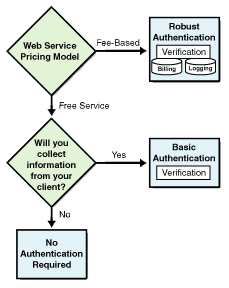
Figure 1 - How to determine whether you need authentication
From Figure 1, you can see that your level of authentication falls into one of three categories:
- You are providing a free service that requires no user information. In such a case, you do not need to worry about authentication.
- You aren't charging for your service, but you are accepting client information. If your service requires the client supply information such as an e-mail address or other data that may need to remain private, you must authenticate requests to prevent malicious users from trying to represent themselves as someone else. Remember that even free Web Services have privacy implications. This scenario requires basic authentication requiring the client to securely identify who he or she is.
- You are charging for your service. Without authentication, you would not make much money because you would not be able to control access to your service. If you are charging for your service, you move into the realm of robust authentication, in which security and logging become much more important. With robust authentication, you not only authenticate the client, but you also log each request and maintain a billing database.
By defining your authentication needs carefully, you actually design the foundation of your Web Service architecture. Authentication defines the client's transaction with your service and handles not only security, but billing and customer management as well.
Your next step is to refine the relationship between your business model and your physical Web Service design. Think of this connection in terms of licensing: If you can define how you are going to license your Web Service to clients, you answer many of the questions that will come up later as you design your authentication and service components.
Licensing models for .NET Web Services will generally fall into one of three models:
- Open-access licensing - Any client may access your Web Service without authentication. This is typical of free services in which no client information is required. Open-access licensing is the easiest to implement because the majority of your work will be on the Web Service functionality itself. You don't need to worry about writing code for authentication, logging, or billing. The typical business model for open-access licensing is one in which you need to gain collateral marketing exposure for your organization. For example, if your site provides stock quotes, you could provide that content to partners as a Web Service. Your partner sites could consume your service and place its output on their site. When a visitor to your partner site clicks on a stock ticker, he or she is redirected to your site. You get more links to your site, and your partners get value-added content for free.
- Single-level licensing - You require authentication directly from the client. In this model, a client requesting access to your Web Service must supply credentials that allow him or her to be uniquely identified.
- Multi-tier licensing - Clients access your Web Service through an intermediary. The intermediary provides your Web Service to end user clients. If you charge for your service, the intermediary also manages payments. An example of multi-tier licensing would be when a credit-card banking operation provides credit-card validation and payment through a Web Service. Instead of marketing this service to individual sites, the bank works with ISPs who resell the service to their customers. Multi-tier licensing is the most complex model because it involves several layers of authentication and security. For example, if you build a Web Service using this model, you need to worry about providing your intermediary with a virtual firewall that protects their proprietary customer information.
As Web Services mature, and new business models appear, additional licensing models will likely appear. As you develop your first Web Service, don't feel you have to constrain your design into one of the above models. Your business needs may require you to use a hybrid approach or even design a completely new licensing model. The key point is that you should define your licensing model carefully before you start writing code.
If you have decided your Web Service needs authentication, you need to design the functionality to support it, and you need to determine how authentication will interact with the other parts of your Web Service solution. Because authentication involves asking a client to provide credentials, your first step is to define the architecture of your authentication parameters.
In a simple system, each Web Service request from the client requires authentication information. Typically, this authentication is in the form of an account identifier and a password. The account identifier uniquely identifies the client to your system, and the password provides a layer of security.
Figure 2 illustrates the flow of the account identifier and password through a typical authentication process. When the client passes authentication information to the server as part of a Web Service request, the server authentication components verify the data against account storage that contains all known accounts. If the account is not found, or the supplied password is incorrect, the process writes an entry to the log database noting the details of the failure. Logging failures can be as important as logging successful authentication. If you have unauthorized clients attempting to break through your authentication barrier, the log database may be your only way to know this is happening. Figure 3 shows the general flow for authenticating a login request.
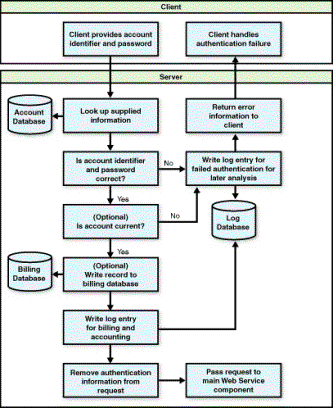
Figure 2 - The authentication flow process
   <WebMethod()>
  Public Function ServiceLogin(ByVal strUser As String, ByVal strPass As String) As String
    ' Comments: Accept and validate a login
    ' Params  : strUser - user account string
    '           strPass - user account password
    ' Returns : License key if successful

    Dim AccountComponent As New MyService.AccountComponent()
    Dim LogComponent As New MyService.Logging()
    Dim LicenseComponent As New  MyService.LicenseComponent()
    Dim fValid As Boolean

    ' Constant value to indicate an invalid login error
    Const cInvalidLogin As Integer = 1000

    ' Validate input values
    fValid = AccountComponent.Validate(strUser, strPass)

    ' Log the entry by writing the passed values, the
    ' current date and time, and whether or not the login was valid
    LogComponent.AddEntry(strUser, strPass, fValid, Now)

    If fValid Then
      ' Get a license key for theclient and return it
      Return LicenseComponent.GetKey()
    Else
      ' Raise an error
      Err.Raise(cInvalidLogin, Me, "Invalid login")
    End If
  End Function
Figure 3: Authenticating a login request.
If the authentication passes, you pass control to an optional process that checks additional validations you may have defined. For example, your licensing model may require your clients pay a subscription fee for access. Subscription pricing requires that accounts expire after a time. In such a case, your authentication logic checks for expired accounts.
If you are charging for your service, you need one more operation before passing the client request on to your actual Web Service. If you need to log requests for billing purposes, you may want to consider adding the authentication attempt to a billing database. That allows you to have a distinct repository for billing data that is separate from your log database.
Finally, once all parts of the authentication process are complete, the client's original request is passed on to your Web Service. At this point, it is important to think about the segmentation of data passed through to your actual Web Service. For security reasons, you may want to strip authentication information from the request before handing if off to your Web Service logic. This allows compartmentalization of data and ensures an additional level of security: Your Web Service logic (and the developers who work on it) never needs to see authentication data. The logic merely assumes any client request that gets to it has passed authentication tests.
In the above model, you have seen a simple authentication model that expects the client to pass authentication information with each request. This model is "stateless" because there is no connection between a client request and a previous authentication state.
While this certainly might work for many Web Services you'll build, your Web Service might be complex enough that requiring client validation on each request is not a reasonable burden to place on your customers. For example, imagine you are creating a drill-down model for client data access. The client initially sends a request for a list of data. After receiving and processing the returned data set, the client needs to request additional data based on the results. With the stateless model, the client would have to pass authentication data at every step. This adds an additional processing burden to your server because the authentication component has to hit the account database for every request and log every request as a separate record in the logging and billing databases.
To overcome these problems, you can design an authentication state model that allows a client to initiate a session, make requests within that session, and then close the session. The burden on the client code decreases, and you reduce the processing overhead on your server. Implementing an authentication state model is not a trivial task, however, so approach it with caution.
The ASP.NET model provides state-management services through its Application and Session objects. Like ASP, these objects use cookies on the client computer to maintain the state of global data or per-user data. Although ASP.NET introduces new power by having scalable session-state management, with support for Web farms and Web gardens, its true scalability still must be proven in the field. Additionally, ASP.NET's reliance on cookies may be an issue if you are working with custom clients that may or may not be running on Windows. If you can live within the design of cookie-based session management, the easiest route is to use ASP.NET's built-in objects. If you can't, there are alternatives you can design and implement. Let's look at one such custom model.
At its simplest level, handling authentication state is simply the process of assigning and revoking temporary licenses. When the client sends its initial request, it sends only authentication information, not requests for the actual return values of your Web Service. This "login" request is processed by your authentication component. If the request passes, you return a license key to the client. Your key could be as simple as a GUID or more complex, such as a GUID hashed with a private key your server has generated. Creating such keys is easy with the .NET Framework because the system base classes include a variety of cryptography and hash functions.
Another important aspect of key design is that keys issued by your server must be transient. This means they need to expire after a predetermined amount of time. This prevents unauthorized reuse of license keys. To implement transient keys, your authentication component should store issued keys in a license pool and create code to run in a new thread that invalidates expired keys by removing them from the pool. Figure 4 shows the generation of license keys.
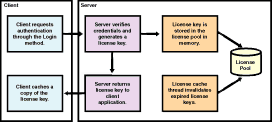
Figure 4 - Generation of transient license keys
After the client receives a license key, the client includes that key in each subsequent call. As long as the request is made within the lifetime of the license key, the client may access the Web Service without issue. Your authentication component should include code to handle expired keys, and return a distinct error code if the client attempts to use an expired key. Finally, you need to give clients the ability to log out to free up license keys. When the client calls the logout method, your component invalidates the license key by removing it from the license pool. Your logout method should require the client to pass the license key. Otherwise, your server won't know which key to invalidate. Figure 5 shows how license keys are used and expired.
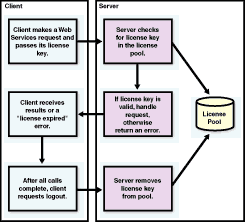
Figure 5 - Using and expiring license keys
If your Web Service is only available to paying clients, you must design the infrastructure to handle flexible payment and subscription options. Current software licensing is based predominantly on the pay-once, use-forever model. You pay for the software once, and you can use it in perpetuity. But, with Web Services, the income stream changes: You can now sell your software or service as a subscription. While subscription- and service-based licensing are certainly not new, they are likely to become the standard for generating revenue with Web Services.
When you are designing your system for payments and subscriptions, you need to define your subscription period first. Do clients pay a fixed fee per time period, or are they on a meter and paying according to the number of requests they make in specific time? Fixed fees allow you to forecast your overall revenue for any given time period, whereas metered billing allows your revenue to match actual usage. Regardless of which model you use, your design needs to handle your business needs in a secure way and still be flexible enough to accommodate your customers' changing requirements.
Earlier, you saw how your authentication component could accomplish several parts of the payment puzzle for you. If you are using a fixed-fee billing model, authentication can check the Account database to see if the client's expiration date has been reached. If it has, you may be tempted to return an error and deny access to your service. However, such a Draconian response is guaranteed to result in angry customers and little repeat business. A better approach would be to build an automatic grace period into the authentication component. For example, if a client makes a request within one week of expiration, your server should send a reminder e-mail, reminding the customer of the impending expiration. Additionally, if a client account is expired by 48 hours or less, you may consider allowing access and sending a more urgent e-mail message. This compromise allows you to protect your revenue stream and give your customer the flexibility they probably will demand. Figure 6 shows how your authentication component can call a private function that handles expired accounts and grace periods.
  Private Function HandleAccountExpire( ByVal strUser As String, ByVal strPass As String) As Boolean
    ' Comment: Dispatch events in the case of expired or close to expire accounts
    ' Params : strUser - user account string
    '          strPass - user account password
    ' Returns: True if customer isnot expired or within grace period

    Dim LogComponent As New MySVC.Logging()
    Dim MailComponent As New MySVC.MailHandling()
    Dim AccountComponent As New MySVC.AccountComponent()
    Dim intExpireFlag As Integer
    Dim fOK As Boolean = False

    ' Login as the user
    If AccountComponent.Validate(strUser, strPass) Then
      intExpireFlag = AccountComponent.GetExpireDays
      Select Case intExpireFlag
        Case cExpireSoon
          ' Within 7 days of expiration, allow login
          MailComponent.SendMail( AccountComponent.EmailAddress, cstrExpireSoonEmail)
          fOK = True
        Case cNotExpired
          ' Not close to expiring, allow entry
          fOK = True
        Case cExpired
          ' Account is expired for too long
          LogComponent.AddEntry( strUser, strPass, True, Now, "Account is expired > 30 days.")
          ' Send expiration email to customer telling
          MailComponent.SendMail(AccountComponent.EmailAddress, cstrExpiredEmail)
          fOK = False
      End Select
    End If

    ' Return expiry status
    Return (fOK)
  End Function
Figure 6: Handling expired accounts.
The authentication component can handle metered billing, also. As you may recall, the design included an optional layer to write login attempts to the Billing database. Your organization's accounting department uses the contents of the Billing database to determine the customer's bill. Note that if you are using metered billing and need to support authentication state, you need to define what is actually being metered. Do you charge per login session, or per Web Service request regardless of login count?
Finally, your business model likely will dictate that you offer potential customers a no-cost evaluation period. This is the norm in today's software world. Customers expect a trial version, and, if you don't offer one, you may lose sales. Web Services make this requirement even more important for several reasons. If a customer is going to commit to your Web Service, he or she probably wants to see it in action. Customers want to test your availability and throughput, as well as how well you support their client development by providing documentation, samples, and technical support during the initial integration period. Fortunately, adding trial-period functionality rarely affects the architecture of your actual Web Service. Instead, it will be a function of your back-office employees, who simply need to add trial accounts for customer access. Trial accounts can use the same account expiration logic you build for real accounts.
As with any systems project, your early investment in careful design yields great rewards later. Your first steps are to define your business model and start mapping that to a systems model. With authentication, licensing, billing, and subscriptions out of the way, you can move on to other important aspects of your commercial Web Service design. In the final installment of this two-part series, I'll present information about versioning your service, supporting client software development, UDDI, WDSL, and more.
Dan Haught manages product development for FMS, Inc. in Vienna, VA, where he is responsible for shipping developer products for Visual Basic, SQL Server, Access, and soon, .NET. Dan frequently speaks at developer conferences and has authored several books and many articles on current development topics.
 Latest Newsletter
 Demos
Demos
 Microsoft Access Developer Help Center
 Microsoft Access Query Help Center
 MS Access to SQL Server Upsizing
 Microsoft Outlook Tips
 Technical Papers
 Tips and Techniques
 Videos
Connect with Us
 Email Newsletter
 Developer Team Blog
 Facebook
 X/Twitter
 Support Forum & Tickets
Additional Resources
 Book
Book Links to Related Sites
 My FMS
Thank you! Thank you! I just finished reading this document, which was part of a link in the recent Buzz newsletter. I have printed it for others to read, especially those skeptical on the powers of Access and its capabilities.
Darren D.
 All Our Microsoft Access Products



