

Data Access Objects Version 3 - An Evolutionary Upgrade
by Dan Haught, Vice President of Product Development
All rights reserved
Originally published in Smart Access
Pinnacle Publishing, Inc.
When Microsoft Access 2.0 shipped, it introduced the concept of Data Access Objects. DAO is the programmatic interface to the Microsoft Jet database engine that allows you to work with objects in your database under program control. With the release of Microsoft Access 95, both Microsoft Jet and DAO have been enhanced with new functionality and improved performance. When you use DAO in Access 95, you are using DAO Version 3.0.
The biggest change in version 3 of DAO is that it is now implemented as a 32-bit OLE Automation In-Process Server. This means that any application that can call OLE In-Process servers can access DAO functionality. For Microsoft's 95 line of products, this means that Access 95, Excel 95 and Visual Basic version 4 all share a common DAO component. This allows Microsoft to avoid the planning and development nightmares it has faced in the past with "leap-frogging" versions of Access and Visual Basic. The most notable example of this was the Visual Basic Compatibility Layer that allows Visual Basic version 3 developers to use the new features in Microsoft Jet version 2, but not the new DAO features.
Internally, DAO is a bridge between a programming language and the Microsoft Jet DLL. The following diagram illustrates the interaction between the various components necessary for DAO to work. You can see that VBA, as part of Microsoft Access 95, gets information about DAO capabilities from the DAO type library. VBA then makes calls to the DAO DLL, which in turn calls the Microsoft Jet DLL. The Jet DLL is the only component that actually opens and reads your database file.
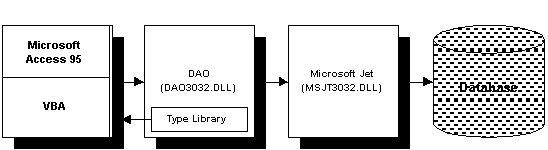
Figure 1 - Component Interaction
DAO 3 also introduces the concept of dual type libraries. A type library (or typelib) allows an in-process server to expose its functionality to calling applications. It is through the typelib that an application such as Microsoft Access knows how to call DAO. Microsoft has decided to offer two typelibs for DAO in Microsoft Access 95. The first, known as the "compatibility" typelib, contains definitions for all Data Access Objects, including those that are now considered obsolete. For example, in Access 1, you probably used the ListFields() method to retrieve a list of table fields. With the advent of Access 2 and DAO, you started using the Fields collection of a TableDef object to achieve the same results.
By using the Compatibility typelib, your existing code that uses these older methods will still work. However, Microsoft is anticipating that in future versions of DAO, these obsolete methods will no longer be supported. In order to help ease you into the new way of doing things, a second typelib, the "version 3 only" typelib is provided. This typelib removes compatibility with the obsolete functionality. By using this typelib in your application, you can quickly determine where the obsolete functionality exists in your code-when you try and compile your modules, Access will flag them as compile-time errors.
DAO version 3 is not as revolutionary an upgrade as version 2 was. Rather, it is an evolutionary change that adds new functionality to the existing architecture. This section outlines some of this new functionality
The Errors Collection
A new collection, called Errors, has been added to the DBEngine object. This collection contains an Error object for each error that has occurred in Microsoft Jet. You can use this collection to enumerate and identify errors. The following code illustrates this:
Function ShowErrors ()
  Dim intCounter As Integer
  Dim errCurrent As Error
  ' Loop through all the errors
  For intCounter = 0 to DBEngine.Errors.Count - 1
    ' Set an error object
    Set errCurrent = DBEngine.Errors(intCounter)
    ' Print the error name, description and source
    Debug.Print errCurrent.Name
    Debug.Print errCurrent.Description
    Debug.Print errCurrent.Source
  Next intCounter
End Function
As each Jet error occurs, the Errors collection is cleared and new error objects are placed in the collection. There can be several related Error objects in the collection for each error that has occurred. Error objects also contain properties that allow you to determine the Help file and Help Topic ID for the error. This is useful if you want your code to display the appropriate page in the DAO Help File when an error occurs.
The following diagram illustrates the new Errors Collection placement within the DAO hierarchy.
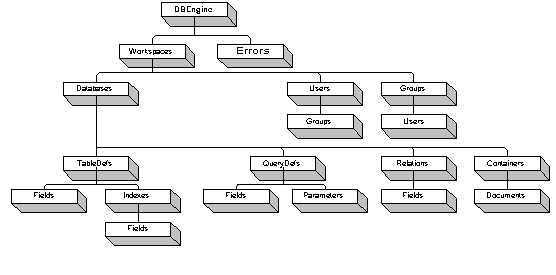
Figure 2 - The DAO Hierarchy
Linking to New Database Types
Microsoft Jet version 3 supports a new set of external data types you can link to. Note that the "attach" terminology from Access 2 has changed to "link" in Access 95. In addition to the external data sources supported in Access 2.0, you can now link to:
- Text Files (read-only)
- Microsoft Excel spreadsheets
- Lotus 123 WK… spreadsheets
These links behave the same way that linked tables do. You can use DAO to link, un-link, or re-link the external data source, and operate on the underlying data using Recordset operations.
New Properties and Methods
A variety of objects have new properties and methods in version 3 of DAO. The following table lists some of the highlights:
| Object | New Functionality |
| DBEngine | You can specify a default user name and password for new workspaces opened through code. This allows you to omit the user name and password parameters for subsequent calls to the CreateWorkspace() method. |
| Workspace | You can now assign a password to the database itself. Without this password, the database cannot be opened. The Workspace object has been updated to allow you to specify a database password in the Connect property. |
| Database | Replication features add a set of new properties to database objects. These properties allow you to control how replication works on a database. The new RecordsAffected property returns the number of records changed by the last Executestatement. The NewPassword method allows you to set or change the database password. |
| Recordset | You can retrieve rows from a Recordset into an array with the new GetRows method. The previously undocumented PercentPostion and AbsolutePosition properties are now supported. The PercentPosition property shows a percentage indicating your position in the recordset, and the AbsolutePosition property indicates the current record number in the recordset. The new EditMode property allows you to determine the current editing state of a record in a recordset. You can create a copy of a querydef used to populate a recordset using the new CopyQueryDef method. |
| TableDef | Various replication properties have been added to allow you to control how tables are replicated. |
| Index | The new DistinctCount property returns the number of unique values in an index object. |
| QueryDef | You can determine if a SQL pass-thru query returns records with the new ReturnsRecords property. The new RecordsAffected property returns the number of records changed by the query object. |
| Container | The new Inherit property can be used in conjunction with the Permissions property to tell Microsoft Jet how to automatically apply permissions to new document objects. |
| Document | Container and Document objects support the new AllPermissions property. This property represents all the permissions a user has on an object by looking at both the user's permissions and the user's group permissions to an object. A new document, called SummaryInfo has been added to the Databases container to store information about the database such as "Title", "Author", and "Subject". This information is similar to the information Microsoft Word allows you to store with a document. |
Using the New VBA Syntax
Visual Basic for Applications (VBA) is one of the most exciting new features of Access 95. While VBA enhancements are not technically part of DAO, they have a place in any discussion of DAO. Because support for collections is built into the language, the DAO hierarchy is easily manipulated using VBA. The biggest enhancement is the For…Each construct. In Access Basic, you used to have to write code like this to iterate a collection:
For Each intCounter In dbCurrent.TableDefs.Count - 1
  Debug.Print dbCurrent.Tabledefs(intCounter).Name
  Debug.Print dbCurrent.Tabledefs(intCounter).Connect
  ' and so on
Next intCounter
' and so on
Next intCounter
With VBA, you could rewrite this to:
For Each tblTemp In dbCurrent.TableDefs
  Debug.Print tblTemp.Name
  Debug.Print tblTemp.Connect
Next tblTemp
In this example, VBA is automatically setting the tblTemp object variable to each tabledef in the database. This works equally well with any object in the DAO hierarchy-not just tabledefs. This syntax allows you to simplify your code and make it more readable and maintainable.
Additionally, the new With…End With construct. Imagine that you had a number of properties to set on a field object. With Access Basic, you would write code like this:
dbCurrent.Tabledefs("Customers").Fields("LastName").Caption = "Enter the last name"
dbCurrent.Tabledefs("Customers").Fields("LastName").ValidationRule = strRule
dbCurrent.Tabledefs("Customers").Fields("LastName").Size = 20
' and so on
With VBA, you could rewrite this to:
With dbCurrent.Tabledefs("Customers").Fields("LastName")
  .Caption = "Enter the last name"
  .ValidationRule = strRule
  .Size = 20
End With
You can see the With…End With syntax allows you to perform multiple operations on an object without having the name the object in each line of code.
Finally, you can now pass objects between procedures in your VBA code in a generic fashion. This may seem like a small change, but it opens up great new possibilities in writing re-usable code. For example, in Access 2, if you wanted to write a procedure that would list all of the properties of a given object, you would have to write a long procedure full of Select…End Select statements to operate on different types of objects. You had to do this because you couldn't pass a generic object to the procedure, you had to pass a specific object, such as a Tabledef or a Querydef. The following code sample illustrates this:
Sub ShowAllProps (strType As String, strName As String)
  Select Case strType
    Case "Table"
      Set tblTemp = dbCurrent.Tabledefs(strName)
      For intCounter = 0 To tblTemp.Properties.Count - 1
        Debug.Print tblTemp.Properties(intCounter).Name
      Next intCounter
    Case "Query"
      set qryTemp = dbCurrent.QueryDefs(strName)
      ' and so on
  End Select
End Function
You would then call this procedure like this:
For intCounter = 0 to dbCurrent.Tabledefs.Count - 1
  Call ShowallProps ("Table", dbCurrent.Tabledefs(intcounter).Name)
Next intCounter

For intCounter = 0 to dbCurrent.Querydefs.Count - 1
  Call ShowAllProps ("Query", dbCurrent.Querydefs(intCounter).Name)
Next intCounter

' and so on
With VBA, you can pass an object, as a generic Object variable object, to a procedure. So the ShowAllProps procedure could be changed to:
Sub ShowAllProps (objTemp As Object)
  Dim prpTemp As Property
  For Each prpTemp In objTemp.Properties
     Debug.Print prpTemp.Name
  Next prpTemp
End Sub
And you could call it like this:
For Each tblTemp in dbCurrent.Tabledefs
  Call ShowAllProps (tblTemp)
Next tblTemp

For Each qryTemp in dbCurrent.Querydefs
  Call ShowAllProps (tblTemp)
Next qryTemp

' and so on
You can see from this example that you can write re-usable procedures that can work on any object type without having lots of special case code.
Another hot new feature in Access 95 is database replication. Using replication you can create a set of replicated databases that Microsoft Jet can automatically synchronize at regular intervals. You can use replication to:
- Manage data among multiple offices.
- Manage data among mobile users, such as a sales staff with notebook computers.
- Support "hot" backups that make archival copies of data while the database is in use.
- Manage application changes and updates, such as new table definitions, or new forms and reports.
Although Microsoft Access 95 provides sophisticated user-interface driven tools to implement and manage the replication process, many developers will be heartened to hear that replication is also fully accessible through DAO. Version 3 of DAO includes numerous extensions that make DAO replication-aware. You can use DAO to:
- Convert a database into a replicable database.
- Create additional replicas.
- Synchronize replicas.
- Modify replication-specific properties of a database.
One of the common questions developers ask is "How can I open and use Access databases using C++?" Up to now, the answer has been: "Use ODBC". Unfortunately, this approach has not been popular because of performance reasons, and because DAO cannot be accessed through ODBC. Since DAO is now an in-process server, it can be used from other programming languages. Microsoft Visual C++ version 4.0 offers two ways to access your databases. The first involves using the Microsoft Foundation Classes. The second allows you to make DAO calls to a database from your C++ code much as you would using DAO from Visual Basic of Microsoft Access.
The DAO Software Developers Kit that allows you to do this ships with Microsoft C++ version 4.0.
While the DAO development team has made great efforts to ensure backward compatibility with previous versions, there are some changes you should be aware of before you migrate to DAO version 3. This section covers these issues.
The "Version 3 Only" Typelib
As mentioned earlier, you can opt to use the "version 3 only" typelib for DAO. This typelib does not support older methods and objects-they are not considered obsolete. The following table lists these obsolete objects and shows you which object to use instead:
| Obsolete Object or Property | Use This Instead: |
| DBEngine.FreeLocks | Idle |
| DBEngine.SetDefaultWorkspace | DefaultUser/DefaultPassword properties |
| DBEngine.SetDataAccessOption | IniPath property to point to the registry where settings are now stored. |
| Database.BeginTrans | Workspace.BeginTrans |
| Database.CommitTrans | Workspace.CommitTrans |
| Database.CreateDynaset | Database.OpenRecordset of type dbOpenDynaset |
| Database.CreateSnapshot | Database.OpenRecordset of type dbOpenSnapshot |
| Database.DeleteQueryDef | Delete method of the QueryDefs collection. |
| Database.ExecuteSQL | Database.Execute method and Database.RecordsAffected property. |
| Database.ListTables | Database.TableDefs collection |
| Database.OpenQueryDef | Database.QueryDefs collection |
| Database.OpenTable | Database.OpenRecordset of type dbOpenTable. |
| Database.Rollback | Workspace.Rollback |
| ListFields method of the Table, Dynaset, and Snapshot objects | Workspace.Rollback |
| ListFields method of the Table, Dynaset, and Snapshot objects | Recordset.Fields collection |
| Table.ListIndexes | TableDef.Indexes collection |
| QueryDef.CreateDynaset | QueryDef.OpenRecordset |
| QueryDef.CreateSnapshot | QueryDef.OpenRecordset |
| QueryDef.ListParameters | QueryDef.Parameters collection |
| Dynaset object | Dynaset-type Recordset object |
| Snapshot object | Snapshot-type Recordset object |
| Table object | Table-type Recordset object |
| CreateDynaset method of the Dynaset and QueryDef objects | Recordset.OpenRecordset with dbOpenDynaset parameter. |
| CreateSnapshot method of the Dynaset and QueryDef objects | Recordset.OpenRecordset with dbOpenSnapshot parameter. |
Using Constants
With the inclusion of VBA in Access 95, Microsoft has adopted a new style of constant naming. Constants are no longer in all capital letters, and don't use underscore characters. For example, where you used to use:
DB_OPENRECORDSET
you would now use
dbOpenRecordset
Constants in databases created with previous versions of Microsoft Access will not automatically be converted to the new constant format, but old constants will continue to work without errors. To ensure that your databases will work under future versions of Access, it's recommended that you use the new format when writing code.
Use of the Registry
All 32 bit applications and components used by Microsoft Access 95 store their settings in the System Registry. Initialization files (INI) are no longer used. As such, settings for Microsoft Access 95, Microsoft Jet version 3, and DAO version 3 are stored in the registry under the following trees:
Microsoft Access 95:
\HKEY_LOCAL_MACHINE\SOFTWARE\Microsoft\Access\7.0
Microsoft Jet and DAO:
\HKEY_LOCAL_MACHINE\SOFTWARE\Microsoft\Jet\3.0
If you have code to access INI files to retrieve and set configuration information, you need to update this code to work with the registry.
Licensing Issues
Now that DAO is considered a stand-alone component that can be used by a variety of environments, Microsoft has instituted a licensing policy for it. Fortunately, this policy will rarely affect your Access applications.
If you use DAO in Microsoft Access, or in runtime applications distributed using the runtime component of the Microsoft Access Developers Toolkit, the necessary components to use DAO are automatically included. However, you should note that DAO shipped with Access runtime applications is only usable by your application. You application's users cannot use DAO for their own applications, unless they have a licensed copy of DAO (such as one purchased as part of Access or Visual Basic).
If DAO version 3 is any indication, it is obvious that the Data Access Retrieval Technology team at Microsoft has been hard at work. With all the new functionality, you will find that several problem areas in previous versions have been addressed. The new Errors collection will assist you in developing more robust applications, and the new VBA container syntax will make your code easier to read and maintain. Finally, the new properties and methods expand an already powerful object model.
Copyright © 1998, FMS Inc. All rights reserved. This information may not be republished, reprinted or retransmitted in any form without the express written permission of FMS Inc. The information provided in this document is provided "as is" without warranty of any kind.
 Latest Newsletter
 Demos
Demos
 Microsoft Access Developer Help Center
 Microsoft Access Query Help Center
 MS Access to SQL Server Upsizing
 Microsoft Outlook Tips
 Technical Papers
 Tips and Techniques
 Videos
Connect with Us
 Email Newsletter
 Developer Team Blog
 Facebook
 X/Twitter
 Support Forum & Tickets
Additional Resources
 Book
Book Links to Related Sites
 My FMS
Thank you! Thank you! I just finished reading this document, which was part of a link in the recent Buzz newsletter. I have printed it for others to read, especially those skeptical on the powers of Access and its capabilities.
Darren D.
 All Our Microsoft Access Products



