



Microsoft Access Bracketed and Formatted VBA Module Printout
Even if your Microsoft Access modules or classes are a complete mess (even if it's all left aligned or misaligned), the powerful Bracketed Module Printout report in Total Access Analyzer properly indents it and shows programming loops so you can read the code more efficiently.
See every VBA programming loop, embedded loops, and exits from them in colored brackets. No matter how your code is originally indented, Total Access Analyzer properly indents each loop.
Easily see and understand complex logic structures, and find buried Exit statements pointing to the loop it exits, like the "Exit Function" example below. All the lines are numbered making it easy to reference.
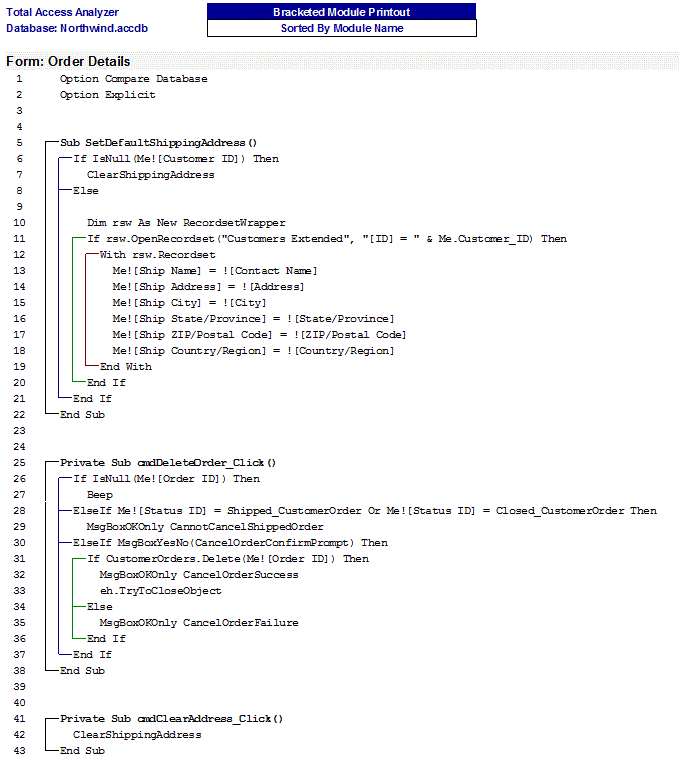
Exit Function and Exit Sub
In the example below, notice the Exit Function command that exits the procedure in the middle. Procedure exits like this are considered sloppy programming and should be avoided. Read this tip on Avoiding Exits in the Body of Procedures in VB6/VBA for more information.
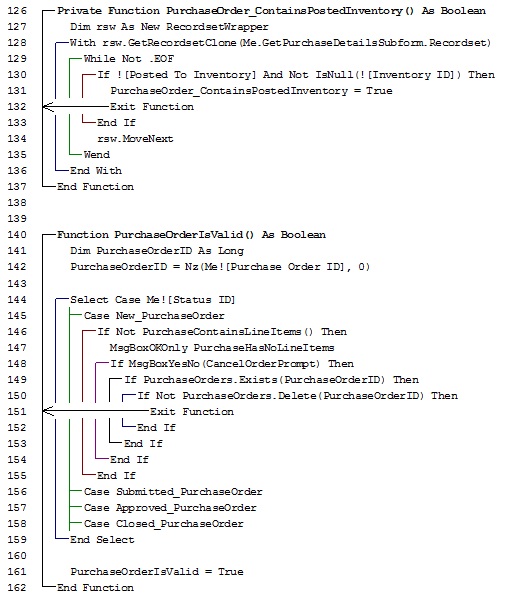
A related report which prints the code without adjusting for indentations is the Standard Module report.
Additional Tools
- If you want to cleanup your VBA code and apply standardized coding styles, check out our Total Visual CodeTools' VB6/VBA Code Cleanup feature.
- Total Access Analyzer and Total Visual CodeTools and are part of the Total Access Developer Suite and Total Access Ultimate Suite.
Microsoft Access 2019 / 365 Version is shipping!

Version 16.7 for
Microsoft Access 2016
Version 15.7 for
Microsoft Access 2013
Version 14.7 for
Microsoft Access 2010
Version 12.97 for
Microsoft Access 2007
Version 11.95 for
Microsoft Access 2003
Version 10.8 and 9.8 for
Access 2002 and 2000

Awards and Reviews



"Total Access Analyzer is an amazing product that I've relied on and recommended for years. It's a huge time saver."
Sal Ricciardi, Programming Writer, Microsoft Corporation
Analyzer Info


Why Analyzer?
Additional Info




