



Total Visual SourceBook Product Fact Sheet
This document provides a detailed review of Total Visual SourceBook and how it helps you develop Access, Excel, Office, VBA, and VB6 applications more efficiently.
Contents
- Introduction
- What's New in This Version
- Included Code
- The Code Explorer
- Managing Your Own Code
- Sharing Code with Others
- Conventions and Style
- Technical Details
- Included Documentation
- Awards and Feedback
- Purchasing and Pricing
- Conclusion
Introduction
Total Visual SourceBook is the ultimate code library for VBA/VB developers, teams and enterprises--providing a complete solution to your coding needs for Access/Office 2007, 2003, 2002, & 2000 and Visual Basic 6
The Best Collection of Truly Useful Code
Shave weeks off your development projects by using our ready-to-run
code. Every major area of software development is covered, from ADO to XML,
with 200+ modules/classes and 100,000+ lines of code in 45+ categories with
almost 20,000 lines of example code.
Manage Your Own Code
Tired of digging for code you know you've already written? Use the Total
Visual SourceBook Repository to store, index, and manage all your code in a
shared environment. Track author, creation and modification dates, comments,
examples and more.
Runs Directly in the Integrated Development Environment (IDE)
Total Visual SourceBook is completely integrated with the Visual Basic
IDE available in Access/Office VBA & Visual Basic 6. Start it as an add-in and
its always ready to get you to the code you need!
Source Code Exchange
The Source Code Exchange (SCE) feature simplifies the process of sharing code when you aren't connected to your network. Take any code from SourceBook and package it into an SCE file--code, comments, and author information are automatically included. Then email your SCE file or put it on your website. Other Total Visual SourceBook users can import SCE files and handle new and modified code with ease.
What's New in This Version
Total Visual SourceBook 2007, version 12, has many new features:
- Supports Office/Access 2007. Also supports Microsoft Office 2003, 2002 (XP), 2000, and Visual Basic 6 (VB6)
- Lots of new code:
- Code for Office/Access 2007, including support for the Access ACCDB database, tables with new field types such as multivalue and attachment fields, ribbons, etc.
- Startup routines for Access applications to disable the close button, hide the navigation pane, relink tables, etc.
- Additional database code for DAO and ADO approaches
- Additional support for using Access Data Projects (ADPs)
- Significantly expanded code for Outlook with routines to manage email, calendar, contacts, notes, tasks, and folders
- General code for searching Google and using Twitter
- Reformatted code with fewer line continuations and wider code lines for wide screen monitors
- Enhanced Code Explorer with Vista and Windows 7 support
- Improved support for applying your custom error handling routines for all the source code we provide
- Enhanced documentation
For more information, visit New features in Total Visual SourceBook 2007.
Included Code
This section lists the major areas of included code. For a complete list, visit the List of All Code.
Total Visual SourceBook’s source code library contains an extensive set of ready to run code. This section highlights the solutions that are available. For a complete list of every class, module, and procedure, along with complete documentation, visit List of All Code.
ActiveX Data Objects (ADO)
ADO is now established as the
data access layer of choice. Total Visual SourceBook has thousands
of lines of code for working with ADO against both SQL Server and
the Jet database engine. Code is included for working with
connections, commands, queries, recordsets, and more.
Data Access Objects (DAO/Jet Engine)
Work with Jet/Access
databases and objects, attached/linked tables, ODBC data sources, and
security. Repair, compact, encrypt, and decrypt databases. Extract minimum,
maximum, average, and other statistical results from tables. Find duplicates
in tables, retrieve random records, and use recordsets in index order.
Detect record numbers and counts, and export data to external files. Get
object definition information including table structures, index layouts, and
query definitions.
Access
New code for working with Access 2007 is included.
Code for working with forms, reports, macros and modules makes it easy to
get you Access application up to speed in record time. Also included is a
full set of information routines to find out exactly how your database is
structured.
Outlook
Need to send a simple email? No problem: code is
included for sending mail with Outlook. What about advanced emailing with
multiple destinations, cc/bcc addresses and attachments? That's covered too,
along with code for dealing with the Calendar (appointments and event
scheduling), Contacts, Tasks, Task Requests, Notes. and Folder Management.
Excel
Fully-functional class modules make working with Excel
data super easy. Code is included to create, modify and save workbooks,
transfer data from tables to cells, and a full range of printing and
formatting options.
Word
Need to customize your mail merges? How about
programmatically creating documents, or modifying existing ones? Our code
for Word makes document management and creation as easy as plugging in
a module.
VB6 Application Techniques
Launch and monitor programs, access
e-mail and web pages, handle multiple instances of programs, close forms on
exit, and handle debugging from VB6’s editor.
VB6 Forms and Controls
Move captionless forms with a mouse. Save
and restore size and position. Make forms transparent. Supercharge treeview
and listbox controls. Enhance VB controls with binary searches, dropdown
routines, incremental searches, and string finds. Set text box controls to
filter alpha or numeric values, force upper or lower case, and save/retrieve
values to/from disk.
Graphics
Use the Windows Graphical Device Interface (GDI) to
draw arcs, chords, ellipses, flood fills, and more. Draw control edges and
individual pixels, fill rectangles, perform gradient fills, and tile and
rotate pictures and text. Simulated control routines make it easy to blast
lightweight windowless controls onto your forms for optimum performance.
Date & Time
Perform business day math including user-defined
holidays. Work with dates and times using native commands. Use code-based
high resolution timers to get around VB’s internal timer limitations.
Error Handling
Maintain state information about your
application for current procedure name, the call stack, error information,
and system information. Implement our error handler to provide detailed
information written to a file when your application encounters an error.
Encryption and Compression
Compress and decompress data using
Huffman, LZ, RLE, and UUEncode algorithms. Encrypt data with serialized
passwords. Generate checksums using CRC16 and CRC32 techniques.
Abstract Data Types
Create a history list to manage recently
used items, or a bit array to efficiently manage storage. Manage data with
queues and stacks.
Data Type and Unit Conversion
Work with bits, bytes, and binary
numbers. Safely convert between data types, convert units of measure, and
convert to and from EBCDIC and overpunched formats. Convert among binary,
octal, and hexadecimal, and convert to/from Roman numerals.
File and Disk Operations
Manipulate files, disks, and folders
using native VB commands. Use the Windows API to get file and disk
information, including drive type, label, serial number, and free and total
space. Change drive labels and detect if a floppy disk drive is ready. Call
the Win32 API to use the Windows Explorer shell to provide file and folder
manipulation, work with the Recycle Bin, and get the paths of various system
directories.
Internet and Web
Work with HTTP and FTP sources and the
Internet Explorer and Web Browser controls for flexible web-enabled
applications.
Search and Sorting
Quick and efficient searching techniques
such as Boyer-Moore, fuzzy matching, MetaPhone and Soundex phonetic
matching, and binary and variant searches. Sorting code is rounded out with
the standard bubblesort, quicksort and shell sort algorithms.
String Handling
Parse, tokenize, and de-tokenize string data.
Perform search and replace operations, evaluate command line arguments, and
concatenate strings much faster than standard VB string routines. Generate
random passwords, get number suffixes as text, pad, strip, and remove nulls
from strings.
Plus Hundreds of additional solutions including:
Printing and Fonts
Code Explorer
Code Explorer is the user interface for Total Visual SourceBook and organizes all the source code. Use the Code Explorer to find the code you need, export it to your application, and manage your own code.
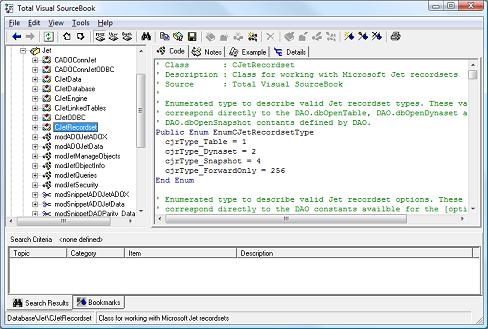
Code Explorer
Window
This is where you do most of your work. Code Explorer is used to find Total Visual SourceBook's own procedures as well as to create, copy, and edit your own procedures. The Code Explorer interface is divided into three main areas:
- The Treeview Window shows all topics, categories, classes, modules, and individual procedures.
- The Information Window shows detailed information about the current item selected in the Treeview. Details include the code, notes, and example code.
- The Tracking Window at the bottom shows Search Results and all the Bookmarks you defined.
Dual Modes
Code Explorer can run in standalone mode when invoked from the Windows Start Menu, or can run in "integrated" mode when called from you development program's Integrated Development Environment.
Finding Code
Total Visual SourceBook includes a powerful search capability, making it fast and easy to find the code you need. Simply select Search from the menu, and you can search by a variety of criteria. Total Visual SourceBook displays search results directly in the Code Explorer in the Search Results pane at the bottom of the form. This makes it easy to navigate through search results without having to switch to another window.

Code Explorer Window
Using Code
Once you have found the code you need, you can export it using a number of modes:
- Export directly to Visual Basic, Access, Excel, Word, Outlook, or any other supported IDE.
- Export to the Windows clipboard.
- Export to a file.
- Export to a Source Code Exchange file.
Managing Your Own Code
In addition to the extensive library of built-in code, Total Visual SourceBook includes complete facilities for managing your own code. You can add:
- Modules
- Classes
- Procedures
- Code Snippets
- Examples
- Documentation
- Security Settings
Additionally, Total Visual SourceBook automatically maintains administrative information with your code for modification and creation dates, and code author name.
You can add code to the Total Visual SourceBook repository in one of two ways:
- Select Add from the Code Explorer Menu, and type or paste code into the Add/Edit dialog.
- Import code into Total Visual SourceBook directly from Visual Basic, Microsoft Access, or any of the other supported Integrated Development Environments.
The FMS Rich Text Editor
When you add your own code to Total Visual SourceBook, you can supply notes to describe it. Your notes can be plain text, or you can use Rich Text to add fonts, colors, bold face, italics, paragraph alignment, indentations, tabs, bullet points, etc. You can even add graphics, "live" hyperlinks, and OLE objects.
The built-in FMS Rich Text Editor gives you these features and works like other text editors such as WordPad or Microsoft Word. As such, we do not go into a great detail on each feature of the editor or how to use a word processor. Instead, the main functions of the editor are described as they are listed on the menus.
Sharing Code with Others
The Total Visual SourceBook Code Repository is multi-user ready and can be shared among multiple developers. This lets the senior developers share their code among the team and not get pestered by repeated requests for their code. The person adding the code can also designate whether other developers have the right to modify or just view it to prevent the new hire from modifying their code.
To use Total Visual SourceBook in a multi-user team environment, simply install your code database on a shared drive using our Code Location dialog. Then have all team members point their installation of Total Visual SourceBook to the shared drive--its as simple as that.
Source Code Exchange
Total Visual SourceBook Source Code Exchange files (SCEs) provide an
easy way to share code among your colleagues, or to publish your code on
a disk file or web page. SCEs are packages of code and notes extracted
from a Total Visual SourceBook user code database.
Because Source Code Exchange handles replicating code and notes, you
can use it to keep multiple versions of code in sync. Some common uses
for SCE files are:
- Send updated code to offsite developers
- Share new techniques with other members of your programming team
- Create subject-matter specific code routines for easy inclusion in a project
- Post your own code on the web
In addition, Total Visual SourceBook code library updates are provided in the form of SCE files that you may obtain from our product support web site.
Conventions and Style
All developers have their own style of writing code. In creating Total Visual SourceBook, we tried to take this into account. The style, comments, and error handling for each procedure are what we consider to be the best mixture of common practices, while allowing you to use and customize the code with the least disruption to your programming system.
Consistency
As we develop code for Total Visual SourceBook, we place a high premium on consistency in the style and techniques of the code in Total Visual SourceBook. After you use one procedure or class from Total Visual SourceBook, it should be very easy to find and use another one. There should be no arbitrary differences in naming conventions, commenting, and functional behavior.
If several related procedures are included in a module, you can be sure that they always work similarly. Our assumptions and standards are described in this section, so you can easily convert from our standards to yours, if your situation requires it. For example, if you prefer a different variable naming convention to the one we use, it should be easy for you to translate our system to yours.
Error Handling
There are as many approaches for error handling as there are programmers. Each of us implements error handling in our own way because error handling logic is much more tied to the specific procedure than are naming conventions. Because of this, we tried to keep our error handling from getting in your way. We accomplish this by taking a minimalist approach to error handling-we don't want you to deal with complex error handling setup and maintenance every time you use the product's source code.
However, we strongly feel that every non-trivial subroutine, function, and property procedure should have a minimum level of error handling which accomplishes the following goals:
- Identify the name of the procedure with the error
- Display the error code and error message
- Prevent your program from crashing with a fatal run-time error
The following is the structure of the standard generic error handling style used in the code in Total Visual SourceBook:
Function GenericFunction() as
Boolean
' Comments: Comments about GenericFunction
' Params : None
' Returns : True or False
' Source : Total Visual SourceBook
On Error GoTo PROC_ERR
Debug.Print 1 / 0
PROC_EXIT:
Exit Function
PROC_ERR:
MsgBox "Error: " & Err.Number & ". " & Err.Description,
, "GenericFunction"
Resume PROC_EXIT
End Function
Structured Programming Style and Formatting
The procedures, functions, and class methods used in Total Visual SourceBook follow the generally recognized standards for structured programming style. The following list includes the standards we use:
- Each subroutine or function has only a single exit point. "Exit Sub" and "Exit Function" are not used, except in the context of a single defined exit label.
- The "GoTo" statement is not used except to enable a module-level error handler. Similarly, the "GoSub" statement is not used. In rare cases, an unconditional branch to the procedure exit label may be used in order to avoid deeply-nested conditional code.
- Line labels are not used except for procedure handling exit points.
- There is no reliance on public or global variables for procedures. A class may have static shared data associated with it, but procedures and functions have no external data dependencies.
We use standardized formatting for items such as indenting, where local variables are declared, how in-code comments are formatted, and how error handling is enabled. While the standards may not match yours, we hope our consistent use of the same standards throughout the code make it easy for you to understand and use it.
Naming Conventions
Naming conventions are a touchy area for most developers. Opinions on the proper use of naming conventions vary much more widely than the consensus on other programming areas, such as the use of comments and structured programming style.
You may be among the developers who strongly believe that there should be no naming conventions at all. Or you may use a convention borrowed from the Microsoft-created "Hungarian" style directly from an entirely different language like C++. Some naming conventions are more idiomatic to the Basic language, such as using type declaration characters on variable names (Dim Name$ for example). Or you may be using a completely "non-standard" style that is dictated by the organization for which you develop.
As with many other areas of programming, the true value of using naming conventions may be the consistency they provide, rather than the merits of any one particular standard.
That said, we had to choose one consistent naming convention for
the procedures and classes in Total Visual SourceBook. The style we
selected is a variation on the recommendations that Microsoft makes
in the "Visual Basic Coding Conventions" chapter of the VB
Programmer's Guide.
These include naming standards for controls, objects, menus,
properties, types, constants, and other standard objects. The naming
conventions also indicate scope, and whether or not the variable is
part of an array or a collection.
Technical Details
This section covers the technical aspects of Total Visual SourceBook.
Supported Platforms
Total Visual SourceBook is designed for use with the following development environments:
- Microsoft Access/Office 2007, 2003, 2002, & 2000 (including Access, Outlook, Word, Excel, PowerPoint and FrontPage)
- Microsoft Visual Basic 6.0
- Other VBA Hosts
System Requirements
Total Visual SourceBook has the following system requirements:
- Hardware and operating system supported by Microsoft Office/Access 2007 and Visual Basic 6
- 15 MB free disk space to install the product, and additional disk space to store your code database
Documentation
FMS provides professional documentation for all our products. Total Visual SourceBook comes with the following documentation:- A complete, professionally printed ??? page user guide
- Context-sensitive online help
- Detailed notes and examples for each class and module
Awards and Feedback
Total Visual SourceBook has won numerous industry awards for over a decade:
|
|
|
|
|
|
Best Access Add-In |
Best Office Add-In |
Best Source Code Library |
Reader's Choice |


|
|
|
|
|
|
4.5 out of 5 Stars |
Reader's Choice |
Best Source Code Library |
Best Collection of General Purpose Components |



"Total Visual SourceBook is a valuable tool that I refer to
frequently. It is not only an easy to use reference for reliable
code, it also uses good coding practices that have improved the
quality of my own procedures and applications."
- Norm Chezem, Roseville, CA
- Alex Dybenko, Russia
"It's great! I use it regularly in
Office VBA as well as VB code - just drop the routines in and
they work."
- Jonathan West, MultiLinker, England
"SourceBook is my constant companion as I work on Visual Basic
projects. I’ve never seen a product that addresses the exact needs of a
Visual Basic developer as perfectly as Sourcebook. It’s truly a must-have
for the up-to-date developer!"
- Michael Groh, Technical Editor-Access/Office VB Advisor Magazine
- Steve Boyd, HelpFactory, Inc.
"Congratulations on
another great product! I am excited to see FMS entering the
Visual Basic market. I have been using Total Access software for
several years now. Each FMS product that I have purchased has
been well designed, useful, and every one of them has garnered a
permanent spot in my developer toolbox. SourceBook is no
exception. Thoughtful design, tons of useful routines, and
attention to details are just some of the highlights of this
program."
- Walt Ritscher, Crystal Design Software
- Tom Howe, Control Center Computing, Inc.
"The
product is an extremely valuable aid for anyone doing serious
development in VB with the greatest feature being that you can
customize/extend the code to meet your needs which is something
that is not possible with most third-party products."
- Jeremy Adams, ECX Programmers
"I was very impressed with SourceBook. It was very easy to merge
our corporation’s code library into SourceBook. If you use one
function from SourceBook, it pays for itself!"
- Stephen Forte, The Aurora Development Group
- Nick Jongebloed, IMNET Systems
"Why reinvent the
wheel? Here is what you need, both for newbies and
professionals! Don’t program without it!"
- Asbjoern Aamot, Microsoft MVP for Visual Basic
"SourceBook is a well-designed code repository filled with solid code that
you'll definitely reuse in your other projects. What makes SourceBook
valuable is not only the quality of the code, but the ability to add your
own code routines, share them with your coworkers, and annotate existing
code routines with your comments."
- Rama Ramachandran, VBPJ Buyer's Guide, Product Review
"Smart, innovative and easy-to-use, this product is full of
real-world solutions that you can't find anywhere else...an
invaluable addition to anyone's development toolkit. A must-have!"
- WinPlanet Review
Purchasing and Pricing
|
Total Visual SourceBook Products |
|||||
| License | Price | 2016, 2013, 2010 and VB6 |
2007 | 2003, 2002, and 2000 |
97 & 95 |
 Single Single
|
$399 |

|
|
|
|
|
5 Seat
|
$1299 |
|
|
|
|
|
Upgrades |
|||||
|
Single
|
$299 |
|
|
|
N/A |
|
5 Seat
|
$899 |
|
|
|
N/A |
|
Premium Support Subscription |
|||||
|
Single
|
$299 | More Information | |||
|
5 Seat
|
$999 | ||||
|
Also Available as part of: |
|||||
|
Total Access Ultimate Suite Total Access Developer Suite |
Total Visual Developer Suite Total VB Enterprise Suite |
||||
|
Source Code for 32 and 64-bit Versions of Office/VBA |
|||||
|
Microsoft Office 2016, 2013 and 2010 are available in 32 and 64-bit
versions. The source code library in Total Visual SourceBook
2013 is compatible with 32 and 64-bit Office/VBA. Unless explicitly
specified, all of the source code can be inserted into your projects
and will work for users running either the 32 or 64-bit version of
Office/VBA. This makes it easy to support your users without
worrying about which version of Access/Office they installed.
Note the Visual Basic 6 specific code is only 32-bit compatible since VB6 does not have a 64-bit version. |
|||||
|
Integration with the Module Code Editor (IDE) |
|||||
| Total Visual SourceBook 2013 runs as a standalone program or as an add-in to your VBA/VB6 IDE. The add-in can only run within the 32-bit version of the IDE. If you are using the 64-bit version of Office, Total Visual SourceBook still works on its own, but not within your IDE. | |||||
|
Runtime/Redistributable Version |
|||||
| Source code library material is redistributable royalty-free as long as it is contained in an application that is compiled and the Total Visual SourceBook library code is not redistributed in a readable form. | |||||
|
Licensing Information |
|||||
| Total Visual SourceBook is licensed on a per developer basis. Each developer who runs the program and uses the code must have a license. Read the License Agreement for details. | |||||
Conclusion
Total Visual SourceBook represents the state of the art in integrated code solutions. With its extensive built-in code, and powerful repository features, it offers VBA and VB6 developers a total code solution.
Built upon the foundation of the most successful commercial VBA code library, Total Visual SourceBook provides unprecedented power in code use and management. We invite you to put the product through its paces, and contact us if we can provide any additional assistance in evaluating or deploying Total Visual SourceBook.
Microsoft Access/ Office 2016, 2013, 2010, and 2007 Version
is Shipping!

Supports Access/Office 2016, 2013, 2010 and 2007, and Visual Basic 6.0!

Reviews

Reader Choice
"The code is exactly how I would like to write code and the algorithms used are very efficient and well-documented."
Van T. Dinh, Microsoft MVP
SourceBook Info


Additional Info




