


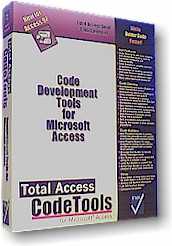
Total Access CodeTools for Microsoft Access 97
Standardize New and Existing Module Code
"FMS is out front with Access add-ins. Total Access CodeTools makes it a lot easier for developers to create and maintain Access applications.
Tod Nielson, General Manager, Microsoft Access Business Unit

Best Access Add-in
Key Benefits
Within one week of using Total Access CodeTools, you will recognize tangible benefits:
- It Takes Less Time To Write Code: Because you can generate entire procedure blocks with the Procedure Builder, coding time is reduced. Additionally, the SQL Builder, Long Text Builder, Message Box Builder and Select Case Builder write 75% of the code you need—automatically!
- Your Application Contains Fewer Errors: Generated code is error-free, and the Code Cleanup tool can add valuable error-checking elements such as error handlers and variable naming conventions.
- Your Applications Is More Maintainable: Because Code Cleanup can standardize all your code to adhere to the standards you define, your application is more maintainable. This is especially important in development environment where multiple programmers are working on the same project. Code Cleanup, and the use of the code builders makes sure that everyone is on the same page.
- Your Code Is More Readable: With the addition of standardized indentation, comments, variable naming conventions, and standardized error handling, the code in your application becomes much easier to read and understand.
Product Summary
Total Access CodeTools is the leading collection of tools for writing and modifying Access module code. Simplify your job of developing Access applications. If you write module code or inherit/maintain module code written by others, Total Access CodeTools is the tool for you!
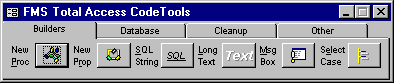
The Total Access CodeTools Toolbar
This powerful collection of tools and utilities makes it easier to:
Ship Robust Applications
- Add error handling to all procedures that lack it. If you are creating databases for others, you know the importance of error handling in every procedure. Manually doing so is extremely time consuming. Let Total Access CodeTools apply the error handling you specify to every procedure. You can even pass your error handler the procedure name!
- Add line numbers to every line of code. This feature is worth the price of the product! With line numbers and an error handler, you can pinpoint the exact line where an error occurs. In most cases knowing the offending line lets you immediately determine the problem ("Wow, how did it get there?"). Eliminate or greatly reduce the need to talk to users, reduce the time you spend replicating crashes, and fix bugs faster than ever!
Quickly Write Solid Code with our Code Builders
- New Procedure Builder to create procedures with error handling and comment structures you specify.
- New Property Builder to create class properties with error handling, comments and variable settings.
- Message Box Builder to visually create MsgBox commands.
- SQL Builder to convert query SQL strings to word wrapped variable assignments.
- and more!
Standardize and Clean Up Code (especially inherited projects you otherwise can't read):
- Standardize indentations (indent IF statements, DO loops, etc.).
- Apply a variable naming convention you specify. For instance, all integers start with "int", strings with "str", globals with "g", etc.
- Add module comment blocks including a list of all procedures in the module.
- Add comment blocks to each procedure.
- Sort procedures (move globals to the top, etc.).
- Split multi-line DIM statements and multi-line commands separated by colons.
- Specify line spacing between procedures.
- Add "Option Explicit" to modules that lack it.
Top Features
Total Access CodeTools provides the features you need to create robust applications from beginning to end. After installing the program, you have a floating toolbar available while you develop your Access applications.
- Code Cleanup
Code Cleanup takes existing code and standardizes it. It's great for cleaning up your old code and especially useful for taking over someone else's work. It applies your standards across all your modules by adding error handling, standardizing indentation, applying variable naming conventions, adding modules and procedure comments, and much more. Most importantly, you can add line numbers to every line of code so your error handler can pinpoint the exact line where a crash occurs. Use this tool on prototype code or inherited projects to quickly apply consistent standards. All parameters are fully user-configurable. Click Here for more information.
- Code Builders
- New Procedure Builder
The Procedure Builder makes it easy to create new procedures that automatically contains all the important elements: A comment block, creation date information, error handling, and naming conventions. Just type in your new procedure name and Total Access CodeTools generates all the code for you. Then press a button and the new procedure is inserted into your module.
- New Property Builder
The Property Procedure Builder does the same thing as the Procedure Builder, but is specifically designed to build Property Let/Set/Get procedures.
- SQL Builder
The SQL Builder takes the SQL string out of any query in your database and converts it to VBA code with line continuation characters and word-wrapping on reserved SQL words such as SELECT, FROM, WHERE, etc.
- Message Box Builder
The Message Box Builder makes creating MsgBox statement easy. Visually create your message box by selecting the icons, buttons, default button, title, message, and other options. Preview and test it. Total Access CodeTools takes care of the details including code to handle the response from the user.
- Other Builders
The Select Case Builder and Long Text builder make inserting new code a snap.
- Constants Generator
The Constants Generator generates the code to initialize constants naming each object in your database. A real must if you want to avoid hardcoding object names in your database code.
- Other Tools
- Bookmarker
BookMarker makes it easy to keep development notes and track tasks on specific objects in your database.
- Access Information Tool
The Access Information Tool quickly displays all the settings and environment options for the current installation of Access and your database. Information on hardware and the operating system is also included to help solve your toughest debugging problems.
- Database Tools
Database Tools give you a convenient launch pad for opening, designing, and copying database objects without having to hunt for the Access database window.
Includes our widely read "VBA Coding Techniques and Tips": 16 techniques for writing better VBA code.
For more detailed information and screen shots of each feature, see our Detailed Product Specifications Sheet.
Code Cleanup
Code Cleanup is one of the most powerful members of the Total Access CodeTools feature set. It allows you to apply a number of operations on all the code in your database, including:
- Adds Option Explicit to Modules
Modules without the Option Explicit setting are the leading cause of bugs in Basic code. You can tell Code Cleanup to add Option Explicit to every module that lacks it. - Add Error Handling to Procedures
Robust error handling is a requirement for professional application development. Unfortunately, it’s a tedious process: you have to write the error enabler, the exit point, and the error handler into every procedure in your database. Code Cleanup can do this for you automatically by adding error handling to every procedure that lacks it. You can use our default error handler, or customize your own. - Standardize Code Indentation
Standardize code indentations including defining how many spaces each indentation level takes. This option also takes care of splitting multiple statements from one line into multiple lines. - Sort Procedures
Define how you want procedures to be sorted within each module. For example, you can have public procedures put first, then property Let/Set/Get procedures, and then private procedures. Additionally, you can specify the order for Let/Set/Get procedures within a single property name. This is a must for large modules—it becomes much easier to find the code you need in a sorted module. - Add Module and Procedure Comments
Add a customizable comment header to the top of each module and procedure. Use our default header, or customize it to fit your needs. Module comments can also automatically include a list of all procedures in a module, including their parameters—a great way to see what's in a module at a glance. Comments can include the current date, and the name of the user. - Apply Variable Naming Conventions
Rename your variables to conform to naming conventions you specify. For instance, if you dim a variable named "Name" as a String, it becomes "strName". The tags are completely customizable and you can use prefixes or suffixes. Use Code Cleanup so all your code is consistent.
Set the Number of Lines between Procedures
With the new VBA Editor's "Full Module View", procedures quickly become non-standard in terms of the number of blanks lines between them. Use this feature to specify exactly how many lines should be between procedures. - Add Line Numbers for Error Detection
Add line numbers to every line of code so your error handler can pinpoint the exact line if your application crashes. Great for debugging and knowing exactly where your program needs to be fixed!
For more detailed information and screen shots, see our Detailed Product Specifications Sheet.
Pricing and Availability
Total Access CodeTools is available for Access 97. Total Visual CodeTools is available for Access 2000 through 2010. This product is available as a single product or as a part of a multi-product suite.
|
Total Visual CodeTools Pricing for Visual Basic (VB6) and VBA such as Microsoft Office/Access/Excel/Word |
|||
| Licenses | Price | 2016, 2013, 2010, 2007, 2003, 2002, 2000, VB6 |
97 |
| Single | $299 | Buy Now | Buy Now |
| 5-Pack | $899 | Buy Now | Buy Now |
|
Upgrades |
|||
| Single | $199 | Buy Now | Buy Now |
| 5-Pack | $899 | Buy Now | Buy Now |
|
Premium Support Subscription |
|||
| Single | $299 | More Information | |
| 5-Pack | $999 | ||
|
Also Available as part of: |
|||
|
Runtime/Redistributable Version |
|||
| Not Applicable | |||
|
Licensing Information |
|||
| Total Visual CodeTools is licensed on a per developer basis. Each developer who uses the program must have a license. |
|||
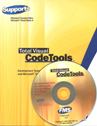
Microsoft Office Access 2016, 2013, 2010 Version
is Shipping

Supports Office/Access 2016, 2013, 2010, 2007, 2003, 2002, 2000, and Visual Basic 6.0!
Also available for
Access 97

Rave Reviews
"Total Visual CodeTools is by far my favorite third-party product."
Alison Balter, Author, Conference Speaker, Instructor

Best Visual Basic Add-In
Rave Reviews
CodeTools Info

Why CodeTools?
Additional Info