



Total Access Speller Version X.5: New Features
With the release of Total Access Speller 2007 for Microsoft Access 2007, we created X.5 versions for Access 2003 and earlier. Many enhancements were added to improve your ability to spell check your MS Access objects.
New versions of Total Access Speller are now available:
- Total Access Speller 2003, Version 11.5
- Total Access Speller 2002, Version 10.5
- Total Access Speller 2000,Version 9.5
Version X.5 Enhancements
- Main Screen Redesign
- Improved Property Spell Checking and Updates
- Other Enhancements
- Pricing and Access Versions
Total Access Speller X.5 includes a completely redesigned user interface to support the sleeker Vista/XP color schemes and look and feel. The main screen reorganizes the separate features of spell checking your objects:
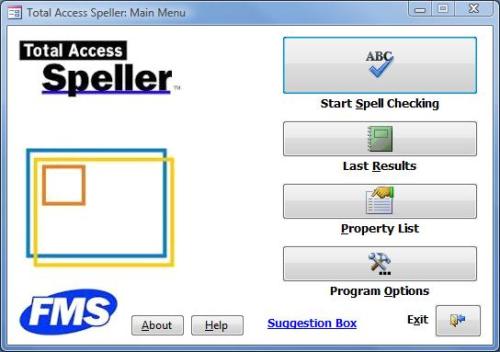
- The main spell checking wizard is under the [Start Spell Checking] button and is similar to what existed in prior versions.
- The [Last Results] button is new and provides a summary of the last set of requested changes with detailed reports of what worked and what failed or requires manual attention.
- The [Property List] feature is removed from the previous version's spell check wizard and placed here since it's not usually modified for each spell checking session.
- The new [Program Options] feature lets you specify the paper size for the reports (US Letter or A4) and how to handle properties on Linked Tables.
In prior versions, changes to certain properties (command bars and controls with hotkeys) were not automatically applied. This is now significantly improved:
- All object property updates are applied
- Updates to linked table properties can be optionally applied
- If a control's caption is updated and it loses its hotkey, a report lists these
- Macro and embedded macro updates cannot be automatically applied because of Access security limitations. A report lists the changes that need to be made manually
A summary screen show the results of the spell checking changes with reports associated with them:
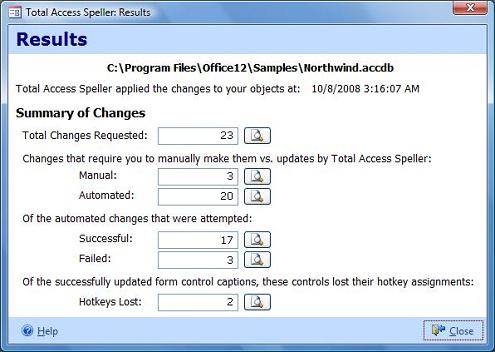
Several reports are available:
- All requested changes
- Requested changes that need to be manually updated
- Requested changes that were automatically applied
- Automated changes that succeeded and failed
(some changes may violate validation rules or permissions) - Any control captions that were changed and lost their hotkey (happens if the letter isn't in the new caption)
- Option to specify how properties of linked tables should be handled
- Option to choose A4 or US Letter size paper for reports
- Rather than storing its temporary data in the Total Access Speller add-in which caused bloat, a separate database is used to store the temporary data in your Application Data folder.
There are many other enhancements to make Total Access Speller better than ever! For a quick overview of Total Access Speller, take the tour.
Pricing and Access Versions
Total Access Speller comes in versions specific to each version of Microsoft Access.
|
Total Access Speller Pricing by Microsoft Access Version |
||||||
| Microsoft Access Version | ||||||
| Licenses | Price | 2016 | 2013 | 2010 | 2007 | 2003 |
| Single | $199 | Buy Now | Buy Now | Buy Now | Buy Now | Buy Now |
| 5-Seat | $599 | Buy Now | Buy Now | Buy Now | Buy Now | Buy Now |
|
Upgrade Between Access Versions |
||||||
| Single | $149 | Buy Now | Buy Now | Buy Now | Buy Now | Buy Now |
| 5-Seat | $449 | Buy Now | Buy Now | Buy Now | Buy Now | Buy Now |
|
Upgrade to Latest within the Same Version |
||||||
| Update 12.7 | Update 11.5 | |||||
| Single | $99 | Buy Now | Buy Now | |||
| 5-Seat | $299 | Buy Now | Buy Now | |||
|
Premium Support Subscription |
||||||
| Single | $299 | |||||
| 5 Seat | $999 | |||||
|
Also available as part of |
||||||
|
Total Access Ultimate Suite Total Access Developer Suite |
||||||
|
Runtime/Redistributable Version |
||||||
| Not Applicable | ||||||
|
Licensing Information |
||||||
| Total Access Speller is licensed on a per user basis.
Each user who runs the program must have a license. Read the License Agreement for details. |
||||||
Microsoft Access 365/2016 is shipping!

Also Available for
Microsoft Access 2010, 2007, 2003, 2002, 2000, and 97

Reviews
"Total Access Speller is a solid product. If you need spell checking in your applications, you should get Total Access Speller."
Paul Litwin, Editor, Smart Access Product Review
Speller Info


Additional Info




