




 Total Access Speller New Features for Microsoft Access 2016, 2013, 2010, and 2007
Total Access Speller is now available for Microsoft Access 2016, 2013 and 2010 with a wide range of new features. Total Access Speller 12.7 for Microsoft Access 2007 was also released with these enhancements. If you have Microsoft Access 2003 or earlier versions, visit our Microsoft Access 2007 new features page for the latest enhancements added in that version.
Enhancements and Features
- Supports the 32 and 64-bit versions of Microsoft Access 2010, 2013 and 2016
- Machine and User Installation Options
- Improved Spell Checking of Macros
- New Option to Ignore Invisible Controls
- Property List Shows Built-In Status
- Take a Tour
- Pricing and Access Versions
Total Access Speller 2010, 2013 and 2016 each includes two programs in one to support the 32 and 64 bit versions of Microsoft Access. Once installed, go to the Database Tools, Add-ins Ribbon to launch it.
Microsoft does not allow 32 and 64 bit versions of the same version of Access to be installed on one machine. The Total Access Speller setup programs detect the appropriate version and installs it on your machine.
The setup program and add-in supports installation for the machine or user. This allows users to run Total Access Speller with or without administrator permissions as set under Windows User Account Control (UAC).
Spell checking has improved for documenting macros including comments and message boxes. Supports standard macros and embedded macros in your forms and reports.
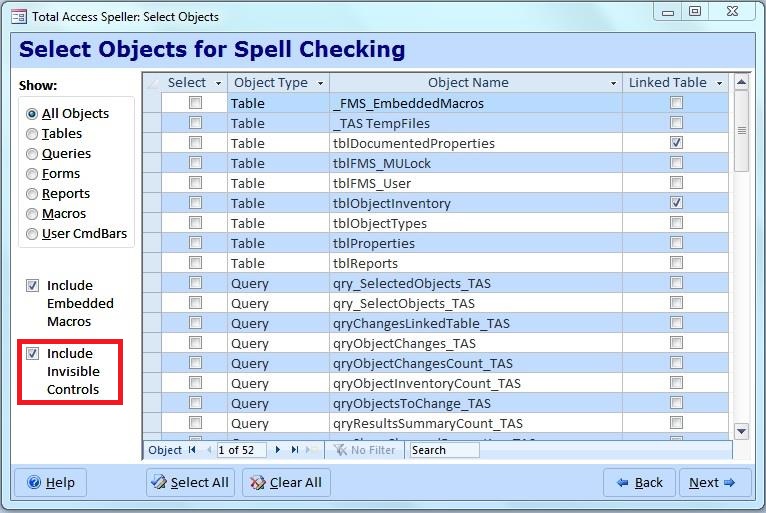
A new option is available to exclude controls with Visible property set to No. This avoids spell checking controls that users never see. Labels associated with controls that are invisible are also excluded. This option is set when selecting objects to spell check:
On the Property List, a new checkbox column shows whether the property is a built-in property or one added by you.
There are many other enhancements to make Total Access Speller better than ever! For a quick overview of Total Access Speller, take the tour.
Pricing and Access Versions
Total Access Speller comes in versions specific to each version of Microsoft Access. It supports all the database formats that version of Access supports.
|
Total Access Speller Pricing by Microsoft Access Version |
||||||
| Microsoft Access Version | ||||||
| Licenses | Price | 2016 | 2013 | 2010 | 2007 | 2003 |
| Single | $199 | Buy Now | Buy Now | Buy Now | Buy Now | Buy Now |
| 5-Seat | $599 | Buy Now | Buy Now | Buy Now | Buy Now | Buy Now |
|
Upgrade Between Access Versions |
||||||
| Single | $149 | Buy Now | Buy Now | Buy Now | Buy Now | Buy Now |
| 5-Seat | $449 | Buy Now | Buy Now | Buy Now | Buy Now | Buy Now |
|
Upgrade to Latest within the Same Version |
||||||
| Update 12.7 | Update 11.5 | |||||
| Single | $99 | Buy Now | Buy Now | |||
| 5-Seat | $299 | Buy Now | Buy Now | |||
|
Premium Support Subscription |
||||||
| Single | $299 | |||||
| 5 Seat | $999 | |||||
|
Also available as part of |
||||||
|
Total Access Ultimate Suite Total Access Developer Suite |
||||||
|
Runtime/Redistributable Version |
||||||
| Not Applicable | ||||||
|
Licensing Information |
||||||
| Total Access Speller is licensed on a per user basis.
Each user who runs the program must have a license. Read the License Agreement for details. |
||||||
Microsoft Access 365/2016 is shipping!

Also Available for
Microsoft Access 2010, 2007, 2003, 2002, 2000, and 97

Reviews
"Total Access Speller is a solid product. If you need spell checking in your applications, you should get Total Access Speller."
Paul Litwin, Editor, Smart Access Product Review
Speller Info


Additional Info




