 Broadcast Microsoft PowerPoint Slide Shows to Remote Viewers for Free using Windows Live ID
Provided by Molly Pell, Senior Systems Analyst
A new feature in Microsoft PowerPoint 2010 allows you to broadcast slide shows to remote viewers over the web. All you need is a Windows Live ID. Microsoft provides a free Broadcast service, and creates the URL for you to share with your viewers.
Just click File, Save & Send, Broadcast Slide Show, Broadcast Slide Show:
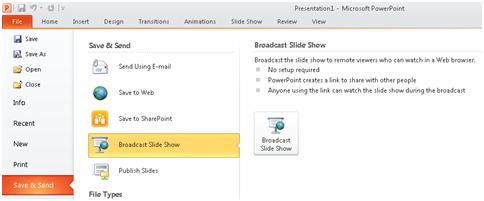
This opens the Broadcast Slide Show dialog:
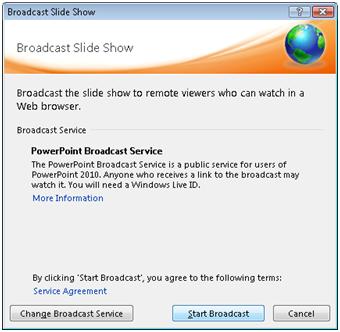
Click “Start Broadcast”, and you’re prompted to log into Microsoft’s broadcast service with a Windows Live ID:
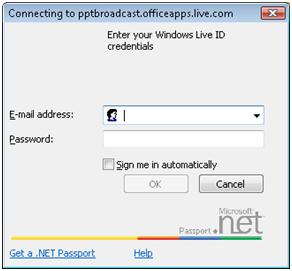
After you log in, your URL is generated and you can share it with your viewers:
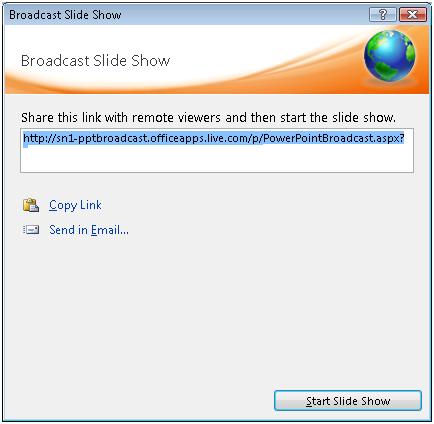
Send this link to viewers, then click “Start Slide Show” to begin your broadcast.
Microsoft Resources
 Additional
Resources for Microsoft Office 2010
Additional
Resources for Microsoft Office 2010
Multiple Microsoft Office 2010 Products
- Quickly Insert Screenshots in Microsoft Excel, Outlook, PowerPoint and Word 2010
- Recover unsaved documents or return to an earlier version of your document in Microsoft Excel, PowerPoint, and Word 2010
 Microsoft
Excel
Microsoft
Excel
 Microsoft
PowerPoint
Microsoft
PowerPoint
 Latest Newsletter
 Demos
Demos
 Microsoft Access Developer Help Center
 Microsoft Access Query Help Center
 MS Access to SQL Server Upsizing
 Microsoft Outlook Tips
 Technical Papers
 Tips and Techniques
 Videos
Connect with Us
 Email Newsletter
 Developer Team Blog
 Facebook
 X/Twitter
 Support Forum & Tickets
Additional Resources
 Book
Book Links to Related Sites
 My FMS
Thank you! Thank you! I just finished reading this document, which was part of a link in the recent Buzz newsletter. I have printed it for others to read, especially those skeptical on the powers of Access and its capabilities.
Darren D.
 All Our Microsoft Access Products



