



Total Access Speller - Spell Check Microsoft Access Tables, Forms, and Reports!
See the
Current Version!
Click Here!
Total Access Speller is ideal for both users and developers...Total Access
Speller is a solid product. If you need spell checking in your applications, you should get Total Access Speller.
- Paul Litwin, Editor, Smart Access Product Review
Total Access Speller is a spell checker for Microsoft Access 1.1 and 2.0 databases. Spell check the data in your tables and on your forms. You can even spell check the labels, captions, validation text, and status bar text on your forms and reports.
Total Access Speller Version 2.0 allows you to spell check forms and reports in design view! You can automatically spell check every label, caption, validation text, and status bar text property. The user dictionary now supports over 20,000 words. For Access Basic programmers, in addition to spell checking multiple controls of the current record in a form, you can now programmatically spell check all the records in sub-forms, continuous forms, and tables.
Total Access Speller is designed specifically for Microsoft Access and is extremely easy to use. An interactive Spell Check Wizard guides you through the process of selecting the table, fields and records to spell check. A programmatic interface allows Access Basic developers to add spell checking directly into their forms.
Spell Check Wizard
Launched from the File|Add-Ins menu, Total Access Speller's Spell Check Wizard guides you through the selection of the table (or query) and text and memo fields to spell check. You can even specify a subset of records to check.
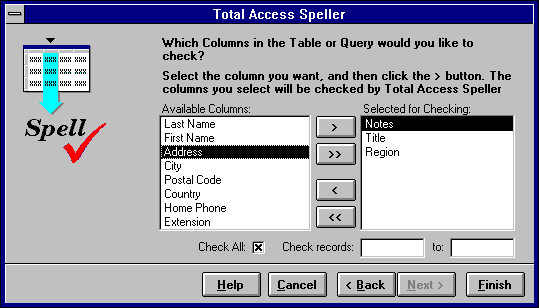
If you are in a field when you launch Total Access Speller, the current field is automatically spell checked. Similarly, if you are in design mode of a form or report, Total Access Speller spell checks every label, caption, status bar text, and validation text in the current form.
Processing Unknown Words
When an unknown word is encountered, this form appears for your decision:
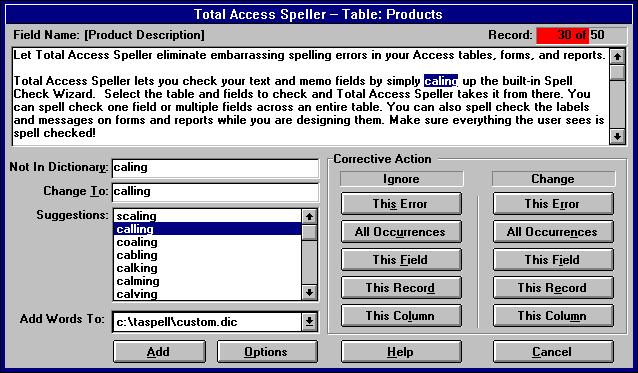
A list of suggested words appears. Features such as Ignore and Change are "table-aware". In addition to handling the current error and all occurrences, Ignore and Change can be limited to just the current field, record, or column (current field for all records). Words not in Total Access Speller's 100,000+ word dictionary can be added to your own custom dictionary.
You can even integrate Total Access Speller into your own forms for your users. Add a spell check button to your form or toolbar, or call it from your Access Basic code. The user manual and demo program show you how to do it.
Features
- Runs directly from the File|Add-ins menu from within Microsoft Access
- Supports Microsoft Access 1.1 and 2.0
- Spell check text and memo fields for one field or multiple fields in an entire table
- Spell check forms and reports
- Includes a 100,000+ word American English dictionary
- When unknown words are encountered, suggestions are provided with options to Ignore, Change, or Add
- Supports a user customizable dictionary
- Detects repeated words
- Option to ignore words in all caps or words with numbers in them
- Multi-user support and respect for field validation rules
- Import and export custom dictionaries
- Fast performance
Pricing and Availability
Total Access Speller is available for Microsoft Access versions 2.0. This product is available as a single license, in a five-user network package, or as a part of the Total Access Enterprise Suite 2.0.
For developers wishing to incorporate Total Access Speller features into their applications, an unlimited runtime license is available for distributing applications to non-Total Access Speller owners or with the runtime version of Microsoft Access.
|
Total Access Speller Pricing by Microsoft Access Version |
||||||
| Microsoft Access Version | ||||||
| Licenses | Price | 2016 | 2013 | 2010 | 2007 | 2003 |
| Single | $199 | Buy Now | Buy Now | Buy Now | Buy Now | Buy Now |
| 5-Seat | $599 | Buy Now | Buy Now | Buy Now | Buy Now | Buy Now |
|
Upgrade Between Access Versions |
||||||
| Single | $149 | Buy Now | Buy Now | Buy Now | Buy Now | Buy Now |
| 5-Seat | $449 | Buy Now | Buy Now | Buy Now | Buy Now | Buy Now |
|
Upgrade to Latest within the Same Version |
||||||
| Update 12.7 | Update 11.5 | |||||
| Single | $99 | Buy Now | Buy Now | |||
| 5-Seat | $299 | Buy Now | Buy Now | |||
|
Premium Support Subscription |
||||||
| Single | $299 | |||||
| 5 Seat | $999 | |||||
|
Also available as part of |
||||||
|
Total Access Ultimate Suite Total Access Developer Suite |
||||||
|
Runtime/Redistributable Version |
||||||
| Not Applicable | ||||||
|
Licensing Information |
||||||
| Total Access Speller is licensed on a per user basis.
Each user who runs the program must have a license. Read the License Agreement for details. |
||||||
Microsoft Access 365/2016 is shipping!

Also Available for
Microsoft Access 2010, 2007, 2003, 2002, 2000, and 97

Reviews
"Total Access Speller is a solid product. If you need spell checking in your applications, you should get Total Access Speller."
Paul Litwin, Editor, Smart Access Product Review
Speller Info


Additional Info




