|

June 2009
For Microsoft Access, SQL Server,
Visual Studio .NET, and VB6 Professionals
 Hi Everyone, Hi Everyone,
I hope your summer is starting off nicely. Last month I
had the pleasure of attending and speaking at the Microsoft
Tech*Ed conference in Los Angeles. Four of my talks were
videotaped and are available online. I hope you find them
useful.
We're also nearing the final stages of completing all our
Access 2007 products. We thank you for your patience and I
hope you'll be as excited as we are by all the new features
and functionality we've added to our Access 2007 product
line.
Best wishes,
Luke Chung
President
Contents
Join the FMS
Development Team Blog!
If you like what you're getting in our monthly email
newsletter, be sure to sign up for an RSS feed from our
blog. We often
announce news, tips and other resources there first. You'll
also be able to converse with our team and share your
thoughts on the topics we cover.
Product Feature: Total Access
Statistics
Microsoft Access queries offer rudimentary data analysis.
For more advanced computations and real number crunching,
programming is required, sometimes lots of it, or you need
to export your data to another program. Designed
specifically for Microsoft Access,
Total Access
Statistics runs as an Access add-in and offers a wide
range of statistical functions to analyze your data. Easily
perform data normalization, rankings, percentiles, frequency
distributions, correlations, confidence intervals,
regressions, ANOVA, and much more. Create your analysis
interactively, see the results in tables, and use the
programmatic interface to embed it in your applications.
Total Access Statistics is available in versions for Access
97 through 2007.
 Videos
from the Microsoft Tech Ed Conference Videos
from the Microsoft Tech Ed Conference
Los Angeles Convention Center (May 11-15, 2009)
FMS President Luke Chung participated on four panel
discussion that are now available online:
 Migrating
Your Data Tier to SQL Server: Strategies for Survival Migrating
Your Data Tier to SQL Server: Strategies for Survival
Learn about the experiences of this panel migrating
applications from to SQL Server from Access, Excel, and
Oracle. Learn when, how, why, and why not. (43 minutes,
blog)
The World Turned Upside Down: Development Strategies
for Lean Times
 Whether
you're an employee, contractor, or business owner,
these economic times are quite challenging. Hear
this panel discuss ways they are coping and how you
can best prepare and protect your future. (51
minutes,
blog) Whether
you're an employee, contractor, or business owner,
these economic times are quite challenging. Hear
this panel discuss ways they are coping and how you
can best prepare and protect your future. (51
minutes,
blog)
 Let's
Talk about Software Consulting as a Business Let's
Talk about Software Consulting as a Business
Discover how these three owners of software
development firms have run their consulting
businesses over the past two decades. Learn about
what they've done to survive past business cycles
and the challenges they face today. (54 minutes,
blog)
 History
of FMS: Surviving Uncertain Times History
of FMS: Surviving Uncertain Times
Learn about our history, successes, and challenges
over the past 23 years. Hear how we've helped our
customers anticipate the evolution of their
applications, and our philosophy of maximizing your
investments in software development.
(28 minutes,
blog)
See all our online
videos
 Purchase
or Upgrade to Our Access 2007 Suites Now Purchase
or Upgrade to Our Access 2007 Suites Now
Because we're close to completing the upgrade of all our
products for Access 2007, and the number of requests from
existing Suite owners, we are offering our Access 2007
suites on a pre-sale basis.
Purchase either Total Access Developer Suite 2007 or
Total Access Ultimate Suite 2007 now and receive all the
shipping versions of the products, plus the remaining ones
as they are released.
Email us for pricing or call us to place an order.
For more information on all our upcoming Access 2007
related products, visit
Schedule for Microsoft Access 2007
 Access
Tip: Take Advantage of the Search Bar in Microsoft Access
2007 Access
Tip: Take Advantage of the Search Bar in Microsoft Access
2007
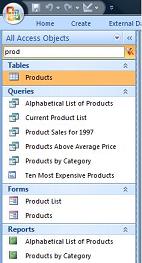
The Navigation Pane is a new feature in Access 2007 that
has existing Access users grumbling about losing
functionality from the Access 2003 database container.
However, it comes with a powerful new feature, the Search
Bar, which lets you find your objects in a whole new way.
Once you're comfortable with it, you'll find it hard to go
back.
The Search Bar makes it much easier to see similarly
named objects across object types. If your database has lots
of objects, this is extremely helpful. Learn more in our
article
Take Advantage of the Search Bar in Microsoft Access 2007
Microsoft Business Certifications
Are you interested in showing your competency with Office
products like Access and Excel? Microsoft is now offering
certifications for your skills in empowering information
workers:
- Microsoft Office Specialists (MOS)
- Microsoft Certified Application Specialist (MCAS)
Learn more about this from the
Microsoft Learning site. There are exams available for
Access, Excel, Outlook, PowerPoint, Word, and Vista. Online
training is also available for
Using Microsoft Access 2007.
 Microsoft
ASP.NET Website Development Services Microsoft
ASP.NET Website Development Services
FMS is well
known for our world class Microsoft Access and desktop
development skills. Did you also know our Professional
Solutions Group is very experienced creating database driven
web solutions using Microsoft ASP.NET and SQL Server?
We recently updated our information on our
Microsoft ASP.NET website development services.
No matter what your organization's size, FMS offers its
world class services professionally and within your budget.
Leverage our experience, knowledge, and existing work for
your success. Please contact us
to learn how we can help your mission on the web.
Thank you for your continued interest in FMS, Inc.
We look forward to hearing from you!
Sincerely,
Your Friends at FMS |




 Email Newsletter
 Developer Team Blog
 Facebook
 Twitter
 Support Forum
 Demos
Demos Microsoft Access
Developer Help Center
Microsoft Access
Developer Help Center Microsoft Access
Query Help Center
Microsoft Access
Query Help Center

 Technical Papers
 Tips and Techniques
 Videos




 Newsletters
