
Try before you buy. We think you'll be quite impressed by our free demo product downloads.
Remember, all FMS products come with a 30 day money back guarantee!
| Products for Microsoft Access |
| Products for Visual Basic 6.0 |
| Advanced Data Visualization |
|
Sentinel Visualizer NEW! |
| Zip Code Data |
 Monitor your databases in real-time with Total Access Admin to see who's
connected and leaving them. Log the user activity and perform tasks when everyone exits like compacting the database. Total Access Admin
improves your Microsoft Access/Jet database maintenance control issues. Simply start the program, point to your databases to prevent new connections to the database,
automatically disconnect idle users, identify dropped or suspect connections, and send messages to application users.
Monitor your databases in real-time with Total Access Admin to see who's
connected and leaving them. Log the user activity and perform tasks when everyone exits like compacting the database. Total Access Admin
improves your Microsoft Access/Jet database maintenance control issues. Simply start the program, point to your databases to prevent new connections to the database,
automatically disconnect idle users, identify dropped or suspect connections, and send messages to application users.
 Simplify and automate Microsoft Access database maintenance!
Total Visual Agent lets you schedule unattended database maintenance
chores such as repairs, compacts, data-only backups, rolling backups, and zip archives. You can also track records, and run macros and command
lines on a schedule. Manage multiple databases and set schedules hourly, daily, weekly, or monthly. A complete audit trail is maintained and you
can even generate e-mail notification of a system administrator if errors are encountered.
Simplify and automate Microsoft Access database maintenance!
Total Visual Agent lets you schedule unattended database maintenance
chores such as repairs, compacts, data-only backups, rolling backups, and zip archives. You can also track records, and run macros and command
lines on a schedule. Manage multiple databases and set schedules hourly, daily, weekly, or monthly. A complete audit trail is maintained and you
can even generate e-mail notification of a system administrator if errors are encountered.
 Discover why Total
Access Analyzer is the winner of every Best Access Add-in Award year
after year! Total Access Analyzer documents and analyzes your Microsoft
Access database to reveal detailed information on each object, extensive
cross-reference on where and how each object is used, and 300 types
of errors and suggestions to fix and improve your database.
Discover why Total
Access Analyzer is the winner of every Best Access Add-in Award year
after year! Total Access Analyzer documents and analyzes your Microsoft
Access database to reveal detailed information on each object, extensive
cross-reference on where and how each object is used, and 300 types
of errors and suggestions to fix and improve your database.
Quickly see why serious Access users and developers rely on Total Access Analyzer to simplify their development efforts and make sure they deliver systems with fewer problems.
 Enhance the appearance of your Access forms and reports with the only collection of ActiveX controls designed
specifically for Microsoft Access! Download the demo version of Total Access Components and see the 30 controls
that you can place on your forms and reports. Simplify programming and enhance your application's ease of use, appearance, and operation.
Many controls allow you to provide new and enhanced display effects, while others allow you to use properties and methods to perform complex operations.
Enhance the appearance of your Access forms and reports with the only collection of ActiveX controls designed
specifically for Microsoft Access! Download the demo version of Total Access Components and see the 30 controls
that you can place on your forms and reports. Simplify programming and enhance your application's ease of use, appearance, and operation.
Many controls allow you to provide new and enhanced display effects, while others allow you to use properties and methods to perform complex operations.
 Integrated directly into the VB6/VBA IDE, Total Visual CodeTools
increases your productivity and lets your entire development team share and enforce a consistent set of coding standards. Great for getting new
team members to adopt your styles, cleaning up inherited code, and finding unused variables. Total Visual CodeTools also simplifies adding
error handling and lets you pinpoint the exact line where a crash occurs, saving you time and headaches when trying to reproduce errors or understand users.
Integrated directly into the VB6/VBA IDE, Total Visual CodeTools
increases your productivity and lets your entire development team share and enforce a consistent set of coding standards. Great for getting new
team members to adopt your styles, cleaning up inherited code, and finding unused variables. Total Visual CodeTools also simplifies adding
error handling and lets you pinpoint the exact line where a crash occurs, saving you time and headaches when trying to reproduce errors or understand users.
 Total Access Detective is available when you need to know what changed between two Access databases or two objects in one database. Avoid the guesswork and
pinpoint exactly what fields, properties, controls, and lines of code was added, deleted, or modified. Even detect changes in data.
Total Access Detective is available when you need to know what changed between two Access databases or two objects in one database. Avoid the guesswork and
pinpoint exactly what fields, properties, controls, and lines of code was added, deleted, or modified. Even detect changes in data.
Easily compare your development version vs. the deployed version, or your desktop version vs. your laptop version. You can even merge data between two tables to create a new table with the records you want to keep. Please note that this is only a tour.
While there is not a trial version of Total Access Detective, there is an online tutorial.
 Total Access Emailer taps the power of Microsoft Access and email so you can generate personalized messages
for everyone in your Access table, query, or view. Send messages in text and/or HTML format, attach files, and use field values to create customized emails
for each recipient. You can even embed Access reports, tables, and queries/views as your message or as PDF attachments. Access reports can even be used to
create your personalized HTML messages. Attachments can be compressed into zip files and password protected for greater security.
Total Access Emailer lets you use the power of Access to create custom, richly formatted emails for each recipient!
Total Access Emailer taps the power of Microsoft Access and email so you can generate personalized messages
for everyone in your Access table, query, or view. Send messages in text and/or HTML format, attach files, and use field values to create customized emails
for each recipient. You can even embed Access reports, tables, and queries/views as your message or as PDF attachments. Access reports can even be used to
create your personalized HTML messages. Attachments can be compressed into zip files and password protected for greater security.
Total Access Emailer lets you use the power of Access to create custom, richly formatted emails for each recipient!
 Total Access Memo
Add rich text format (RTF) memo fields to your Access forms and reports with Total Access Memo.
Total Access Memo includes a powerful editor to let you apply formatting and styles to your text. The contents are stored in standard rich text format in your table's memo field.
Total Access Memo
Add rich text format (RTF) memo fields to your Access forms and reports with Total Access Memo.
Total Access Memo includes a powerful editor to let you apply formatting and styles to your text. The contents are stored in standard rich text format in your table's memo field.
This fully functional demo version lets you view, edit, and print rich text format memo fields in Access. It does not allow you to insert Total Access Memo into your own forms or reports.
 Total Visual SourceBook
Consistently written and documented, this new version contains 227 modules. With 125,000+ lines of code in 55 categories,
Total Visual SourceBook is the most extensive professional code library for
Microsoft Access/Office and Visual Basic 6. You have full control: use our code, learn from it, modify, and enhance it. Written by our staff of
Microsoft MVPs, much of this code isn't find anywhere else.
Total Visual SourceBook
Consistently written and documented, this new version contains 227 modules. With 125,000+ lines of code in 55 categories,
Total Visual SourceBook is the most extensive professional code library for
Microsoft Access/Office and Visual Basic 6. You have full control: use our code, learn from it, modify, and enhance it. Written by our staff of
Microsoft MVPs, much of this code isn't find anywhere else.
Leverage your existing work by having your experienced developers store their custom code into the code repository for everyone to share. Developers can even "lock" their code so others can't modify them. Eliminate repeated work, and get your junior developers up-to-speed faster without always bothering the senior developers.
 Total Access Speller
 is an add-in for Microsoft Access that makes it easy to spell check your
object properties and designs. Although Microsoft Access includes a spell checker, it only handles data in tables. What about typos in your
forms and reports? No matter how much work you do to make your Access applications fast and reliable, if there are typos in your user
interface or on your reports that is what your users (and your boss) will remember.
Total Access Speller
Total Access Speller is an add-in for Microsoft Access that makes it easy to spell check your
object properties and designs. Although Microsoft Access includes a spell checker, it only handles data in tables. What about typos in your
forms and reports? No matter how much work you do to make your Access applications fast and reliable, if there are typos in your user
interface or on your reports that is what your users (and your boss) will remember.
 Download the trial of Total Access Startup,
ease your deployment and management of Access databases. With Total Access Startup, you can:
Download the trial of Total Access Startup,
ease your deployment and management of Access databases. With Total Access Startup, you can:
- Launch your database with the right version or versions of Microsoft Access, including bitness
- Easily deploy copies of your database to each user's PC and ensure it's updated
- Centrally manage and control the deployment of all your Access database applications
- Run startup programs or batch file when the local copy is created or updated
- Specify the macro to run when the database starts
- Display a professional splash screen graphic while loading
- Display a customized error message when a problem is encountered
 Download a trial of Total Access Statistics,
the most powerful data analysis program for Microsoft Access. Total Access Statistics offers a wide range of statistical functions to extend
the capability of Access to analyze your data. Features including weighted averages, percentiles, t-tests, frequency distributions,
confidence intervals, correlations, regressions, crosstabs, ANOVA, Chi-Square, non-parametrics, test value probability calculator, data
normalization, ranking, random record selection, cash flow analysis, and much more.
Download a trial of Total Access Statistics,
the most powerful data analysis program for Microsoft Access. Total Access Statistics offers a wide range of statistical functions to extend
the capability of Access to analyze your data. Features including weighted averages, percentiles, t-tests, frequency distributions,
confidence intervals, correlations, regressions, crosstabs, ANOVA, Chi-Square, non-parametrics, test value probability calculator, data
normalization, ranking, random record selection, cash flow analysis, and much more.
 FMS in conjunction with the US Postal Service (USPS) is pleased to
offer a monthly subscription to the official USPS zip code database, Total ZipCode Database.
FMS in conjunction with the US Postal Service (USPS) is pleased to
offer a monthly subscription to the official USPS zip code database, Total ZipCode Database.
Receive the official USPS zip code database with every valid zip code and their acceptable city and state names across the entire USA: Over 50,000 records!
Simplify and speed up data entry by automatically filling city and state fields when a zip code is entered.
Easily let your users choose the one they need without spelling a city name or state abbreviation EVER again!
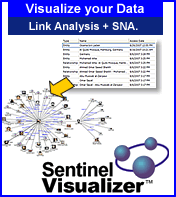 Sentinel Visualizer is a leading-edge data visualization program that combines link analysis, geospatial mapping, timelines,
and Social Network Analysis (SNA) to find hidden relationships among people, places and events.
Sentinel Visualizer is a leading-edge data visualization program that combines link analysis, geospatial mapping, timelines,
and Social Network Analysis (SNA) to find hidden relationships among people, places and events.
Using a Microsoft SQL Server database, Sentinel Visualizer helps you prioritize the most important entities in your network in a mathematical and repeatable manner.
Add advanced data analysis to your Visual Basic projects. Total VB Statistics offers a wide range of statistical functions you can easily add to your Visual Basic 6 projects. Analyze any Jet/Access table, linked table (including SQL Server, dBase, Paradox, FoxPro, etc.), or query. Multiple fields and an unlimited number of records can be analyzed at one time. Statistical features include weighted averages, percentiles, t-tests, frequency distributions, confidence intervals, correlations, regressions, crosstabs, ANOVA, Chi-Square, non-parametrics, probability, and much more. Analyses are setup interactively without programming, and it generates the code you need to add it to your projects. Simply copy and paste! Best of all, the results are provided in Access tables that you can further analyze or include in your forms and reports.
The trial version includes every statistical function in the full version. Analyze any Jet/Access table or linked table, select the fields to analyze, pick the statistical functions to calculate, and generate the results. Only tables with 100 or fewer records can be analyzed in the trial version.
 Latest Newsletter
 Demos
Demos
 Microsoft Access Developer Help Center
 Microsoft Access Query Help Center
 MS Access to SQL Server Upsizing
 Microsoft Outlook Tips
 Technical Papers
 Tips and Techniques
 Videos
Connect with Us
 Email Newsletter
 Developer Team Blog
 Facebook
 X/Twitter
 Support Forum & Tickets
Additional Resources
 Book
Book Links to Related Sites
 My FMS
Thank you! Thank you! I just finished reading this document, which was part of a link in the recent Buzz newsletter. I have printed it for others to read, especially those skeptical on the powers of Access and its capabilities.
Darren D.
 All Our Microsoft Access Products



