



Microsoft Access Email Add-in Easily Sends Personalized Emails and PDF Attachments to Your List
Total Access Emailer is the most popular Microsoft Access email program. The email addresses in your Microsoft Access databases are a valuable asset. Whether it's a list of customers, employees, friends, prospects, or other contacts, email offers an efficient way to communicate with them. Imagine the power of your emails by merging that with all your other information for each person.
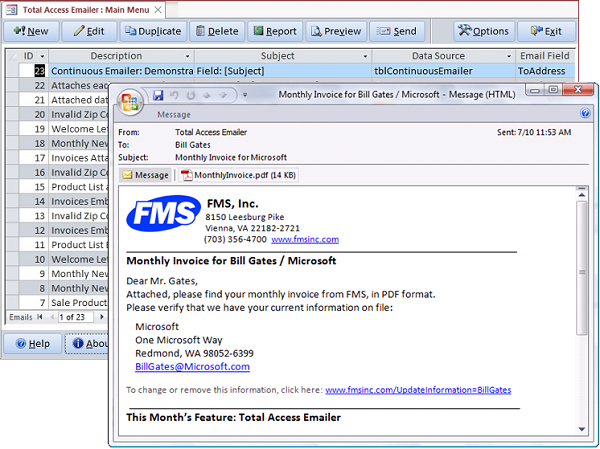
Sending emails merged with your MS Access data is a snap with Total Access Emailer. Generate personalized emails for everyone in your table or query. Emails can be in text and/or HTML format, and you can even embed or attach personalized (filtered) data and Access reports for each recipient.
Improve your communication and service, and generate results!
 Shipping for Microsoft Access 365/2021
New Features:
- Supports Access 365/2021/2019 (64 and 32 bit)
- TLS 1.3 and Office365 SMTP security changes
- Google Gmail OAUTH protocol for SMTP
- Multiple FROM addresses to rotate senders
- Different ReplyTo address
- SMTP Validation without sending an email
- Relative Paths for File Names
- Main form datasheet customizations saved
- Resizable email blast edit form
- Runtime libraries with explicit bitness names
- Preview settings saved for multiuser environments
- Revised sample database, help file, and user manual
- Consolidated setup and redistribution EXE
- all the new features...
Total Access Emailer is designed specifically for Microsoft Access and behaves the way you expect. Tightly integrated into Access, it runs as an add-in directly from your MS Access database (ACCDB, MDB, or ADP formats). It includes an interactive, Wizard-like user interface that makes it easy to customize your email blasts in your MSAccess environment.
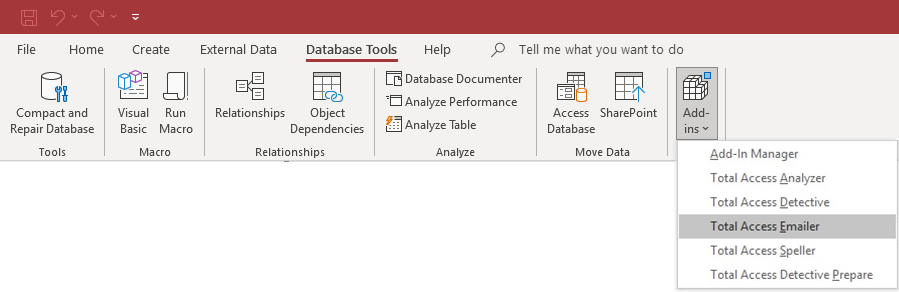
Total Access Emailer runs as a Microsoft Access Add-in from Your Database
Main Form
Once launched from the add-ins menu, the main form appears listing all the existing email blasts for this database. The wizard interface makes it easy to create a new email blast, edit one, and send it.
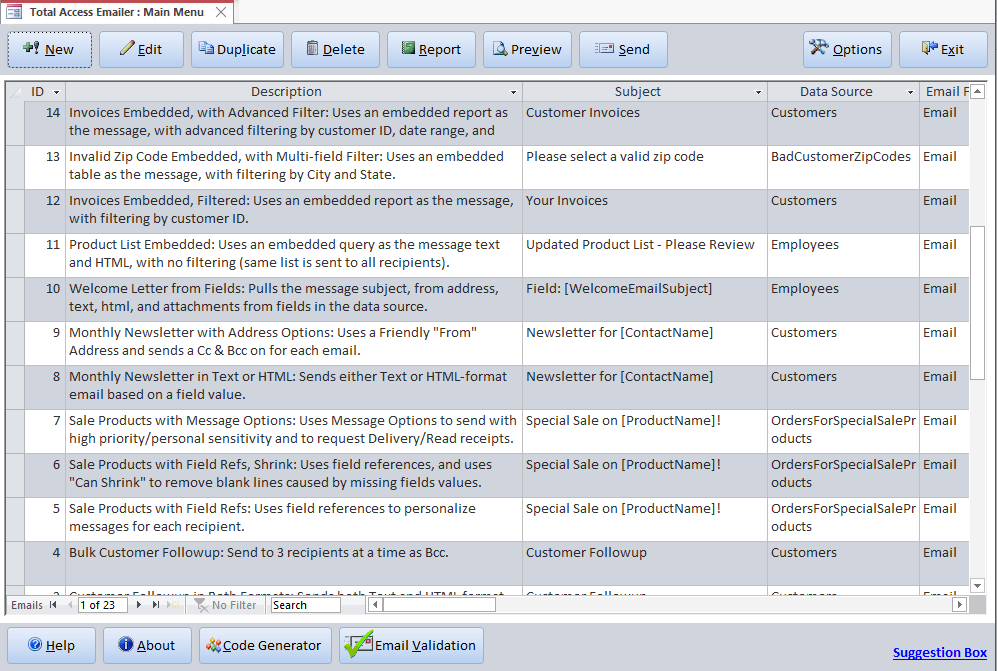
Total Access Emailer Add-in Wizard with the List of Saved Email Blasts
NEW! Adjustments to the datasheet's column widths, row height, sorting and filtering are preserved the next time you run the add-in.
Easily create custom, personalize message to everyone in your list:
- Choose any table or query with your email addresses as your data source. This includes local and linked tables.
- Select the field with the email addresses.
- Create your subject and message which can reference field values in your data source.
- Optionally attach Microsoft Access reports filtered for each recipient.
You'll be quickly sending personalized messages to everyone. Your email blast settings are automatically saved in your database for reuse and sharing with other users.
Total Access Emailer is the easiest way to email Microsoft Access reports! Use your Access report generator to design reports that can be attached as PDF files to your emails.
Easily include data from different sources, apply the rich formatting and summaries of Access reports, then email them to your contacts. You can filter the report by contact person to send each person their own information.

Total Access Emailer also lets you use your reports as the text or HTML of your email message.
Leverage the power of the Access report generator to create custom emails for each recipient.
This is the ultimate in mail merge! Here's more information on Emailing Microsoft Access Reports
Over the years, thousands of Access enthusiasts have used Total Access Emailer to enhance their Microsoft Access applications. We're always amazed at what people are doing with it. Here are some examples of how people added email with Access:
- Email Newsletters using Microsoft Access email lists customized to include each recipient's name, address, and other specific data in the email, and sending text or HTML formats based on customer request.
- Late Invoice Notifications based on a query determining late invoices and emailing the invoices directly to them with different messages based on how late it is.
- Welcome New Customers based on a query flagging new people added to a database and automatically sending a welcome message.
- Conference/Meeting Event Reminders. A series of messages scheduled a certain number of days before an event to update people on the latest information and requirements.
- Human Resources Compliance for internal staff to get missing timesheets and other paperwork for payroll, 401(k)s, flexible spending accounts, insurance benefits, HR news, legal requirements, etc. Emails only go to employees that should receive them based on how employees are tagged and can contain their private information.
- Membership List Management From school PTAs, sports teams, church groups, and non-profit organizations, tagging participants into different groups makes it easy to send mass one-off and recurring messages while making each of them appear personal. This eliminates the impersonal mass CC or BCC blasts.
- Project Management Status Reports to easily distribute Access reports to all relevant parties on a recurring basis
- Green Initiatives and Improved Security to eliminate the use of paper reports and distribute them all via email. This also improves confidentiality and security since people only get their data and paper with confidential information isn't laying around.
- System Administration Alert to notify someone when certain data changes occur. Can be tied to a specific trigger or continual checking.
- Plus many more uses. Read some customer comments for more examples.
Email specifications created in Total Access Emailer are easily customized for each blast, or just repeated over and over. With its programmatic interface, you can tie the blast to a button or event. You can even set a macro to call it, then send it on a recurring schedule with a program like Total Visual Agent. Total Visual Agent lets you schedule Access chores hourly, daily, weekly, monthly, or just one time in the future.
Send Email from Access to Everyone on Your List
Easily send a message to every email address in your Microsoft Access table, linked table, or query. Emails can be sent individually or in bulk as regular email or using CC or BCC.
Personalize Each Email with Their Data
Easily customize the email subject and message for each recipient by referencing field values from your table or query. CanShrink options enhance formatting. Alternatively, you can even specify a file or field in your data containing the subject and/or message to send so you have complete control over each message.
Send HTML and Text Messages
Prepare both an HTML and a plain text message, and send one or the other depending on what the recipient's email supports. HTML messages can be an HTML file or explicit HTML text.
Include Graphics in HTML Messages
HTML messages automatically embed local graphics referenced by the message. You do not need to manually add the graphics as attachments—they are automatically embedded in the email message.
Easily Merge and Email Data and Attachments Including Filtered Data and Reports
Total Access Emailer lets you add multiple attachments per email. Easily attach Access data, objects, and files on disk to your message. Use the same attachments for everyone or filter the data and reports for each recipient. Embedded objects can include data from tables, queries, and reports which can be in formats such as PDF, text, Excel, HTML, and rich text format (RTF). You can also email files stored in an ACCDB table's attachment field.
You can even use fields from your data source with the names of your attached files
 Data Compression (Zip Files) and Security
Total Access Emailer lets you compress all your file attachments into one zip file and add a password to protect it. You can use the same zip file name and password for everyone, or apply values from fields in your data source so each recipient has their own zip file name and password.

Resend Your Email Blast
Email blast settings are automatically saved for reuse such as monthly newsletters or late notices. Easily send the email again, or edit it with your latest message. Store an unlimited number of email blast settings and share them with your team.
Email People Who Haven't Received Your Message
An optional audit trail can be maintained to know when an email was sent to each person. Easily send the same email to new people or to those whom the original message was skipped because the process was interrupted.
Custom FROM Address
Specify the FROM address for your emails. Use the same for every email or reference a field from the data source.
Alternate ReplyTo Address NEW!
The email address for replies can be different from the FROM address with the new ReplyTo feature.
Multiple FROM Addresses NEW!
You can also use multiple FROM addresses to spread your emails across multiple accounts. This is especially helpful if you have limits on the number of emails you can send for each account over a period of time.
With the ReplyTo feature, all replies can go to one account.
Specification Report
Print out the detail specifications of each email blast.
 To prevent email viruses, Microsoft Outlook/MAPI makes it practically impossible to
send multiple emails programmatically. Users either have to manually confirm messages or run very slowly. This is what happens if you use the
Microsoft Access DoCmd.SendObject command or try to automate Outlook.
To prevent email viruses, Microsoft Outlook/MAPI makes it practically impossible to
send multiple emails programmatically. Users either have to manually confirm messages or run very slowly. This is what happens if you use the
Microsoft Access DoCmd.SendObject command or try to automate Outlook.
Total Access Emailer avoids this problem by using SMTP rather than Outlook. This is fast and efficient. You can even specify the FROM email address of your messages, which can be different from your Outlook profile address.
SMTP Server
By sending email through your SMTP server, Total Access Emailer is compatible with any machine or software that has SMTP (or ESMTP) capabilities, including Microsoft Exchange, SendGrid/Twillio, and other third party email host services.
Supports Secure Servers (SSL) and Transport Layer Security (TLS) Protocols
Total Access Emailer supports multiple connection protocols such as Secure Socket Layer (SSL) and Transport Layer Security (TLS) to send your emails from platforms.
TLS Enhancements for smtp.Office365.com NEW!
 TLS is used for the SMTP Server provided by Office365.
The latest releases of Total Access Emailer added support for TLS 1.3, in addition to 1.0, 1.1 and 1.2, and enhanced security with Windows.
For more information, visit SMTP Configuration for Office365.
TLS is used for the SMTP Server provided by Office365.
The latest releases of Total Access Emailer added support for TLS 1.3, in addition to 1.0, 1.1 and 1.2, and enhanced security with Windows.
For more information, visit SMTP Configuration for Office365.
 Google Gmail OAUTH 2.0 Support NEW!
Supports sending emails for Google Gmail accounts using smtp.gmail.com with the new OAUTH 2.0 protocol requirement introduced in June 2022.
Preview Messages Enhanced!
Before you send your Microsoft Access e-mail blast, the powerful preview feature sends your messages to a table, the screen, or an email address you specify. Easily preview each custom message before you send it. You can test with the entire list or specify a limited number of messages. If Save Files is set, you can preview saving the attached files to your local disk.
Email Validation
The Email Validation button verifies the syntax of all the email addresses in your data source.

Fix them before launching your email blast.
Send Multiple Email Blasts
Select and send multiple email blasts one after the other. This is ideal if you have email blasts to send consecutively, or use multiple data sources for related email blasts.
Schedule Email Blasts
Launch the email blast and tell it to start at a specific time. This can be useful for scheduling your emails for a particular time or after hours when your mail server is less busy.
Audit Trail
Track when the emails were sent in a date/time field in your data source and/or save a copy of the email to a table. You can also use the Save File feature to save copies of all attached files.
Disaster Recovery
In the event your email blast is interrupted (power, network or Internet failure) and you've turned on auditing, Total Access Emailer can restart the email blast where you left off, ensuring everyone is properly notified without duplication.
Total Access Emailer is available in two versions. The Standard Version is for end users and includes all the interactive features of the Total Access Emailer add-in to create, manage, and send email blasts.
Professional Version: VBA Programmatic Interface
The Professional Version includes the Standard Version, plus a library and programmatic module interface for power users and developers to add email blasts into applications. This lets you use VBA or a macro to send the email blasts you've designed. This version also includes a royalty-free Runtime License that allows the distribution of our library to people who do not own Total Access Emailer.
The Professional Version includes VBA procedures to let you:
- Send a saved email blast
- Preview a saved email blast
- Email a single message
- Change and validate the SMTP settings
- Send and preview email blasts with Save Files option
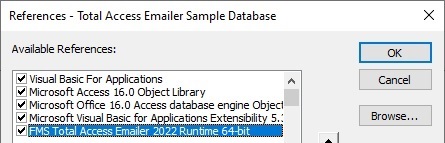
If your users don't need to create or modify the email blasts you prepare, you can get the Professional Version and not purchase individual licenses for each user. For instance, you can create a button on a form to launch an email blast. Or you can create a system that continuously checks for certain criteria like new orders before triggering an email blast. Your users don't even need to know that Total Access Emailer is running in the background.
Complete details of the Runtime License are included in the License Agreement.
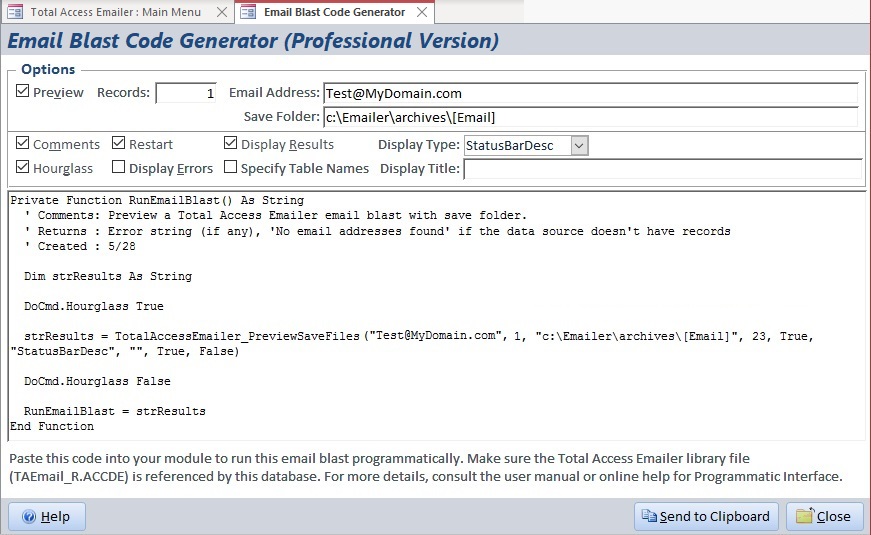
The add-in has a Code Generator that creates the VBA code to run or preview an email blast. Simply paste it into your module.
Part of the Total Access Solution
Total Access Emailer is a member of FMS' award-winning family of add-ins for Microsoft Access. Discover why FMS is the world's leading developer of MS Access third party products with customers in over 100 countries.
Pricing and Access Versions
Total Access Emailer comes in versions specific to each version of Microsoft Access. Purchases are available with electronic software download (ESD) and physical delivery of a CD and professionally printed user manual.
With Total Access Emailer, you simply buy it once:
- Support all your Microsoft Access databases
- No need to use an outside vendor
- No monthly recurring fees to automate your email broadcasts
- No limit on the number of emails you send or email addresses you manage
- Send emails with your reports and data filtered for each recipient, which outside vendors like Constant Contacts can't support
- The Professional Version includes a royalty-free distribution license, so you can extend your solution to others, with no additional licensing fees
Total Access Emailer is available by Microsoft Access version.
|
Total Access Emailer Products for Microsoft Access |
|||||||||
| Licenses | Price | 365*, 2021, 2019 | 2016 | 2013 | 2010 | 2007 | 2003 | ||
|
Professional Version |
22.0 |
16.81 |
15.81 |
14.81 |
12.7 |
11.6 |
|||
| Single | $699 | Buy Now | Buy Now | Buy Now | Buy Now | Buy Now | Buy Now | ||
| 5 Seat | $2,099 | Buy Now | Buy Now | Buy Now | Buy Now | Buy Now | Buy Now | ||
|
Standard Version |
|||||||||
| Single | $399 | Buy Now | Buy Now | Buy Now | Buy Now | Buy Now | Buy Now | ||
| 5 Seat | $1,199 | Buy Now | Buy Now | Buy Now | Buy Now | Buy Now | Buy Now | ||
| UPGRADES (between DIFFERENT Access versions) | |||||||||
|
Upgrade from prior Access Professional version to Professional |
|||||||||
| Single | $399 | Buy Now | Buy Now | Buy Now | Buy Now | Buy Now | Buy Now | ||
| 5 Seat | $1,199 | Buy Now | Buy Now | Buy Now | Buy Now | Buy Now | Buy Now | ||
|
Upgrade from prior Access Standard version to Standard |
|||||||||
| Single | $299 | Buy Now | Buy Now | Buy Now | Buy Now | ||||
| 5 Seat | $899 | Buy Now | Buy Now | Buy Now | |||||
|
Upgrade from prior Standard version to Professional |
|||||||||
| Single | $549 | Buy Now | Buy Now | Buy Now | Buy Now | ||||
| 5 Seat | $1,649 | Buy Now | Buy Now | Buy Now | |||||
| UPDATES (within the SAME Access) | |||||||||
|
Update from Professional to Professional |
|||||||||
| Single | $299 | Buy Now | Buy Now | Buy Now | Buy Now | Buy Now | |||
| 5 Seat | $899 | Buy Now | Buy Now | Buy Now | Buy Now | Buy Now | |||
|
Update from Standard to Standard |
|||||||||
| Single | $299 | Buy Now | Buy Now | Buy Now | Buy Now | Buy Now | |||
| 5 Seat | $899 | Buy Now | Buy Now | Buy Now | Buy Now | Buy Now | |||
|
Update and upgrade from Standard to Professional |
|||||||||
| Single | $399 | Buy Now | Buy Now | Buy Now | Buy Now | Buy Now | Buy Now | ||
| 5 Seat | $1,199 | Buy Now | Buy Now | Buy Now | Buy Now | Buy Now | Buy Now | ||
|
Premium Support Subscription |
|||||||||
| Single | $299 | ||||||||
| 5 Seat | $999 | ||||||||
|
Also available as part of |
|||||||||
| Total Access Ultimate Suite | |||||||||
|
Runtime/Redistributable Version |
|||||||||
| The Professional version of Total Access Emailer offers a VBA Programmatic interface and runtime library. It includes royalty-free redistribution rights to non-Total Access Emailer owners. Use is subject to the terms of the license agreement. | |||||||||
|
* Office/Access 365 Support |
|||||||||
| Microsoft Office/Access 365 is a subscription that is constantly updated. Total Access Emailer 2022, version 22.0, supports the version of Office/Access 365 when it was released. We cannot guarantee automatic support for all future releases with our current version. We strive to provide upgrades to support new features as they become available. | |||||||||
|
Licensing Information |
|||||||||
| Total Access Emailer is licensed on a per user basis. Each user who runs the program must have a license. | |||||||||
 100% Guaranteed
Sending email from MS Access couldn't be easier! We guarantee Total Access Emailer will pay for itself and extend the power of Access and your work. You'll be delighted with its flexibility and ease of use. You'll quickly discover how improved email communication with your contacts generates results. If you are not completely satisfied with Total Access Emailer, return it within 30 days for a complete refund.
Total Access Emailer 2022 is shipping for Access 365/2021/2019!

New X.81 Versions for Microsoft Access 2016, 2013, and 2010!
X.7 Version for Access 2007
X.6 Versions for Access 2003, 2002, and 2000

Reviews
"I was thrilled with how easy it was to run and I appreciated that I didn't need to build any special tables or queries."
Sandra Daigle
Microsoft Access MVP
Emailer Info

Additional Info