Microsoft Access Subforms Should Reference the Control Rather than Field Name for Link Master Fields
Provided by: Luke Chung, President
Sample database: SubformMaster.zip (39K)
Microsoft Access lets you quickly create forms displaying one-to-many relationships with subforms.
Subforms are most commonly forms displayed as datasheets or continuous forms that show multiple records. Queries and tables can also be used, and even forms in Form View. How the subform is defined does not matter but for this paper, we'll assume it's a form displayed as a datasheet.
The subform is linked based on their LinkMasterFields and LinkChildFields properties, and appear on the subform's property sheet as "Link Master Fields" and "Link Child Fields". One more more fields can be specified separated by commas. MS Access automatically pairs the fields between the master (Parent) and child to filter the data in the subform.
The word "fields" is misleading because the fields may be be fields in your data source or control names on your form. This is the case for the Link Master Fields. For the Child fields, they have to be actual fields in the subform's recordsource.
Is there's a difference in using field names or control names for the master link fields and does it matter? The answer is Yes and Yes. Here's why...
We recommend referencing the control rather than field when specifying the Link Master Field. This is different from the Link Child Field which should always be a field in the subform. For situations where the link master field is editable, a subform MUST be linked to the control rather than underlying field. Otherwise, the wrong data could be displayed or edited by the user.
What we're considering is how the subforms should reference the Master. Should it reference the control (txtMasterID) or the field name directly (EditableID) below?
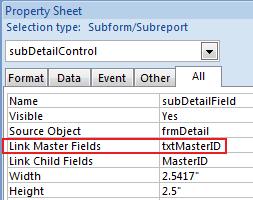
Linked on Control (Good)
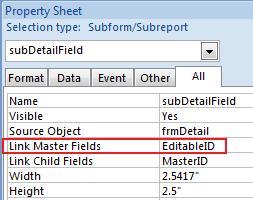
Linked Directly to Field (bad)
If the link master field were MasterID which is an autonumber field and can't be edited, this would not be an issue. However, if the field/control can be edited, it's critical that the Link Master Field uses the control name rather than the field name. It's also important that you rename the control so it's not the same name as the field name.
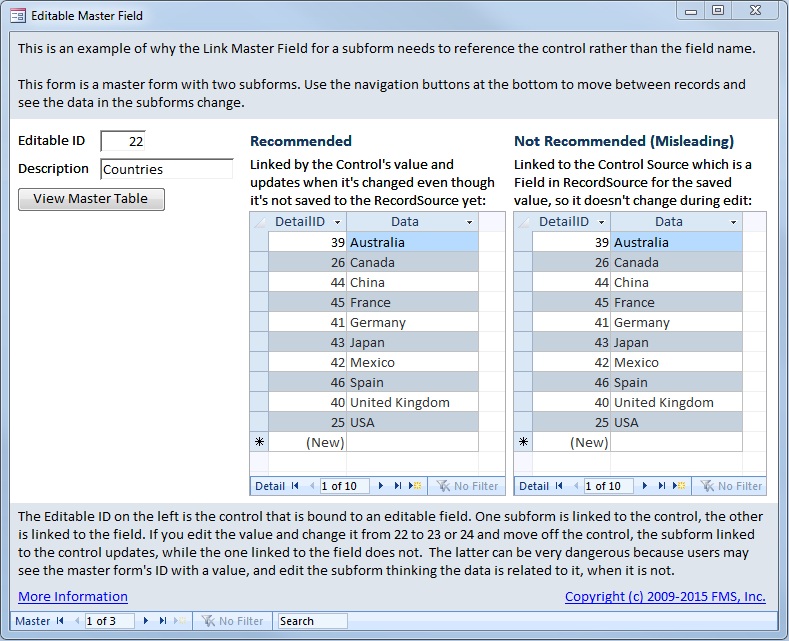
One of the most powerful features of displaying data is the use of subforms. A subform is a form with its own data source that is embedded in another "master" form. From our sample database, open the form frmEditableMaster:
The form uses the table tblMaster as its RecordSource:
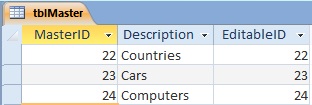
In the sample form, the field that's being used to link the subforms is the EditableID, rather than the MasterID. The two fields happen to contain the same information, but the EditableID field can be modified. This makes it easy for you to reset it to the MasterID value after changing it.
To see why referencing the control is important, open the form and change the value of the ID value from 22 to 23, then move to the Description control:
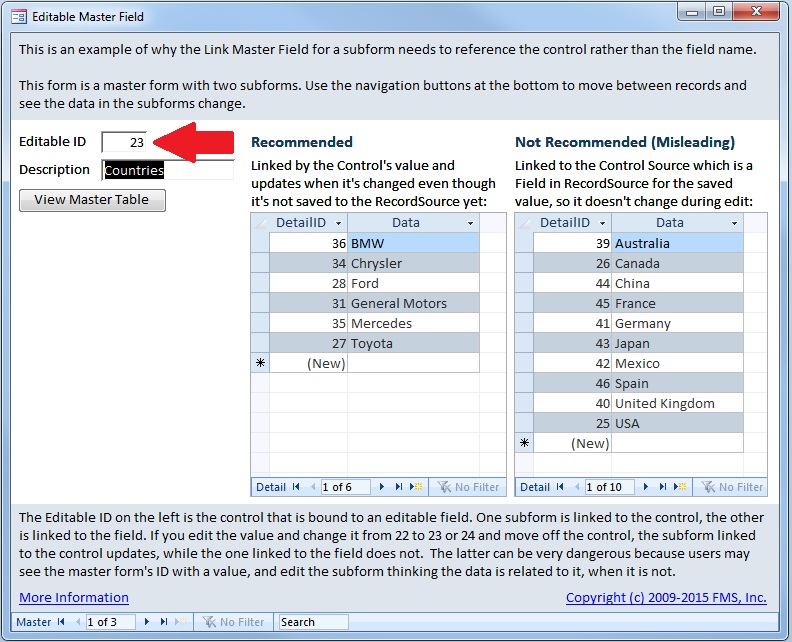
The control's value has changed, but the underlying value in the table has not because the record is not saved. That only occurs when the user leaves the record. However, the subforms displayed on the screen are totally different. The one linked to the control (left) shows the records related to Master ID 23, while the one linked to the field (right), continues to show the saved value of 22.
By referencing the control, the subform linked on the control automatically updates when the control's value changes. This ensures the subform always reflects the displayed master field value.
By referencing the field, it's easy to get confused and think the subform records are related to the value when they aren't. Users think they're looking at data related to one master record, when they were really viewing another one. Who knows what bad decisions could result? Even worse, if the user adds, edits, or deletes records in the subform, they could mess up lots of their ataa in the database.
By default, Microsoft Access names the control the same name as its ControlSource value. So in this case, the text box would be named EditableID (we named it txtMasterID). If the LinkMasterField is set to a value that is the same for the field name and control name, the field is linked and not the control. That creates the problem described here. If you are referring to a control, you should always rename the control to a different name to avoid any confusion. Common convention is to prefix control names based on its type: txt for Text Boxes, cbo for ComboBoxes, cmd for Command Buttons, lbl for Labels, etc.
The example is obviously quite trivial but displays the difference.
As a habit, you should rename the control to a different name from the field name, and always reference the control name rather than field as the Link Master Field.
Good luck!
Strategic Overview
Microsoft Access within an Organization's Database Strategy
How many simultaneous Microsoft Access users?
Blaming Microsoft Access instead of the Developer
History of Access
Microsoft Access Version Feature Differences
Microsoft Access Versions, Service Packs and Updates
Microsoft Office 365 Access Update Version Releases
Best Practices
Taking Over Legacy MS Access Databases

Winner of Every Best Access Add-in Award
Table Design
Set AutoNumber Starting Number Other than 1
Avoid Unnecessary or Duplicate Indexes
Query Design

Form Design
Copy Command Button and Keep Picture
Module VBA to Forms and Controls
Subform Reference to Control Rather than Field
Report Design
Suppress Page Headers and Footers on the First Page of Your Report
Annual Monthly Crosstab Columns
Design Environment
Add Buttons to the Quick Access Toolbar
Collapse the Office Ribbon for more space
VBA Programming
Avoid Exits in the Body of a Procedure
Send Emails with DoCmd.SendObject
Source Code Library

VBA Error Handling
Error Handling and Debugging Techniques
Error Number and Description Reference
Performance Tips
Deployment
Remote Desktop Connection Setup
Terminal Services and RemoteApp Deployment
Missing Package & Deployment Wizard

System Admin
Database Corruption
Remove 'Save to SharePoint Site' Prompt from an Access Database
Class Not Registered Run-time Error -2147221164
SQL Server Upsizing

Microsoft Access to SQL Server Upsizing Center
When and How to Upsize Access to SQL Server
SQL Server Express Versions and Downloads
Cloud and Azure
Deploying MS Access Linked to SQL Azure
SQL Server Azure Usage and DTU Limits
Visual Studio LightSwitch
Additional Resources
Connect with Us
 Email Newsletter
 Developer Team Blog
 Facebook
 X/Twitter
 Support Forum & Tickets


