



Animate Pictures to Create Dynamic Microsoft Access Forms and Splash Screens
The Bitmap Effects control lets you create catchy effects, fades, and transitions between bitmaps on your Microsoft Access forms.
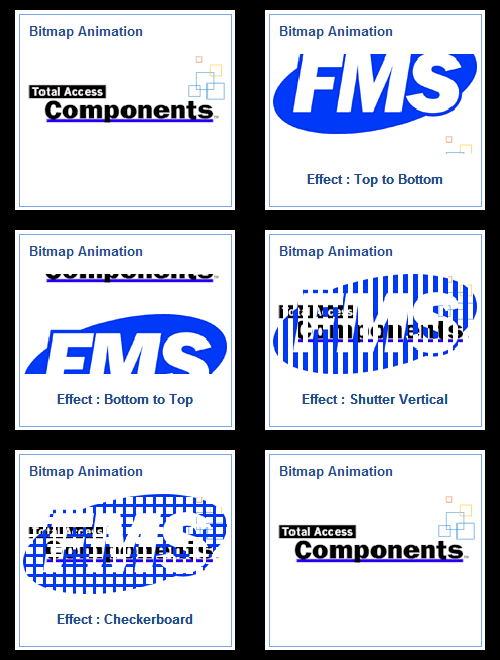
Bring Your Pictures to Life
Adding animated pictures to your forms is very simple. Just add the Bitmap Effects control to your form and specify the two pictures to use. The pictures can be in bitmap (BMP), GIF, icon, or JPG formats.
Create Great Splash Screens
The initial screen of an application leaves a lasting impression on your users. With the Bitmap Effects control, you can dynamically display a graphic when your application starts. By providing only one picture, it appears to burst from a black background.
Open the demo database to see the form with this example.
Specify the Effect
Your bitmaps can transition in many ways:
- Left to Right
- Right to Left
- Bottom to Top
- Top to Bottom
- Shutter Horizontal
- Shutter Vertical
- Rectangle
- Checkerboard
- Multiple Rectangles
Specify the Speed
Set the number of steps and time interval between steps to control how smoothly and quickly the transitions occur.
Invoking the Visual Effects
To launch the bitmap effect, invoke the Animate method of the control.
If you want to do this when the form starts, rather than the Form_Open event, this can be invoked in a timer event to make sure the form is visible before your animations occur. An example of this is in the sample database.
Programmatic Options
All the properties of the Bitmap Effects control can be modified via VBA. Methods are available to load new pictures and show the animation.
Menus
 Icon Menus
 Popup Menus
Form Design
 Form Resizers
 Splitter Bars
 Tab Strips
 Cursors
 Timers
Relative Values
 Gauges
 Progress Meters
Data Entry
 Date Time Pickers
 Popup Notes
 Slider Bars
 Spin Buttons
Animation
 Bitmaps
 Marquees
Visual Effects
 Borders
 Clocks and Alarms
 Digital Displays
 Enhanced Buttons
 Rotated Text
Windows Dialogs
 About Box
 Browse for Folders and Printers
 Clipboard
 Common Dialogs
 INI Files
 Registry Settings
 System Information
Multimedia
 CD Player
 Music Sound File Player
 Video AVI Player
Supports Microsoft Access 2016, 2013, 2010, 2007, 2003, 2002, and 2000


