



Add Slider Bars to Visualize and Input Values to Microsoft Access
Like Progress Meters, Slider Bars let you visualize the relative size of a value within a range. Slider Bars have the additional feature of letting you adjust the value graphically. By dragging the slider, the underlying value changes.

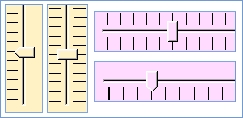
By using the Slider control in your Microsoft Access forms, you can give your users a whole new way to view and enter data. The control can be used to modify another field or control.
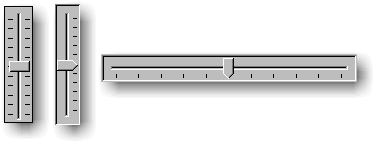
Slider Bars can also be added to reports to display data.
Using the Slider Control
Adding a Slider to your form or report is very simple. Place the control on your MS Access form or report and adjust its size. Then set its properties.
Appearance
- Horizontal or vertical orientation
- Direction which the slider increases
- Tick Style (none, one side, both sides)
- Tick Frequency
- Background color
Data Values
- Minimum and Maximum values
- Small and Large Change sizes
- Starting value
- Control Source for data binding (optional)
Programmatic Features
The Slider Bar's OnChange event occurs when the user moves the slider so you can update other controls when the user makes updates. Simply reference the Value property of the slider.
Menus
 Icon Menus
 Popup Menus
Form Design
 Form Resizers
 Splitter Bars
 Tab Strips
 Cursors
 Timers
Relative Values
 Gauges
 Progress Meters
Data Entry
 Date Time Pickers
 Popup Notes
 Slider Bars
 Spin Buttons
Animation
 Bitmaps
 Marquees
Visual Effects
 Borders
 Clocks and Alarms
 Digital Displays
 Enhanced Buttons
 Rotated Text
Windows Dialogs
 About Box
 Browse for Folders and Printers
 Clipboard
 Common Dialogs
 INI Files
 Registry Settings
 System Information
Multimedia
 CD Player
 Music Sound File Player
 Video AVI Player
Supports Microsoft Access 2016, 2013, 2010, 2007, 2003, 2002, and 2000


