



Custom Cursors Add Emphasis in Microsoft Access Database Applications
Grab your user's attention! The Cursor control lets you select your own graphic to replace the standard arrow and hourglass icons in Microsoft Access.
There are situations where you may want to emphasize items or let users know they're in a unique environment. Changing the cursor image and/or adding color immediately alerts the user's and provides a unique experience for your application.
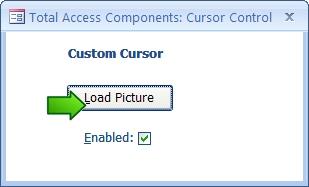
Customizing the Cursor Control
The Cursor control is very easy to use. Simply place the control on your form and load the picture property with your graphic. When the control is disabled, nothing changes. But when it's enabled, the mouse cursor becomes your graphic.You can use graphics in bitmap (BMP), CUR, ICO, or JPG formats.
In addition to arrows, examples could include:
 |
Edit pencil |
 |
Help |
 |
Microsoft Access |
 |
Form |
 |
Binoculars/Find |
 |
PDF Report |
 |
Eraser |
 |
Report |
 |
Export |
 |
Table |
 |
Filter |
 |
Sound |
Use your creativity to create your own cursors and amaze your users!
Complete Programmatic Control
Programmatically change the cursor's picture, and enable or disable it via VBA.
Menus
 Icon Menus
 Popup Menus
Form Design
 Form Resizers
 Splitter Bars
 Tab Strips
 Cursors
 Timers
Relative Values
 Gauges
 Progress Meters
Data Entry
 Date Time Pickers
 Popup Notes
 Slider Bars
 Spin Buttons
Animation
 Bitmaps
 Marquees
Visual Effects
 Borders
 Clocks and Alarms
 Digital Displays
 Enhanced Buttons
 Rotated Text
Windows Dialogs
 About Box
 Browse for Folders and Printers
 Clipboard
 Common Dialogs
 INI Files
 Registry Settings
 System Information
Multimedia
 CD Player
 Music Sound File Player
 Video AVI Player
Supports Microsoft Access 2016, 2013, 2010, 2007, 2003, 2002, and 2000


