



Spin Buttons Simplify Incrementing Numeric Values on Your Microsoft Access Forms
The Spin Button control is used to increment or decrement a numeric value by clicking on or holding the mouse button down over the control’s "up" or "down" button.
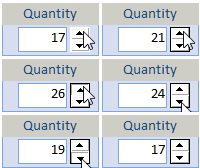 It
is commonly used with a text box containing a numeric value, and
eliminates the need for users to manually enter values.
It
is commonly used with a text box containing a numeric value, and
eliminates the need for users to manually enter values.
Using the Spin Button control
Easily add a Spin button to your Microsoft Access form. Place the spin button next to the textbox you want it to modify. Then set its properties and write a little code.
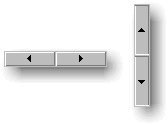 Spin
Button Appearance
Spin
Button Appearance
- Orientation: horizontal or vertical
- Arrow style: normal or 3-D
- Colors: back, fore, highlight, and shadow
Values and Behavior
- Value for the initial value
- Minimum and Maximum values
- Small Change (when button is pressed)
- Large Change (when button is pressed with the Ctrl key down)
- Auto Increment if you want it to fire repeatedly when the button is held down
- Rollover if you want the value to cycle after going past the minimum or maximum
- Control Source if you want to bind the control directly to a field.
Programming Features
No programming is required for the spin button. It automatically increments or decrements its value based on the user's button click.
All of its properties can be set via VBA. You can also reference its Value property in code and use it accordingly. Its OnChange event fires when the user presses a button to change the value.
For more detailed information, you can use the control's MouseDown event to determine which button and whether the Ctrl key is depressed.
Menus
 Icon Menus
 Popup Menus
Form Design
 Form Resizers
 Splitter Bars
 Tab Strips
 Cursors
 Timers
Relative Values
 Gauges
 Progress Meters
Data Entry
 Date Time Pickers
 Popup Notes
 Slider Bars
 Spin Buttons
Animation
 Bitmaps
 Marquees
Visual Effects
 Borders
 Clocks and Alarms
 Digital Displays
 Enhanced Buttons
 Rotated Text
Windows Dialogs
 About Box
 Browse for Folders and Printers
 Clipboard
 Common Dialogs
 INI Files
 Registry Settings
 System Information
Multimedia
 CD Player
 Music Sound File Player
 Video AVI Player
Supports Microsoft Access 2016, 2013, 2010, 2007, 2003, 2002, and 2000


