



Icon Menus Add Graphical Menu Bars to Microsoft Access Forms
Rather than basic text menus or buttons, Icon Menus let you combine graphics with text for menu selections on your Microsoft Access forms.
This display was popularized by Microsoft Outlook and lets you visually identify selections with a picture.
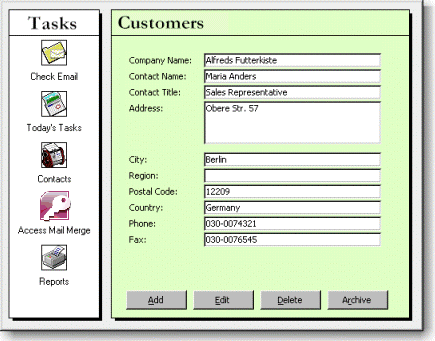
Find or create your own graphic files and give your users a more intuitive experience in your applications.
The picture can be any common graphic format such as bitmap (*.bmp), JPG, or icon (*.ico).
Display Options
Orientation
The Icon Menu has a property to let you easily specify whether you want the graphics displayed horizontally, flowed, or vertically:



Icon Size
You can even switch to small icon mode by setting a property:

Customizing Menu Items
The Icon Menu lets you specify the background color of the menu, along with the details of each item:
- Icon graphic file
Note: once you specify the file, it's stored in the control so you don't need to worry about shipping it with your database to your users. - Text to display
- Font including point size, style, and color
Using the Icon Menu Control
Once you've placed and customized the Icon Menu on your form, you're ready to handle the user's selection. The Icon Menu control generates an OnSelect event when the user selects an item. Simply respond to the user's choice.
Programmatic Options
Any icon menu property including the graphic pictures can be modified via VBA. You can also respond to OnHighlight and OnUnHighlight events when a user moves on or off an item on your MS Access form.
Menus
 Icon Menus
 Popup Menus
Form Design
 Form Resizers
 Splitter Bars
 Tab Strips
 Cursors
 Timers
Relative Values
 Gauges
 Progress Meters
Data Entry
 Date Time Pickers
 Popup Notes
 Slider Bars
 Spin Buttons
Animation
 Bitmaps
 Marquees
Visual Effects
 Borders
 Clocks and Alarms
 Digital Displays
 Enhanced Buttons
 Rotated Text
Windows Dialogs
 About Box
 Browse for Folders and Printers
 Clipboard
 Common Dialogs
 INI Files
 Registry Settings
 System Information
Multimedia
 CD Player
 Music Sound File Player
 Video AVI Player
Supports Microsoft Access 2016, 2013, 2010, 2007, 2003, 2002, and 2000


