



Listen to CDs and Control the CD Player from Microsoft Access
The CD Player control allows you to play audio compact disks. Properties and methods are available to control playing and getting information from your CD and CD drive.
The CD Player control doesn't have a visible user interface. It's designed to hide the complexity of dealing with the CD Player so you can create your own user interface and invoke the CD Player features as needed.
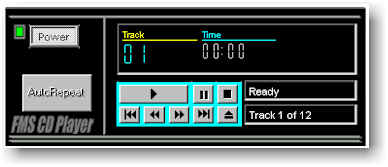
Sample CD Player
Here's an example of a CD Player created in an Access form that's part of the Demo database. The CD Player control makes it easy to support the buttons (play, pause, skip, stop, eject etc.), and update information on the tracks and time.
Using the CD Control
Place the CD Control on your form and invoke its methods to:
- Play
- Pause
- Stop
- Skip tracks forwards or backwards
- Fast forward
- Rewind
- Repeat
- Eject
You can also work with the CD contents using properties such as:
- Number of Tracks
- Current Track
- Time for the Current Track: total, elapsed, remaining
Responding to Events
The CD Player control supports two events. The OnNewTrack event fires when the CD player reaches a new track. Use this event to update a display showing the current track number.
The OnNewPosition event fires every second when the CD is playing. This lets you update displays showing the CD's playing time.
NOTE: Your computer must have the correct hardware devices and software drivers for this control to work.
Menus
 Icon Menus
 Popup Menus
Form Design
 Form Resizers
 Splitter Bars
 Tab Strips
 Cursors
 Timers
Relative Values
 Gauges
 Progress Meters
Data Entry
 Date Time Pickers
 Popup Notes
 Slider Bars
 Spin Buttons
Animation
 Bitmaps
 Marquees
Visual Effects
 Borders
 Clocks and Alarms
 Digital Displays
 Enhanced Buttons
 Rotated Text
Windows Dialogs
 About Box
 Browse for Folders and Printers
 Clipboard
 Common Dialogs
 INI Files
 Registry Settings
 System Information
Multimedia
 CD Player
 Music Sound File Player
 Video AVI Player
Supports Microsoft Access 2016, 2013, 2010, 2007, 2003, 2002, and 2000


