



Browse for Folder, File, or Printer using the Windows Dialog in Microsoft Access
The Browse control lets you invoke the Windows dialog to select a folder, file, or printer on your computer or network. The dialog supports the user's operating system so it appears the way they expect, just like their other Windows applications.
Easily give your Microsoft Access database solutions the same look and feel as the rest of the user's machine whether it's Windows XP, Vista, or earlier.
Customizing the Browse Dialog
By setting a few properties, your dialog prompts the user for what you want them to select.
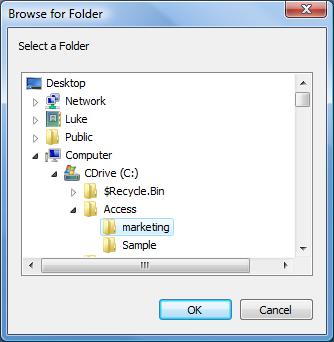
Browse for Folder or File
You can set whether you want users to be able to select individual files or just folder names. You can also optionally include network computers.
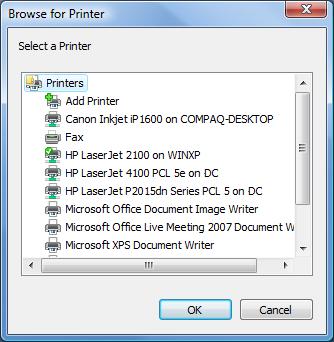
Browse for Printer
Easily let users select an installed printer, or add one:
Using the Browse Control
Simply add the Browse control to your form and set its properties. When you want to prompt the user, simply use the Show method to display the dialog. The control's Value property holds the user's selection.
Complete Programmatic Control
Use VBA to set any property of the browse dialog including the title, caption, and selection options.
Menus
 Icon Menus
 Popup Menus
Form Design
 Form Resizers
 Splitter Bars
 Tab Strips
 Cursors
 Timers
Relative Values
 Gauges
 Progress Meters
Data Entry
 Date Time Pickers
 Popup Notes
 Slider Bars
 Spin Buttons
Animation
 Bitmaps
 Marquees
Visual Effects
 Borders
 Clocks and Alarms
 Digital Displays
 Enhanced Buttons
 Rotated Text
Windows Dialogs
 About Box
 Browse for Folders and Printers
 Clipboard
 Common Dialogs
 INI Files
 Registry Settings
 System Information
Multimedia
 CD Player
 Music Sound File Player
 Video AVI Player
Supports Microsoft Access 2016, 2013, 2010, 2007, 2003, 2002, and 2000


