



Manage the Windows System Registry and Register Objects from Microsoft Access
The Registry control in Total Access Components lets you read and write Windows registry values, and register objects like DLL and ActiveX files to the Windows OLE server.
The Windows registry is a structured database of settings used to store setting and configuration information for Windows and applications. It separates machine and user level information and has security based on your Windows login rights.
Overview of the Windows System Registry
To use the Registry control, you need a basic understanding of the Windows Registry and should be familiar with the Windows REGEDIT.EXE command.
The registry is organized at the top level with root keys. Each of these root keys contains sub-keys, which can themselves contain sub-keys and values. Each value in a key has data associated with it. A value is identified by three pieces of information:
- Root Key:
- HKEY_CLASSES_ROOT
- HKEY_CURRENT_CONFIG
- HKEY_CURRENT_USER
- HKEY_DYN_DATA
- HKEY_LOCAL_MACHINE
- HKEY_PERFORMANCE_DATA
- HKEY_USERS
- Key Name
- Value Name
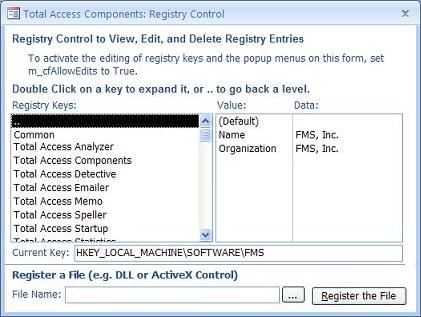
Using the Registry Control
Place the Registry control on your Microsoft Access form and call its methods (there are no properties for this control).
When you invoke a method, you'll need to specify the Root, Key, and Value names. You can then invoke methods such as:
- GetValueString
- SetKeyValue
- GetKeyValue and GetKeyCount
- GetSubKeyString and SetSubKeyCount
- DeleteKey and DeleteKeyValue
Using the Register Method
The Register method lets you easily register a DLL or ActiveX control by providing the file name. The control automatically updates the registry with the appropriate entries.
Menus
 Icon Menus
 Popup Menus
Form Design
 Form Resizers
 Splitter Bars
 Tab Strips
 Cursors
 Timers
Relative Values
 Gauges
 Progress Meters
Data Entry
 Date Time Pickers
 Popup Notes
 Slider Bars
 Spin Buttons
Animation
 Bitmaps
 Marquees
Visual Effects
 Borders
 Clocks and Alarms
 Digital Displays
 Enhanced Buttons
 Rotated Text
Windows Dialogs
 About Box
 Browse for Folders and Printers
 Clipboard
 Common Dialogs
 INI Files
 Registry Settings
 System Information
Multimedia
 CD Player
 Music Sound File Player
 Video AVI Player
Supports Microsoft Access 2016, 2013, 2010, 2007, 2003, 2002, and 2000


